Observability on NKPPart 1: the concepts
Tested onNKP 2.19Kubernetes 1.36.2Rook Ceph 1.19.6Grafana Loki 3.6.7Lab date
Summary: monitoring tells you whether something is broken; observability tells you why. This part brings together the concepts I use with customers (pillars, methods, SLOs and cost) and shows what NKP 2.19 already ships. In the lab, the workload cluster had metrics only. Turning on logs from the catalog took four apps and about 30 minutes, including a complete Ceph storage cluster. And the Alertmanager, on since day one, was firing alerts to no one. This is part 1 of 3.
Why this series
After the NKP upgrade to 2.19, the next question from customers was almost always the same: “so how do I see what is happening inside the cluster?”. The short answer is that NKP already brings a lot. The long answer involves concepts, choices and a few caveats, and it became this series.
| Part | Topic |
|---|---|
| 1 | The concepts and what NKP already ships (this post) |
| 2 | NKP Insights: the cluster pointing out its own problems |
| 3 | OpenTelemetry Operator: traces, metrics and logs from an application, without touching its code |
Everything was tested in the Clear IT AI lab: one management cluster and one workload cluster on NKP 2.19, running on Nutanix AHV.
Monitoring × observability
The two terms are often used as synonyms, but they answer different questions.
| Monitoring | Observability | |
|---|---|---|
| Question | Is it working? | Why is it not working? |
| Starts from | Problems you already know | Problems nobody predicted |
| Typical form | Dashboard and fixed-threshold alert | Exploring data freely, crossing signals |
| Example | “Node CPU above 90%” | “Why do 10% of purchases fail only when the item is a mouse?” |
Monitoring is a subset of observability. You still need the alerts; the difference is having enough data to investigate what the alert does not explain.
Observability is a property of the system
A system is observable when you can understand its internal state just by looking at what it emits. It is not a tool you buy: it is something you build, by instrumenting the applications and keeping the right signals.
The pillars
| Signal | What it is | Good for | Example tools |
|---|---|---|---|
| Metrics | Numbers over time | Trends, alerting, capacity | Prometheus, Thanos, Mimir, VictoriaMetrics |
| Logs | Event records, as text | Detail of a specific error | Loki, Elasticsearch, Fluent Bit, Fluentd |
| Traces | The path of a request across services | Latency and failures in distributed systems | Jaeger, Tempo, Zipkin |
| Kubernetes events | State changes of objects | “What changed?” | kubectl get events, Headlamp |
| Profiling | Where the code spends CPU and memory | Fine-grained optimization | Pyroscope, Parca |
In Kubernetes, events work in practice as a fourth pillar: an OOMKilled or a FailedScheduling explains a lot before any dashboard does. The real value shows up when the signals are linked. In Part 3, one click on a failed trace opens the logs of that very request.
What to measure: three methods
Measuring everything is expensive and confusing. These methods help you pick the useful minimum.
| Method | For what | Signals |
|---|---|---|
| Four golden signals (Google SRE book) | Any user-facing service | Latency, traffic, errors and saturation |
| RED | Microservices and APIs | Rate, Errors, Duration |
| USE | Infrastructure: CPU, disk, network | Utilization, Saturation, Errors |
A rule of thumb: RED for applications, USE for nodes and storage. The dashboards NKP ships cover USE well; RED depends on instrumenting the applications, which is the subject of Part 3.
SLI, SLO and error budget
This is where observability becomes a business conversation.
| Term | What it is | Example |
|---|---|---|
| SLI | The measured indicator | % of purchases completed successfully |
| SLO | The target for the indicator | 99.5% success over 30 days |
| Error budget | How much you can fail within the target | 0.5% of purchases, about 3.6 hours a month of equivalent downtime |
With an SLO in place, the alert stops being “CPU went up” and becomes “we are burning the error budget too fast”. That cuts useless alerts and gives a clear criterion for choosing between shipping new features and investing in stability.
OpenTelemetry: the open standard
OpenTelemetry is a CNCF project that standardizes how applications produce metrics, logs and traces and how that data is transported. The core idea: instrument once and send to any tool, open source or commercial.
In practice, it removes lock-in from the instrumentation layer. Changing backends becomes a configuration change in the Collector, not a code rewrite. NKP 2.19 ships the OpenTelemetry Operator in the catalog, and it is the topic of Part 3.
The tools on the market
A neutral view of what is out there. There is no best one; there is the one that fits each company’s team, budget and retention rules.
| Type | Examples | Strengths | Watch out for |
|---|---|---|---|
| Open source | Prometheus, Grafana, Loki, Tempo, Mimir, Thanos, VictoriaMetrics, Jaeger, OpenTelemetry, Fluent Bit, SigNoz, OpenCost | No license cost, no lock-in, large community | Running, scaling and storing the data is on you |
| Enterprise and SaaS | Datadog, Dynatrace, New Relic, Splunk Observability, Elastic, Grafana Cloud, Honeycomb, Chronosphere | Ready to use, built-in correlation and AI, support | Cost grows with volume; data leaves the environment; vendor dependency |
| From the platform (Nutanix) | NKP stack (Prometheus, Grafana, Loki, Logging Operator), NKP Insights, Prism operations | Already integrated, supported by the platform vendor | Scope limited to what the platform packages |
The criteria I use to choose:
| Criterion | Question |
|---|---|
| Cost | How much per GB of logs, per metric series, per host? And two years from now? |
| Operating effort | Who maintains, upgrades and scales the tool? |
| Retention | How long must data be kept, by policy or for audits? |
| Data sovereignty | Can the data leave the environment? |
| Lock-in | Is the instrumentation open (OpenTelemetry) or proprietary? |
Many companies end up with a mixed model: the platform’s open stack for day-to-day work and a commercial tool for the most critical applications.
The cost of observability
Observability is not free, even with open source tools. The cost comes from three places:
- Metric cardinality: every combination of labels becomes a series. A label holding the user ID can multiply the series by millions.
- Log volume and retention: debug logging left on in production fills storage fast.
- Cluster resources: every component of the stack uses CPU, memory and disk.
In the lab, the management cluster’s Prometheus alone used about 5.9 GiB of memory, with 10-day retention on a 100 GiB volume. And by the end of this series, after turning on logs, Insights and OpenTelemetry in the workload cluster, the cluster’s reserved CPU (requests) went from 27.1% to 72.5%. Observability has to be part of sizing from the start.
What NKP already ships turned on
Before enabling anything, I ran a read-only inventory on both clusters. The difference between them was the first finding.
| Component | Management | Workload |
|---|---|---|
| Prometheus (kube-prometheus-stack) | ✓ | ✓ |
| Alertmanager | ✓ | ✓ |
| Grafana | ✓ (per cluster plus a central one) | ✓ |
| Thanos (cross-cluster queries) | ✓ | route only |
| Karma (alert dashboard) | ✓ | route only |
| OpenCost | ✓ (per cluster plus a central one) | ✓ |
| Grafana Loki + Logging Operator | ✓ | — |
| Grafana Logging | ✓ | — |
| NKP Insights (central part) | ✓ | — |
| Prometheus retention | 10 days, 100 GiB | 10 days, 100 GiB |
The workload cluster comes with metrics but no logs. For whoever runs applications there, the most-used signal in daily work was missing.
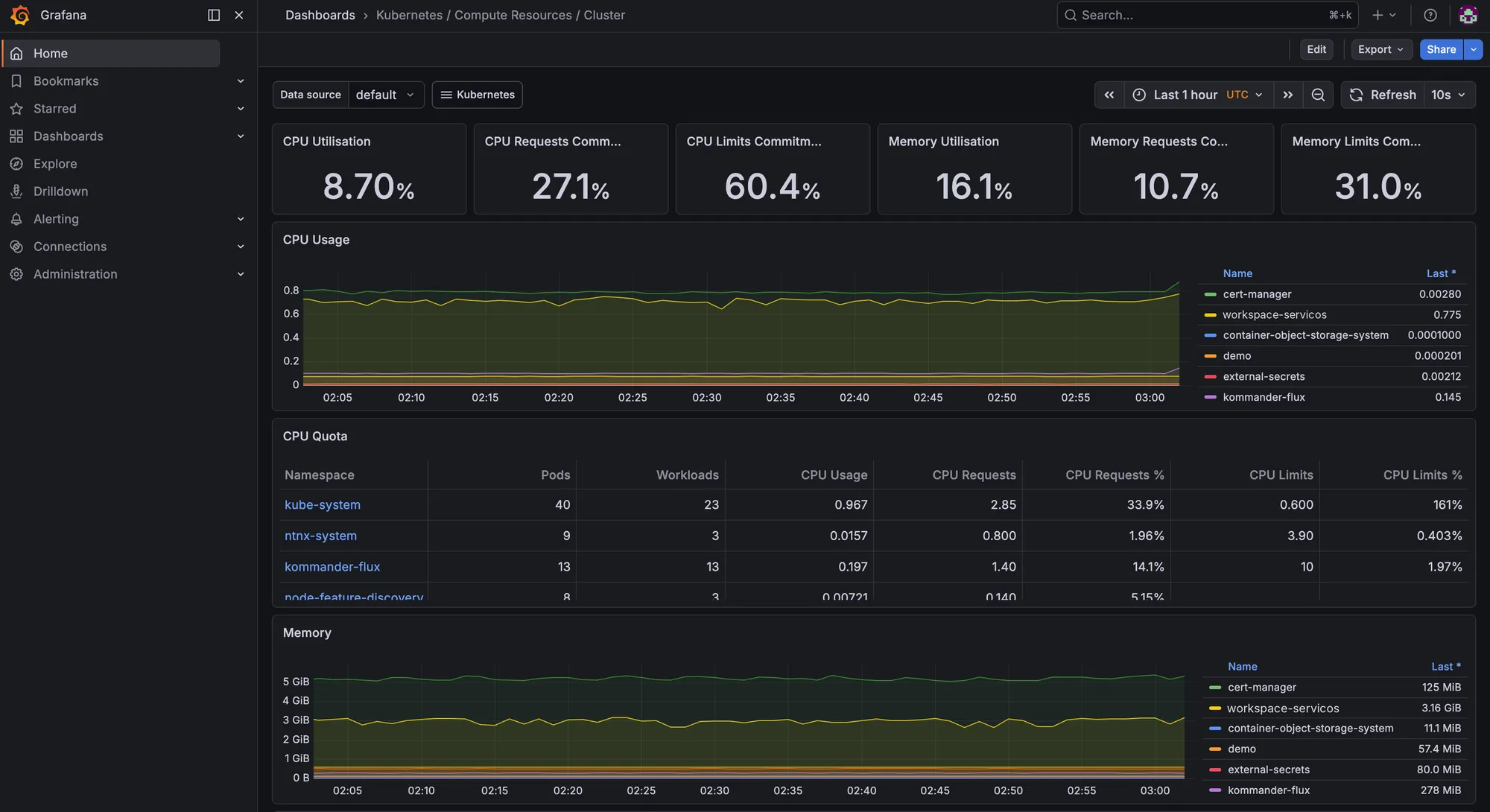
The workload Grafana already showed the resource dashboards working, with a detail worth flagging to any customer: the CPU limits of the kube-system namespace added up to 161% of what the cluster has.
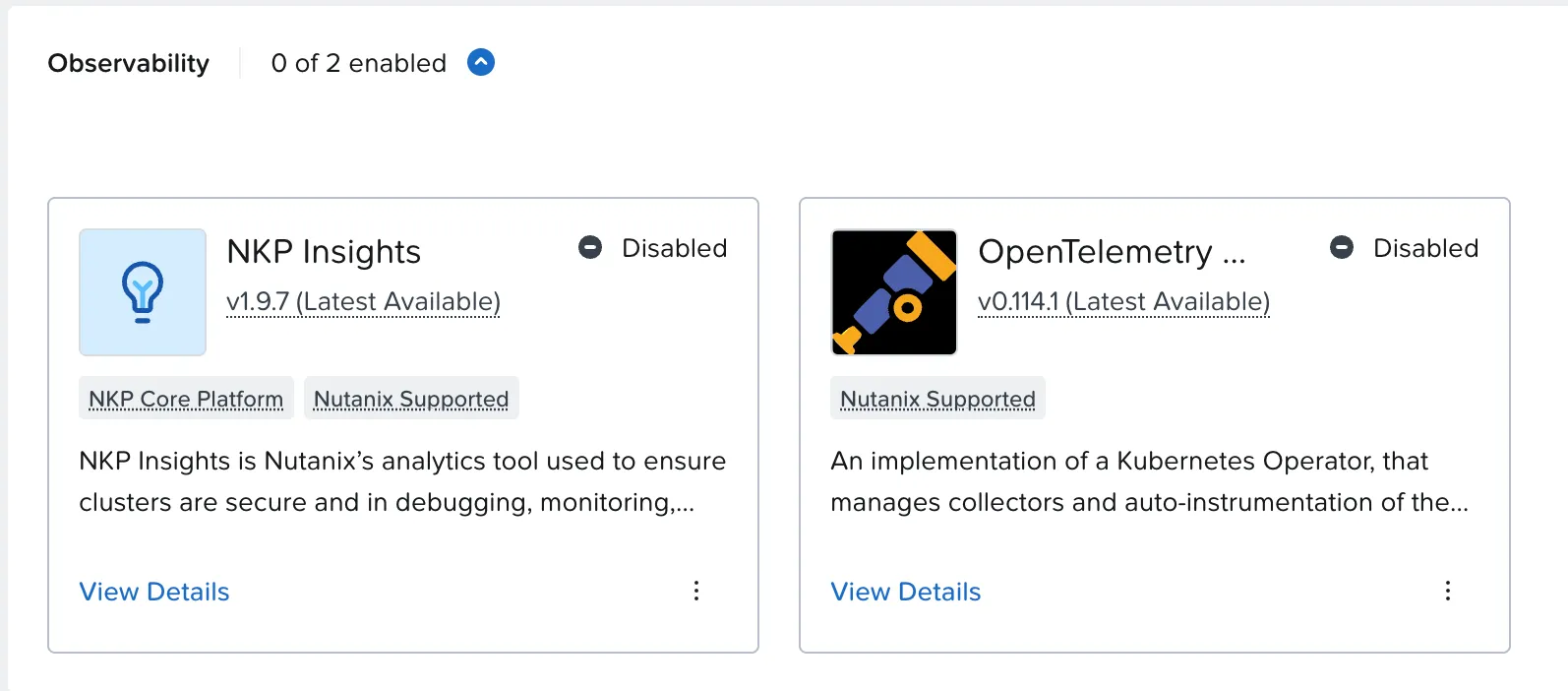
In the catalog, the Observability category has two apps, both off by default. They are the topics of parts 2 and 3.
In the lab: turning on logs in the workload cluster
Goal: get the logs of every pod in the workload cluster into Grafana, using only the NKP catalog.
This is the log path in NKP:
%3b%7d%23mermaid-0 .cluster rect%7bfill:hsl(0%2c 0%25%2c 98.9215686275%25)%3bstroke:%23707070%3bstroke-width:1px%3b%7d%23mermaid-0 .cluster text%7bfill:%23333%3b%7d%23mermaid-0 .cluster span%7bcolor:%23333%3b%7d%23mermaid-0 .node .collapsed-indicator%7bfill:%23707070%3bstroke:none%3bopacity:0.6%3b%7d%23mermaid-0 .node .collapsed-separator%7bstroke:%23707070%3bstroke-width:0.75px%3b%7d%23mermaid-0 div.mermaidTooltip%7bposition:absolute%3btext-align:center%3bmax-width:200px%3bpadding:2px%3bfont-family:arial%2csans-serif%3bfont-size:12px%3bbackground:hsl(-160%2c 0%25%2c 93.3333333333%25)%3bborder:1px solid %23707070%3bborder-radius:2px%3bpointer-events:none%3bz-index:100%3b%7d%23mermaid-0 .flowchartTitleText%7btext-anchor:middle%3bfont-size:18px%3bfill:black%3b%7d%23mermaid-0 rect.text%7bfill:none%3bstroke-width:0%3b%7d%23mermaid-0 .icon-shape%2c%23mermaid-0 .image-shape%7bbackground-color:white%3btext-align:center%3b%7d%23mermaid-0 .icon-shape p%2c%23mermaid-0 .image-shape p%7bbackground-color:white%3bpadding:2px%3b%7d%23mermaid-0 .icon-shape .label rect%2c%23mermaid-0 .image-shape .label rect%7bopacity:0.5%3bbackground-color:white%3bfill:white%3b%7d%23mermaid-0 .label-icon%7bdisplay:inline-block%3bheight:1em%3boverflow:visible%3bvertical-align:-0.125em%3b%7d%23mermaid-0 .node .label-icon path%7bfill:currentColor%3bstroke:revert%3bstroke-width:revert%3b%7d%23mermaid-0 .node .neo-node%7bstroke:%23999%3b%7d%23mermaid-0 %5bdata-look='neo'%5d.node rect%2c%23mermaid-0 %5bdata-look='neo'%5d.cluster rect%2c%23mermaid-0 %5bdata-look='neo'%5d.node polygon%7bstroke:url(%23mermaid-0-gradient)%3bfilter:drop-shadow( 1px 2px 2px rgba(185%2c185%2c185%2c1))%3b%7d%23mermaid-0 %5bdata-look='neo'%5d.swimlane.cluster rect%7bfilter:none%3b%7d%23mermaid-0 %5bdata-look='neo'%5d.node path%7bstroke:url(%23mermaid-0-gradient)%3bstroke-width:1px%3b%7d%23mermaid-0 %5bdata-look='neo'%5d.node .outer-path%7bfilter:drop-shadow( 1px 2px 2px rgba(185%2c185%2c185%2c1))%3b%7d%23mermaid-0 %5bdata-look='neo'%5d.node .neo-line path%7bstroke:%23999%3bfilter:none%3b%7d%23mermaid-0 %5bdata-look='neo'%5d.node circle%7bstroke:url(%23mermaid-0-gradient)%3bfilter:drop-shadow( 1px 2px 2px rgba(185%2c185%2c185%2c1))%3b%7d%23mermaid-0 %5bdata-look='neo'%5d.node circle .state-start%7bfill:black%3b%7d%23mermaid-0 %5bdata-look='neo'%5d.icon-shape .icon%7bfill:url(%23mermaid-0-gradient)%3bfilter:drop-shadow( 1px 2px 2px rgba(185%2c185%2c185%2c1))%3b%7d%23mermaid-0 %5bdata-look='neo'%5d.icon-shape .icon-neo path%7bstroke:url(%23mermaid-0-gradient)%3bfilter:drop-shadow( 1px 2px 2px rgba(185%2c185%2c185%2c1))%3b%7d%23mermaid-0 :root%7b--mermaid-font-family:arial%2csans-serif%3b%7d%3c/style%3e%3cg%3e%3cmarker id='mermaid-0_flowchart-v2-pointEnd' class='marker flowchart-v2' viewBox='0 0 10 10' refX='5' refY='5' markerUnits='userSpaceOnUse' markerWidth='8' markerHeight='8' orient='auto'%3e%3cpath d='M 0 0 L 10 5 L 0 10 z' class='arrowMarkerPath' style='stroke-width: 1%3b stroke-dasharray: 1%2c 0%3b'/%3e%3c/marker%3e%3cmarker id='mermaid-0_flowchart-v2-pointStart' class='marker flowchart-v2' viewBox='0 0 10 10' refX='4.5' refY='5' markerUnits='userSpaceOnUse' markerWidth='8' markerHeight='8' orient='auto'%3e%3cpath d='M 0 5 L 10 10 L 10 0 z' class='arrowMarkerPath' style='stroke-width: 1%3b stroke-dasharray: 1%2c 0%3b'/%3e%3c/marker%3e%3cmarker id='mermaid-0_flowchart-v2-pointEnd-margin' class='marker flowchart-v2' viewBox='0 0 11.5 14' refX='11.5' refY='7' markerUnits='userSpaceOnUse' markerWidth='10.5' markerHeight='14' orient='auto'%3e%3cpath d='M 0 0 L 11.5 7 L 0 14 z' class='arrowMarkerPath' style='stroke-width: 0%3b stroke-dasharray: 1%2c 0%3b'/%3e%3c/marker%3e%3cmarker id='mermaid-0_flowchart-v2-pointStart-margin' class='marker flowchart-v2' viewBox='0 0 11.5 14' refX='1' refY='7' markerUnits='userSpaceOnUse' markerWidth='11.5' markerHeight='14' orient='auto'%3e%3cpolygon points='0%2c7 11.5%2c14 11.5%2c0' class='arrowMarkerPath' style='stroke-width: 0%3b stroke-dasharray: 1%2c 0%3b'/%3e%3c/marker%3e%3cmarker id='mermaid-0_flowchart-v2-circleEnd' class='marker flowchart-v2' viewBox='0 0 10 10' refX='11' refY='5' markerUnits='userSpaceOnUse' markerWidth='11' markerHeight='11' orient='auto'%3e%3ccircle cx='5' cy='5' r='5' class='arrowMarkerPath' style='stroke-width: 1%3b stroke-dasharray: 1%2c 0%3b'/%3e%3c/marker%3e%3cmarker id='mermaid-0_flowchart-v2-circleStart' class='marker flowchart-v2' viewBox='0 0 10 10' refX='-1' refY='5' markerUnits='userSpaceOnUse' markerWidth='11' markerHeight='11' orient='auto'%3e%3ccircle cx='5' cy='5' r='5' class='arrowMarkerPath' style='stroke-width: 1%3b stroke-dasharray: 1%2c 0%3b'/%3e%3c/marker%3e%3cmarker id='mermaid-0_flowchart-v2-circleEnd-margin' class='marker flowchart-v2' viewBox='0 0 10 10' refY='5' refX='12.25' markerUnits='userSpaceOnUse' markerWidth='14' markerHeight='14' orient='auto'%3e%3ccircle cx='5' cy='5' r='5' class='arrowMarkerPath' style='stroke-width: 0%3b stroke-dasharray: 1%2c 0%3b'/%3e%3c/marker%3e%3cmarker id='mermaid-0_flowchart-v2-circleStart-margin' class='marker flowchart-v2' viewBox='0 0 10 10' refX='-2' refY='5' markerUnits='userSpaceOnUse' markerWidth='14' markerHeight='14' orient='auto'%3e%3ccircle cx='5' cy='5' r='5' class='arrowMarkerPath' style='stroke-width: 0%3b stroke-dasharray: 1%2c 0%3b'/%3e%3c/marker%3e%3cmarker id='mermaid-0_flowchart-v2-crossEnd' class='marker cross flowchart-v2' viewBox='0 0 11 11' refX='12' refY='5.2' markerUnits='userSpaceOnUse' markerWidth='11' markerHeight='11' orient='auto'%3e%3cpath d='M 1%2c1 l 9%2c9 M 10%2c1 l -9%2c9' class='arrowMarkerPath' style='stroke-width: 2%3b stroke-dasharray: 1%2c 0%3b'/%3e%3c/marker%3e%3cmarker id='mermaid-0_flowchart-v2-crossStart' class='marker cross flowchart-v2' viewBox='0 0 11 11' refX='-1' refY='5.2' markerUnits='userSpaceOnUse' markerWidth='11' markerHeight='11' orient='auto'%3e%3cpath d='M 1%2c1 l 9%2c9 M 10%2c1 l -9%2c9' class='arrowMarkerPath' style='stroke-width: 2%3b stroke-dasharray: 1%2c 0%3b'/%3e%3c/marker%3e%3cmarker id='mermaid-0_flowchart-v2-crossEnd-margin' class='marker cross flowchart-v2' viewBox='0 0 15 15' refX='17.7' refY='7.5' markerUnits='userSpaceOnUse' markerWidth='12' markerHeight='12' orient='auto'%3e%3cpath d='M 1%2c1 L 14%2c14 M 1%2c14 L 14%2c1' class='arrowMarkerPath' style='stroke-width: 2.5%3b'/%3e%3c/marker%3e%3cmarker id='mermaid-0_flowchart-v2-crossStart-margin' class='marker cross flowchart-v2' viewBox='0 0 15 15' refX='-3.5' refY='7.5' markerUnits='userSpaceOnUse' markerWidth='12' markerHeight='12' orient='auto'%3e%3cpath d='M 1%2c1 L 14%2c14 M 1%2c14 L 14%2c1' class='arrowMarkerPath' style='stroke-width: 2.5%3b stroke-dasharray: 1%2c 0%3b'/%3e%3c/marker%3e%3cg class='root'%3e%3cg class='clusters'/%3e%3cg class='edgePaths'%3e%3cpath d='M155.172%2c47L159.339%2c47C163.505%2c47%2c171.839%2c47%2c180.174%2c47C188.51%2c47%2c196.849%2c47%2c201.018%2c47L205.188%2c47' id='mermaid-0-L_A_B_0' class='edge-thickness-normal edge-pattern-solid edge-thickness-normal edge-pattern-solid flowchart-link' style='%3b' data-edge='true' data-et='edge' data-id='L_A_B_0' data-points='W3sieCI6MTU1LjE3MTg3NSwieSI6NDd9LHsieCI6MTgwLjE3MTg3NSwieSI6NDd9LHsieCI6MjA5LjE4NzUsInkiOjQ3fV0=' data-look='classic' marker-end='url(%23mermaid-0_flowchart-v2-pointEnd)'/%3e%3cpath d='M380.359%2c47L385.195%2c47C390.031%2c47%2c399.703%2c47%2c412.941%2c51.834C426.179%2c56.668%2c442.983%2c66.337%2c451.384%2c71.171L459.786%2c76.005' id='mermaid-0-L_B_C_0' class='edge-thickness-normal edge-pattern-solid edge-thickness-normal edge-pattern-solid flowchart-link' style='%3b' data-edge='true' data-et='edge' data-id='L_B_C_0' data-points='W3sieCI6MzgwLjM1OTM3NSwieSI6NDd9LHsieCI6NDA5LjM3NSwieSI6NDd9LHsieCI6NDYzLjI1MzM2NzQ1Njg5NjU3LCJ5Ijo3OH1d' data-look='classic' marker-end='url(%23mermaid-0_flowchart-v2-pointEnd)'/%3e%3cpath d='M585.984%2c105L590.151%2c105C594.318%2c105%2c602.651%2c105%2c610.318%2c105C617.984%2c105%2c624.984%2c105%2c628.484%2c105L631.984%2c105' id='mermaid-0-L_C_D_0' class='edge-thickness-normal edge-pattern-solid edge-thickness-normal edge-pattern-solid flowchart-link' style='%3b' data-edge='true' data-et='edge' data-id='L_C_D_0' data-points='W3sieCI6NTg1Ljk4NDM3NSwieSI6MTA1fSx7IngiOjYxMC45ODQzNzUsInkiOjEwNX0seyJ4Ijo2MzUuOTg0Mzc1LCJ5IjoxMDV9XQ==' data-look='classic' marker-end='url(%23mermaid-0_flowchart-v2-pointEnd)'/%3e%3cpath d='M384.375%2c163L388.542%2c163C392.708%2c163%2c401.042%2c163%2c413.61%2c158.166C426.179%2c153.332%2c442.983%2c143.663%2c451.384%2c138.829L459.786%2c133.995' id='mermaid-0-L_E_C_0' class='edge-thickness-normal edge-pattern-solid edge-thickness-normal edge-pattern-solid flowchart-link' style='%3b' data-edge='true' data-et='edge' data-id='L_E_C_0' data-points='W3sieCI6Mzg0LjM3NSwieSI6MTYzfSx7IngiOjQwOS4zNzUsInkiOjE2M30seyJ4Ijo0NjMuMjUzMzY3NDU2ODk2NTcsInkiOjEzMn1d' data-look='classic' marker-end='url(%23mermaid-0_flowchart-v2-pointEnd)'/%3e%3c/g%3e%3cg class='edgeLabels'%3e%3cg class='edgeLabel'%3e%3cg class='label' data-id='L_A_B_0' transform='translate(0%2c 0)'%3e%3cforeignObject width='0' height='0'%3e%3cdiv xmlns='http://www.w3.org/1999/xhtml' class='labelBkg' style='display: table-cell%3b white-space: nowrap%3b line-height: 1.5%3b max-width: 200px%3b text-align: center%3b'%3e%3cspan class='edgeLabel'%3e%3c/span%3e%3c/div%3e%3c/foreignObject%3e%3c/g%3e%3c/g%3e%3cg class='edgeLabel'%3e%3cg class='label' data-id='L_B_C_0' transform='translate(0%2c 0)'%3e%3cforeignObject width='0' height='0'%3e%3cdiv xmlns='http://www.w3.org/1999/xhtml' class='labelBkg' style='display: table-cell%3b white-space: nowrap%3b line-height: 1.5%3b max-width: 200px%3b text-align: center%3b'%3e%3cspan class='edgeLabel'%3e%3c/span%3e%3c/div%3e%3c/foreignObject%3e%3c/g%3e%3c/g%3e%3cg class='edgeLabel'%3e%3cg class='label' data-id='L_C_D_0' transform='translate(0%2c 0)'%3e%3cforeignObject width='0' height='0'%3e%3cdiv xmlns='http://www.w3.org/1999/xhtml' class='labelBkg' style='display: table-cell%3b white-space: nowrap%3b line-height: 1.5%3b max-width: 200px%3b text-align: center%3b'%3e%3cspan class='edgeLabel'%3e%3c/span%3e%3c/div%3e%3c/foreignObject%3e%3c/g%3e%3c/g%3e%3cg class='edgeLabel'%3e%3cg class='label' data-id='L_E_C_0' transform='translate(0%2c 0)'%3e%3cforeignObject width='0' height='0'%3e%3cdiv xmlns='http://www.w3.org/1999/xhtml' class='labelBkg' style='display: table-cell%3b white-space: nowrap%3b line-height: 1.5%3b max-width: 200px%3b text-align: center%3b'%3e%3cspan class='edgeLabel'%3e%3c/span%3e%3c/div%3e%3c/foreignObject%3e%3c/g%3e%3c/g%3e%3c/g%3e%3cg class='nodes'%3e%3cg class='node default' id='mermaid-0-flowchart-A-0' data-look='classic' transform='translate(81.5859375%2c 47)'%3e%3crect class='basic label-container' style='' x='-73.5859375' y='-39' width='147.171875' height='78'/%3e%3cg class='label' style='' transform='translate(-43.5859375%2c -24)'%3e%3crect/%3e%3cforeignObject width='87.171875' height='48'%3e%3cdiv xmlns='http://www.w3.org/1999/xhtml' style='display: table-cell%3b white-space: nowrap%3b line-height: 1.5%3b max-width: 200px%3b text-align: center%3b'%3e%3cspan class='nodeLabel'%3e%3cp%3eFluent Bit%3cbr /%3e(1 per node)%3c/p%3e%3c/span%3e%3c/div%3e%3c/foreignObject%3e%3c/g%3e%3c/g%3e%3cg class='node default' id='mermaid-0-flowchart-B-1' data-look='classic' transform='translate(294.7734375%2c 47)'%3e%3crect class='basic label-container' style='' x='-85.5859375' y='-39' width='171.171875' height='78'/%3e%3cg class='label' style='' transform='translate(-55.5859375%2c -24)'%3e%3crect/%3e%3cforeignObject width='111.171875' height='48'%3e%3cdiv xmlns='http://www.w3.org/1999/xhtml' style='display: table-cell%3b white-space: nowrap%3b line-height: 1.5%3b max-width: 200px%3b text-align: center%3b'%3e%3cspan class='nodeLabel'%3e%3cp%3eFluentd%3cbr /%3efilters and ships%3c/p%3e%3c/span%3e%3c/div%3e%3c/foreignObject%3e%3c/g%3e%3c/g%3e%3cg class='node default' id='mermaid-0-flowchart-C-3' data-look='classic' transform='translate(510.1796875%2c 105)'%3e%3crect class='basic label-container' style='' x='-75.8046875' y='-27' width='151.609375' height='54'/%3e%3cg class='label' style='' transform='translate(-45.8046875%2c -12)'%3e%3crect/%3e%3cforeignObject width='91.609375' height='24'%3e%3cdiv xmlns='http://www.w3.org/1999/xhtml' style='display: table-cell%3b white-space: nowrap%3b line-height: 1.5%3b max-width: 200px%3b text-align: center%3b'%3e%3cspan class='nodeLabel'%3e%3cp%3eGrafana Loki%3c/p%3e%3c/span%3e%3c/div%3e%3c/foreignObject%3e%3c/g%3e%3c/g%3e%3cg class='node default' id='mermaid-0-flowchart-D-5' data-look='classic' transform='translate(717.1328125%2c 105)'%3e%3crect class='basic label-container' style='' x='-81.1484375' y='-39' width='162.296875' height='78'/%3e%3cg class='label' style='' transform='translate(-51.1484375%2c -24)'%3e%3crect/%3e%3cforeignObject width='102.296875' height='48'%3e%3cdiv xmlns='http://www.w3.org/1999/xhtml' style='display: table-cell%3b white-space: nowrap%3b line-height: 1.5%3b max-width: 200px%3b text-align: center%3b'%3e%3cspan class='nodeLabel'%3e%3cp%3eS3 bucket%3cbr /%3eon Rook Ceph%3c/p%3e%3c/span%3e%3c/div%3e%3c/foreignObject%3e%3c/g%3e%3c/g%3e%3cg class='node default' id='mermaid-0-flowchart-E-6' data-look='classic' transform='translate(294.7734375%2c 163)'%3e%3crect class='basic label-container' style='' x='-89.6015625' y='-27' width='179.203125' height='54'/%3e%3cg class='label' style='' transform='translate(-59.6015625%2c -12)'%3e%3crect/%3e%3cforeignObject width='119.203125' height='24'%3e%3cdiv xmlns='http://www.w3.org/1999/xhtml' style='display: table-cell%3b white-space: nowrap%3b line-height: 1.5%3b max-width: 200px%3b text-align: center%3b'%3e%3cspan class='nodeLabel'%3e%3cp%3eGrafana Logging%3c/p%3e%3c/span%3e%3c/div%3e%3c/foreignObject%3e%3c/g%3e%3c/g%3e%3c/g%3e%3c/g%3e%3c/g%3e%3cdefs%3e%3cfilter id='mermaid-0-drop-shadow' height='130%25' width='130%25'%3e%3cfeDropShadow dx='4' dy='4' stdDeviation='0' flood-opacity='0.06' flood-color='black'/%3e%3c/filter%3e%3c/defs%3e%3cdefs%3e%3cfilter id='mermaid-0-drop-shadow-small' height='150%25' width='150%25'%3e%3cfeDropShadow dx='2' dy='2' stdDeviation='0' flood-opacity='0.06' flood-color='black'/%3e%3c/filter%3e%3c/defs%3e%3clinearGradient id='mermaid-0-gradient' gradientUnits='objectBoundingBox' x1='0%25' y1='0%25' x2='100%25' y2='0%25'%3e%3cstop offset='0%25' stop-color='hsl(0%2c 0%25%2c 83.3333333333%25)' stop-opacity='1'/%3e%3cstop offset='100%25' stop-color='hsl(0%2c 0%25%2c 88.9215686275%25)' stop-opacity='1'/%3e%3c/linearGradient%3e%3c/svg%3e)
There are four apps in the catalog, each depending on another:
| App | Role | Depends on |
|---|---|---|
| Grafana Logging | Log dashboards and search | Grafana Loki |
| Grafana Loki | Stores and indexes the logs | Rook Ceph Cluster and Logging Operator |
| Logging Operator | Fluent Bit on each node collects; Fluentd filters and ships | — |
| Rook Ceph Cluster | Creates the Ceph storage and Loki’s S3 bucket | Rook Ceph (the operator) |
The shortcut that did not work
I started with Grafana Logging and accepted the dependencies the interface showed. When I enabled Loki, NKP warned that two were missing: Rook Ceph Cluster and Logging Operator. The warning lets you continue anyway, and I did, to see what would happen.
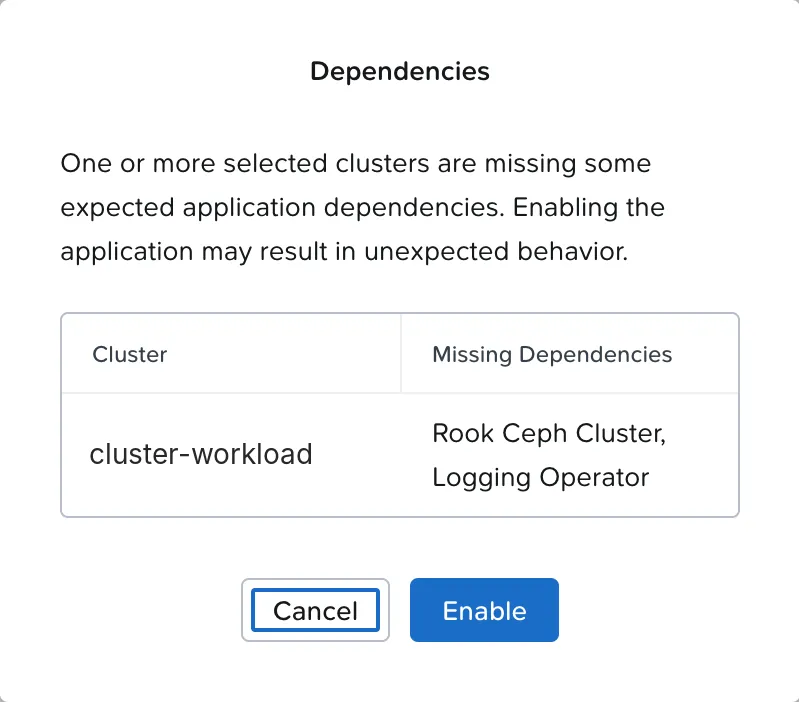
The app showed as Enabled in the interface. The pods did not come up:
grafana-loki-v3-ingester-zone-a-0 0/1 CreateContainerConfigError...Warning Failed kubelet Error: secret "dkp-loki" not foundThe dkp-loki Secret holds the credentials for the bucket Loki writes to. That bucket is created by Rook Ceph Cluster, which did not exist yet. Note a confusing detail: Rook Ceph and Rook Ceph Cluster are different apps. The first is only the operator; the second creates the storage cluster.
“Enabled” does not mean working
NKP lets you enable an app with a missing dependency. The interface shows the app as enabled, but it may never start. After an Enable, check the pods, not just the card.
In the right order
I enabled the missing dependencies. The Logging Operator came up in about a minute: one operator, 6 Fluent Bit pods (one per node) and one Fluentd. Rook Ceph Cluster took longer, because it builds an entire storage cluster in sequence: monitors, managers, disks and the S3 gateway.
| Time | What happened |
|---|---|
| 00:02 | Grafana Logging, Loki and Rook Ceph enabled, ignoring the warnings |
| 00:11 | Loki stuck: secret "dkp-loki" not found |
| 00:13 | Logging Operator up; Fluentd starts collecting |
| 00:16 | Rook Ceph Cluster enabled |
| ~00:22 | 3 monitors, 2 managers and 4 disks being prepared |
| ~00:32 | Bucket and Secret created; Loki recovers on its own, with no action |
| ~00:48 | Ceph HEALTH_OK, less than 32 minutes after the Enable |
The Ceph cluster created by the app uses volumes from the cluster’s default storage and delivered 160 GiB raw, with 4 data disks across the 3 workers, 2 S3 gateways and 3+1 erasure coding for bucket data. It created two buckets: Loki’s and one for Velero.
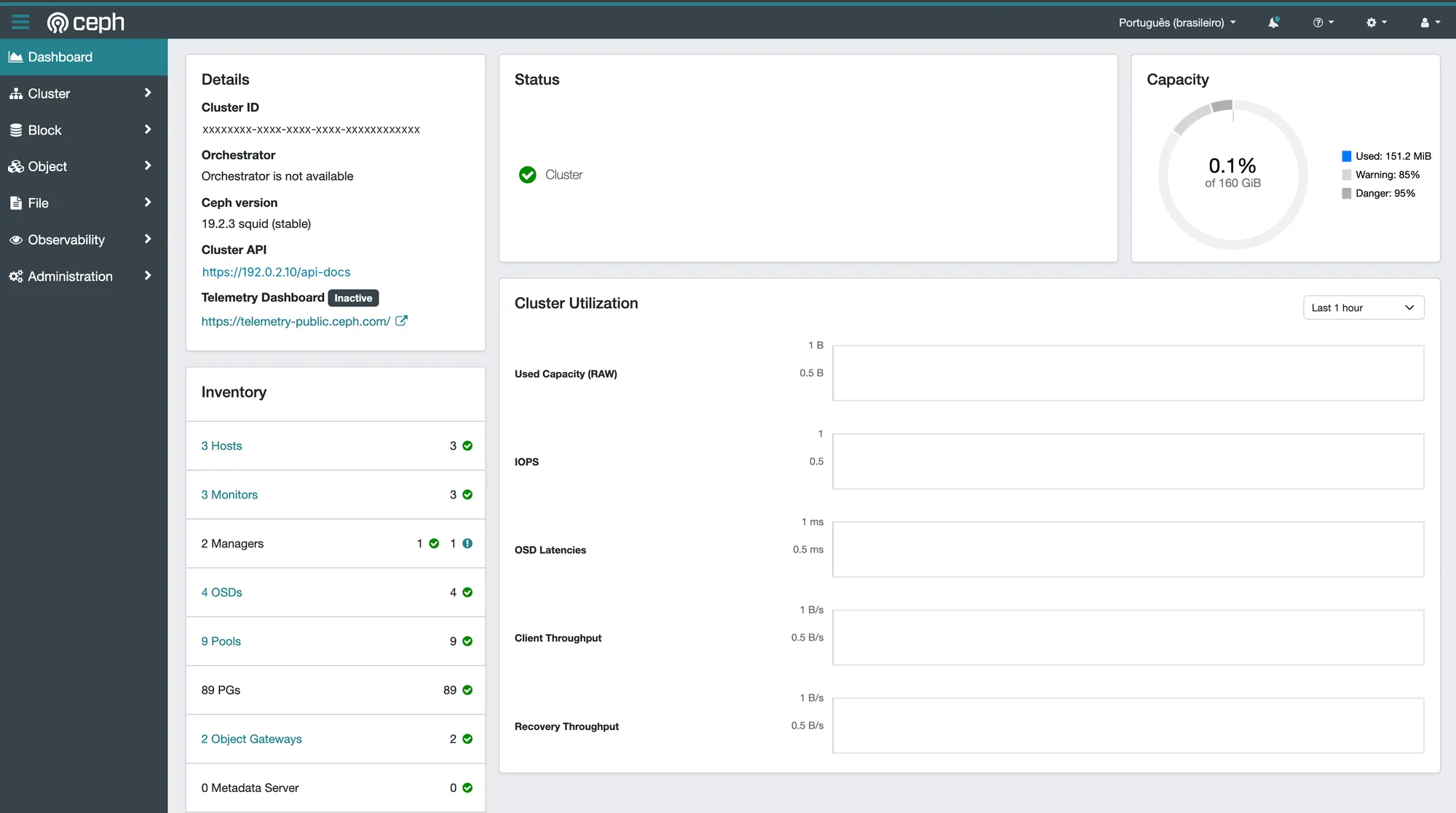
The Ceph dashboard has its own login
The card’s Dashboard button opens the Ceph Dashboard, but it does not use Kommander’s single sign-on. The user is admin, and the password is in the rook-ceph-dashboard-password Secret.
The logs that arrived before Loki
In Grafana Logging, kube-system logs showed up from 00:20, about 12 minutes before Loki was ready. The explanation was in the Fluentd log:
[warn]: ... failed to flush the buffer. retry_times=0 ... error="502 Bad Gateway"[warn]: ... failed to flush the buffer. retry_times=1 ...Fluentd tried to deliver, got a 502 from the Loki gateway, kept the logs in an on-disk buffer and kept retrying. When Loki came up, it delivered what it had stored. Nothing was lost.

Result
Logs from every pod in the workload cluster in Grafana, collected by Fluent Bit and Fluentd and stored in Loki on a Ceph cluster created by NKP itself. About 30 minutes, most of it waiting for Ceph.
The alerts that warned no one
Alertmanager comes turned on in both clusters. In the workload cluster, 5 alerts were firing:
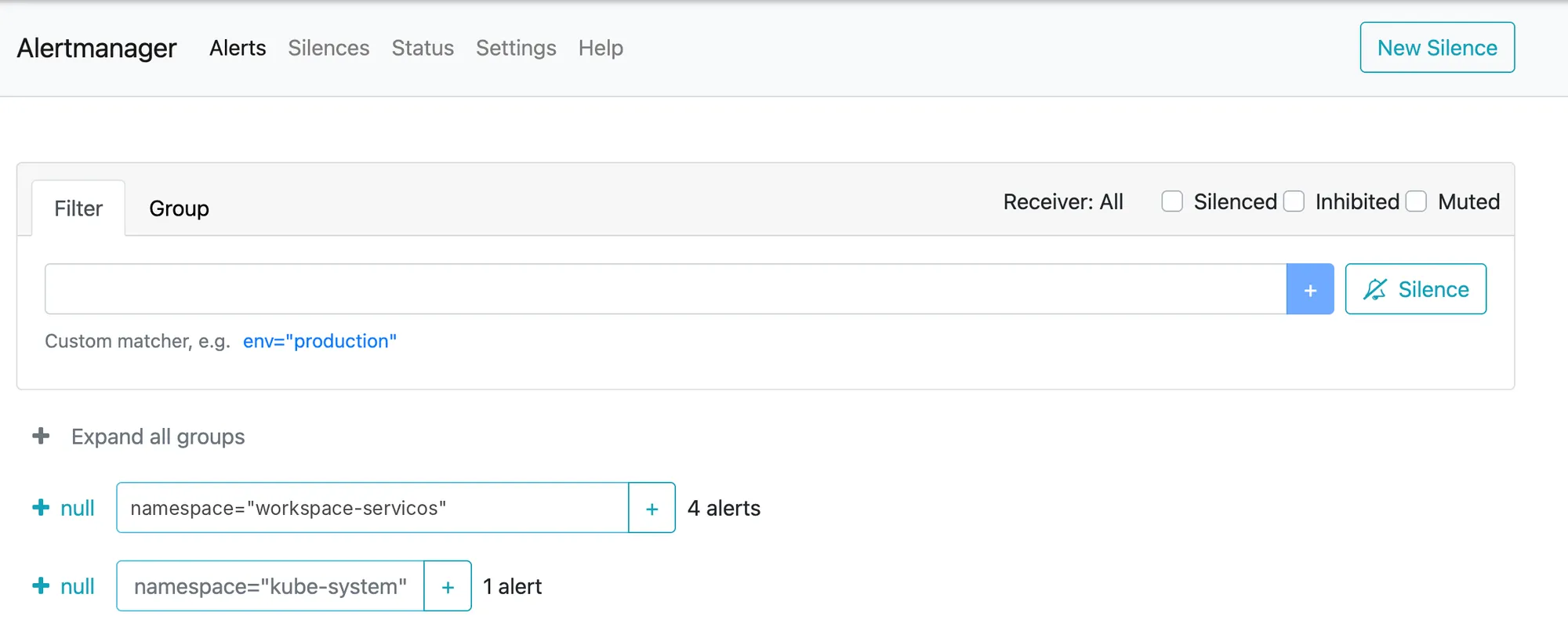
| Alert | Severity | What it was |
|---|---|---|
| Watchdog | none | Always firing on purpose: proves the alerting pipeline is alive |
| InfoInhibitor | none | Helper that silences info-level alerts |
| CPUThrottlingHigh | info | Fluentd sidecar with 30% CPU throttling, right after starting |
| KubeProxyDown | critical | Firing for two days. False alarm |
KubeProxyDown is a false alarm because the cluster has no kube-proxy: Cilium does that job.
$ kubectl -n kube-system get ds kube-proxyError from server (NotFound): daemonsets.apps "kube-proxy" not found$ kubectl -n kube-system get cm cilium-config -o jsonpath='{.data.kube-proxy-replacement}'trueAnd the most important part was in the default configuration:
route: receiver: "null"receivers:- name: "null"The only configured destination is "null". Alerts fire and go to no one: no email, no Slack, no Teams. Together with a false critical alert firing for two days, that is the scenario that teaches a team to ignore alerts.
Before production
Configure at least one real destination in Alertmanager, send the Watchdog to a “dead man’s switch” service, and tune or silence the rules that do not apply to your environment, such as KubeProxyDown in a cluster running Cilium.
What about AI?
The same logic applies to AI workloads, with their own signals:
| Layer | What to observe |
|---|---|
| GPU | Utilization, memory, temperature and errors (NVIDIA DCGM Exporter) |
| Inference server | Queue, requests per second, latency |
| LLM | Input and output tokens, time to first token (TTFT), cost per request |
OpenTelemetry already has semantic conventions specific to generative AI, to record model, tokens and latency in a standard way.
A maturity model
To place where each customer stands:
| Level | What it looks like | In the lab, before this series |
|---|---|---|
| 1. Reactive | Someone looks at the dashboard when users complain | — |
| 2. Monitored | Fixed-threshold alerts reach someone | Partial: alerts exist but reach no one |
| 3. Observable | Metrics, logs and traces linked together; you can investigate the unknown | Metrics yes; logs only on management; no traces |
| 4. SLO-driven | Error-budget alerts; product decisions use the data | — |
Parts 2 and 3 take the lab from level 2 to level 3.
What I learned
- The workload cluster comes with metrics only. Logs and traces have to be enabled, and that has a cost.
- The dependency warning lets you continue, and the result is an “Enabled” app that does not work. Check the pods after every Enable.
- Rook Ceph and Rook Ceph Cluster are different apps. The first is the operator; the second is the storage.
- The Fluentd buffer holds the logs when the destination goes down. That resilience comes out of the box.
- An alert with no destination protects nothing, and a false critical alert teaches people to ignore alerts.
- Observability uses resources. It goes into sizing, not after it.
Basic observability checklist on NKP
- Inventory of what is already on in each cluster
- Logs enabled on workload clusters, with dependencies in order
- Pods checked after every Enable, not just the app card
- At least one real destination configured in Alertmanager
- Watchdog wired to an external “dead man’s switch” service
- Rules that do not apply to the environment tuned or silenced
- Metric and log retention defined by business rules
- Observability stack consumption included in cluster sizing
Next part
In Part 2, NKP Insights: enabling it on both clusters, seeing what it finds on its own and comparing it with the Prometheus alerts we just saw.
References
- Site Reliability Engineering, chapter 6: Monitoring Distributed Systems (Google)
- The USE Method (Brendan Gregg)
- OpenTelemetry
- Grafana Loki
- Logging Operator (Kube Logging)
- Rook
- Nutanix Kubernetes Platform Guide 2.19 (Nutanix portal)
Comments
Comments use GitHub Discussions; you need a GitHub account.