Upgrading NKP 2.18 → 2.19 in practicePart 2: the upgrade
Summary: the window took about 1h42 and ended with both clusters on NKP 2.19, Kubernetes 1.36.2 and Rocky Linux 9.8. The management cluster went up with the CLI in two steps, the workload cluster went up through the new UI in 21 minutes, and two incidents showed up along the way: one that had been hiding since the cluster was created, and a warning that cleared on its own. This is part 2 of a three-part series.
Where we left off
In part 1, I went through phases 0 to 3: assessment, creating the workload cluster while still on 2.18, downloads and backup. With everything green, the window started from here:
| Item | Before the upgrade |
|---|---|
| Management cluster | NKP 2.18, Kubernetes 1.35.2, Rocky Linux 9.7, 3 control planes and 5 workers |
| Workload cluster | NKP 2.18, Kubernetes 1.35.2, 3 control planes and 3 workers |
nkp CLI on the bastion | 2.19.0 |
| Node image in Prism Central | Rocky Linux 9.8, Kubernetes 1.36.2 |
| Phase | What it is | Post |
|---|---|---|
| 0 to 3 | Preparation | Part 1 |
| 4 | Management upgrade (Kommander, then the cluster) | Part 2 (this one) |
| 5 | Workload cluster upgrade from the UI | Part 2 (this one) |
| 6 | Post-upgrade: validation, lessons and what 2.19 brings | Part 3 |
How I watched the window
Three terminals stayed open the whole time, and the entire window was recorded:
- A loop against
podinfo, the test application from part 1, which runs on the workload cluster: one request per second, printing the time and the HTTP code. - The upgrade commands, inside a
tmuxsession on the bastion. If the SSH connection drops, the upgrade keeps running. - A
watchon the nodes or the Cluster API machines, to see the replacement happen.
# Terminal 1 (laptop): the thermometerwhile true; do printf "%s " "$(date +%T)"; curl -s -m 2 -o /dev/null -w "%{http_code}\n" http://<podinfo-ip>/ || echo FAIL; sleep 1; done
# Terminal 2 (bastion): everything inside tmuxssh -t user@<bastion> 'tmux new -A -s upgrade'
Phase 4.1: Kommander
Goal: upgrade the NKP management layer (Kommander and the platform applications) to 2.19.
Coming from 2.18, this step is done with the CLI. Before starting, I checked the CLI version and node health, and sent the output to a log:
export KUBECONFIG=~/.kube/mgmt-admin.confnkp versionkubectl get nodesnkp upgrade kommander 2>&1 | tee ~/phase4-1-kommander-$(date +%Y%m%d-%H%M).logThe command runs four checks before touching anything:
✓ Checking for deprecated GitRepository-based catalog apps✓ Ensuring that new app dependencies introduced by the upgrade are enabled✓ Ensuring upgrading conditions are met✓ Checking docker.io/nutanix credentials are present for the fleet• Upgrading ManagementPlane nkp-platform...The last one is the Nutanix registry credential, the one I thought was configured and wasn’t (part 1, Phase 3). This time, it passed.
After the checks, the upgrade has two steps, and both stay silent for several minutes:
| Step | Duration |
|---|---|
| Upgrading ManagementPlane | 17m31s |
| Ensuring platform Kommander applications are upgraded | about 12 min |
| Phase 4.1 total | about 30 min |
Silence is not a hang
In both steps, the terminal sits on the same line for many minutes. To see progress, open another terminal and watch the HelmReleases: watch -n 10 'kubectl get helmreleases -A | grep -v True'.
The criterion to move on
Once the command finished, I checked whether any platform application had been left unhealthy:
kubectl get helmreleases -A --no-headers | grep -v "True" || echo "ALL APPS READY"The answer was ALL APPS READY. Only then did I move to the next phase.
The Kommander login drops
After Phase 4.1, the authentication token changes and the UI goes back to the login screen. That is expected and documented in the Upgrade Guide. Token-based kubeconfigs also stop working; the admin one, based on a certificate, keeps working. If you are recording the window, pause before logging in again.
Phase 4.2: the management cluster
Goal: take the management cluster itself to Kubernetes 1.36.2 and Rocky Linux 9.8 without taking anything down.
The command needs the cluster’s name and namespace in Cluster API, plus the new image. Instead of typing the first two, I read them straight from the NKP resource:
export MANAGEMENT_CLUSTER_NAME=$(kubectl get -n kommander nkpcluster \  -l 'kommander.d2iq.io/host=true' -o jsonpath='{.items[0].status.capiClusterRef.name}')export MANAGEMENT_CLUSTER_NAMESPACE=$(kubectl get -n kommander nkpcluster \  -l 'kommander.d2iq.io/host=true' -o jsonpath='{.items[0].status.capiClusterRef.namespace}')export VM_IMAGE_NAME=nkp-rocky-9.8-release-cis-1.36.2-<build>.qcow2
echo "Cluster: $MANAGEMENT_CLUSTER_NAME | Namespace: $MANAGEMENT_CLUSTER_NAMESPACE | Image: $VM_IMAGE_NAME"nkp upgrade cluster nutanix \  --cluster-name ${MANAGEMENT_CLUSTER_NAME} \  --namespace ${MANAGEMENT_CLUSTER_NAMESPACE} \  --vm-image ${VM_IMAGE_NAME}
The echo before the upgrade is on purpose: if a variable comes out empty, there is time to cancel. And the image name must be exactly what is in Prism Central (hence the don’t-rename rule from part 1).
✓ Waiting for ClusterClasses to be ready✓ Running preflight checksnkpcluster.clusters.nkp.nutanix.com/<management> upgraded• Upgrading the cluster...The rolling upgrade, node by node
From here on, Cluster API does the work. For each node, it:
- creates a new VM with the new image;
- waits for the new node to become
Readyin Kubernetes; - cordons the old node (
SchedulingDisabled) and drains its pods; - only then removes the old VM.
For a few minutes, the cluster has one extra node (9 instead of 8). It never has less capacity than before. In a terminal running watch -n 15 kubectl get nodes, you can see the versions change line by line:
NAME STATUS ROLES AGE VERSION<mgmt>-cp-new-1 Ready control-plane 28s v1.36.2<mgmt>-cp-old-1 Ready,SchedulingDisabled control-plane 29d v1.35.2<mgmt>-cp-old-2 Ready control-plane 29d v1.35.2...| Step | Duration |
|---|---|
| 3 control planes | about 12 min (about 4 min per node) |
| 5 workers | about 14 min |
| Phase 4.2 total | about 26 min |
The CPU headroom paid off
In part 1, I added a fifth worker to the management cluster because CPU requests were at 87%. This is the phase where that matters: each drained worker has to fit on the other four, plus the temporary extra node.
Phase 4.3: validating the management cluster
Before touching the workload cluster, I validated the management cluster and checked that the workload cluster was still untouched:
kubectl get nodes -o wide # 8 nodes Ready, v1.36.2, Rocky Linux 9.8kubectl get helmreleases -A --no-headers | grep -v "True" || echo "ALL APPS READY"kubectl -n kube-system get cm coredns -o yaml | grep -c "lab.example.local" # internal zone preservedkubectl --kubeconfig ~/.kube/services.conf get nodes # workload still on v1.35.2All good, including a detail I was worried about: the internal DNS zone I had added to CoreDNS (the Phase 1 troubleshooting) survived the upgrade on both clusters.
After logging back in, the dashboard showed v2.19.0 and Kubernetes v1.36.2, plus two new menus under Administration: Metal Host Inventory and Upgrades. The second one is Phase 5.
Phase 4 outcome
Management cluster on NKP 2.19, Kubernetes 1.36.2 and Rocky Linux 9.8, in about 56 minutes and without a single error. Workload cluster untouched, still on 2.18.
Before Phase 5: the problem that had been hiding
The 2.19 UI only allows a workload cluster upgrade when all of its applications are healthy. And part 1 had left a loose end: in the Phase 3 pre-checks, the workload cluster’s OpenCost showed an install failure. Time to understand it.
opencost False Helm install failed ... timeout waiting for: [Deployment/<namespace>/opencost status: 'InProgress']I pulled the thread:
- OpenCost was in
CrashLoopBackOff, with more than 200 restarts. The log was clear:Failed to create Prometheus data source ... connection refused. OpenCost itself was fine; Prometheus was the one not answering. - The Prometheus HelmRelease showed
True, but the Prometheus pod never even started. The events showed why:Error: configmap "cluster-info-configmap" not found - That ConfigMap existed on the management cluster, but not on the workload cluster. It has a single field,
CLUSTER_ID, and Kommander should have delivered it when the cluster was attached to the workspace.
My hypothesis: a side effect of the cluster’s first day, when Flux couldn’t reach Kommander for lack of DNS (part 1, Phase 1). Almost everything was delivered after the fix, but not this item.
The fix, in four steps:
# 1. Confirm the pattern on the management cluster: CLUSTER_ID = UID of the kube-system namespacekubectl -n kommander get cm cluster-info-configmap -o jsonpath='{.data.CLUSTER_ID}'kubectl get ns kube-system -o jsonpath='{.metadata.uid}'
# 2. Create the ConfigMap on the workload cluster, with its own kube-system UIDexport WK=~/.kube/services.conf; export NS=<workspace-namespace>UID_WK=$(kubectl --kubeconfig $WK get ns kube-system -o jsonpath='{.metadata.uid}')kubectl --kubeconfig $WK -n $NS create configmap cluster-info-configmap --from-literal=CLUSTER_ID="$UID_WK"
# 3. Restart Prometheus and OpenCostkubectl --kubeconfig $WK -n $NS delete pod prometheus-kube-prometheus-stack-prometheus-0kubectl --kubeconfig $WK -n $NS rollout restart deploy/opencost
# 4. Make Flux try again (it gives up after running out of retries)kubectl --kubeconfig $WK -n $NS patch helmrelease opencost --type merge -p '{"spec":{"suspend":true}}'kubectl --kubeconfig $WK -n $NS patch helmrelease opencost --type merge -p '{"spec":{"suspend":false}}'T=$(date +%s)kubectl --kubeconfig $WK -n $NS annotate helmrelease opencost \  reconcile.fluxcd.io/requestedAt="$T" reconcile.fluxcd.io/forceAt="$T" reconcile.fluxcd.io/resetAt="$T" --overwrite
In about 8 minutes: Prometheus 3/3 Running, OpenCost 2/2 Running with zero restarts, the HelmRelease True and, in Kommander, the banner “You have cluster(s) that are ready for an upgrade”.
Two lessons from this incident
A True HelmRelease does not mean the application is running: the Prometheus chart was installed, but the pod never started. Look at pods and events. And Flux does not retry after running out of attempts: even with the cause fixed, the status only comes back with an explicit reset.
Phase 5: the workload cluster from the UI
Goal: test the headline feature of 2.19, upgrading a workload cluster from the Kommander UI.
Under Administration → Upgrades, the screen shows both clusters side by side. The management cluster already showed Newest Version; the workload cluster showed Ready, with the path already worked out: from v2.18.0 to v2.19.0 and from v1.35.2 to v1.36.2.
The Upgrade link on the cluster’s row opens a two-step wizard.
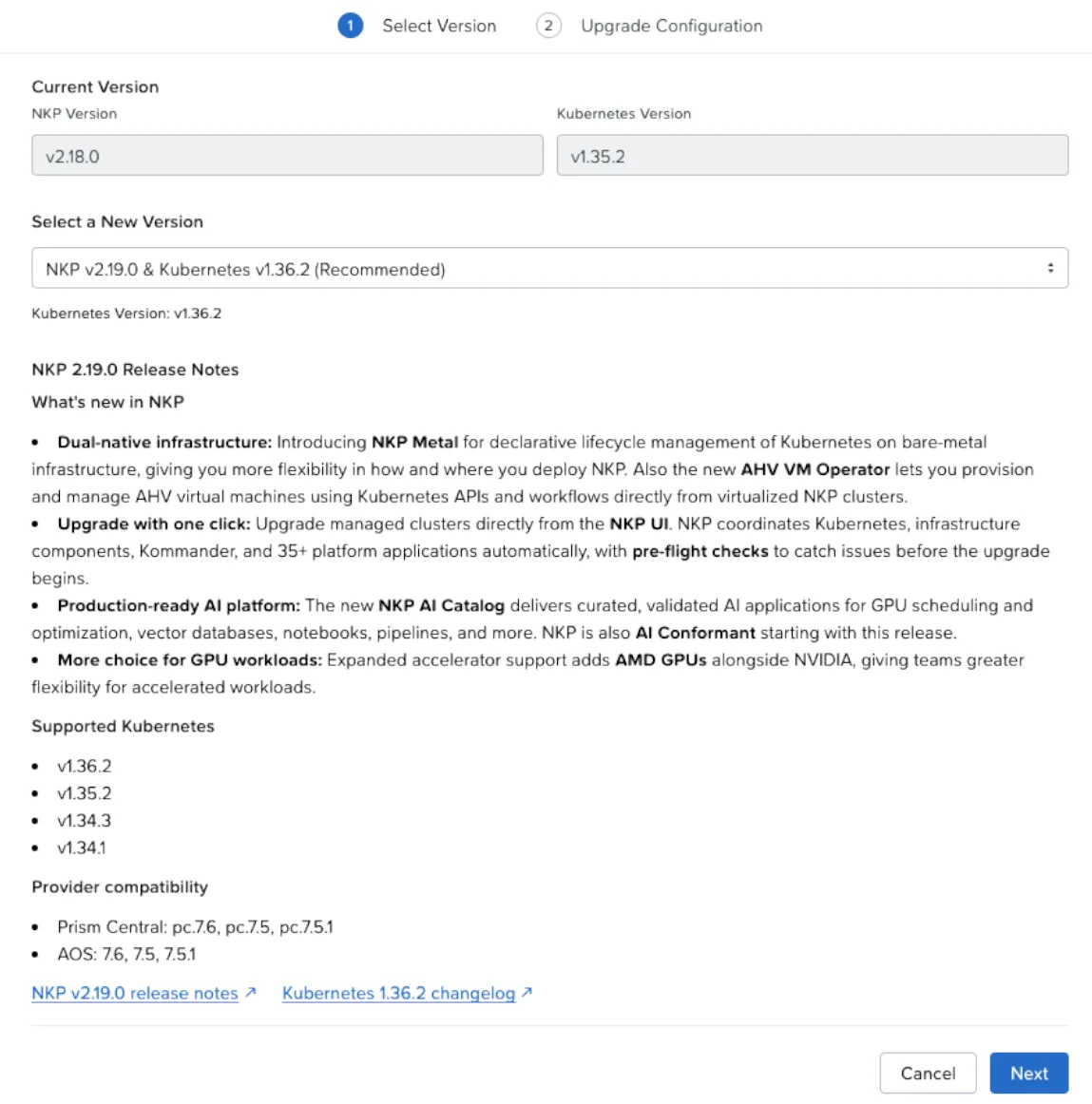
Step 1, Select Version: the current version and the recommended one (NKP v2.19.0 & Kubernetes v1.36.2), with the release notes built into the screen.
Step 2, Upgrade Configuration: the current and new image for each group of nodes (control plane and each node pool). This is where I picked the same Rocky Linux 9.8 image used on the management cluster.
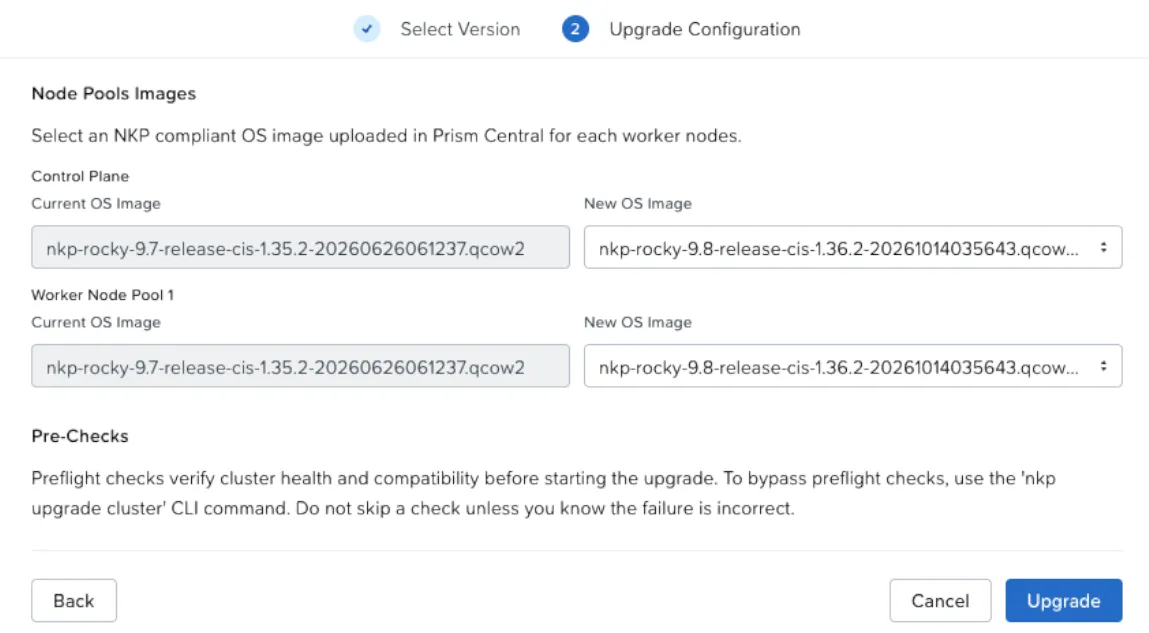
Note the Pre-Checks message: from the UI, the checks always run. Skipping one is only possible from the CLI, and only if you are sure the failure is a false positive.
The Cluster Upgrade Tracker
One click on Upgrade, and the Upgrading link on the cluster’s row opens the Cluster Upgrade Tracker, another new feature in 2.19. It shows three steps, in this order:
- Validating Inputs
- Upgrading Platform Applications
- Upgrading Kubernetes and Cluster Infrastructure
The order is the opposite of what I did on the management cluster: here, the applications go first and Kubernetes after. Machines only start being replaced in the third step.
The yellow warning
At the start of the third step, the Tracker showed this:
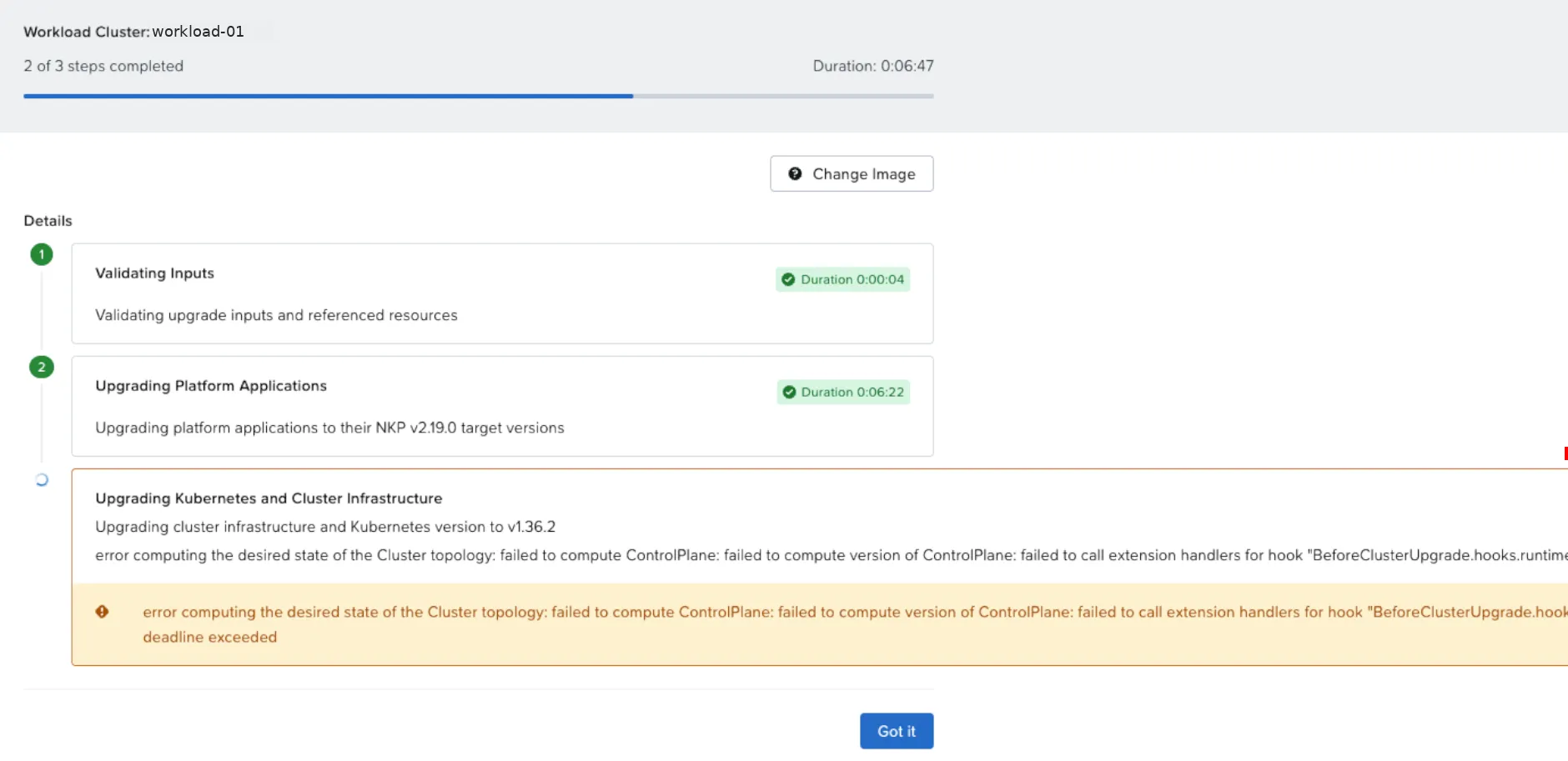
Before replacing machines, Cluster API calls a hook, BeforeClusterUpgrade, answered by an NKP extension running on the management cluster. The call took too long.
I didn’t click anything. The step was still spinning, with no failure mark, and Cluster API retries on its own. A likely cause: that extension’s pods had just moved to new nodes during the management upgrade. In about a minute, the warning was gone and the Tracker showed KubeadmControlPlane upgrading to v1.36.2.
A yellow warning with the step still spinning is not a failure
Wait a few minutes before acting. And don’t use the Change Image button to “unstick” it: the image was right, the problem was the hook.
The node replacement, seen from below
The same steps as on the management cluster, now on the workload cluster’s six nodes. With three terminals, you can see what the UI summarizes:
- Machines in Cluster API:
kubectl get machines -n <namespace>shows each new machine going fromProvisioningtoRunning, and the old ones inDeleting. - Nodes in Kubernetes: the new node shows
NotReadyfor a minute or two (pod networking still coming up) and thenReadyon v1.36.2. - The control plane safeguard: the cluster conditions show “Scaling down 4 → 3 blocked, waiting for control plane components to become healthy”. NKP only removes an old control plane after the new one is healthy.
Done
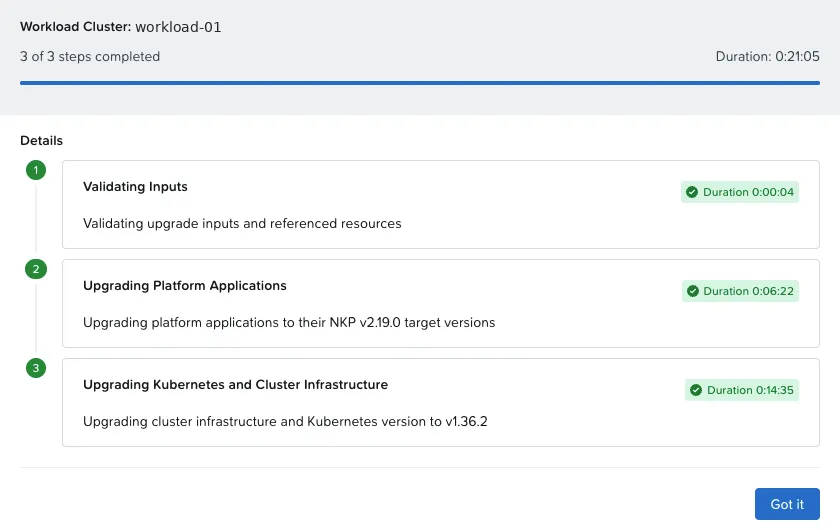
| Tracker step | Duration |
|---|---|
| Validating Inputs | 4 s |
| Upgrading Platform Applications | 6m22s |
| Upgrading Kubernetes and Cluster Infrastructure | 14m35s |
| Phase 5 total | 21m05s |
On the Upgrades screen, both clusters on the same version:
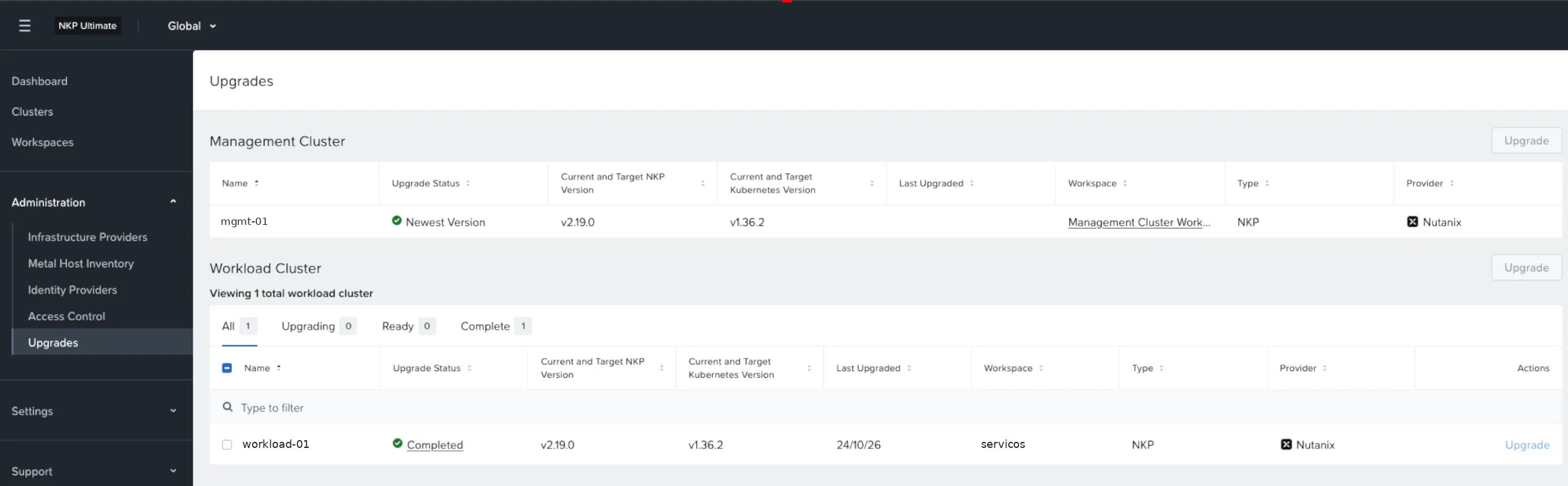
The final validation on the workload cluster repeated Phase 4.3: six nodes Ready on v1.36.2 with Rocky Linux 9.8, all applications ready, the internal DNS zone preserved, and the cluster-info-configmap I had created was still there.
Phase 5 outcome
Workload cluster on NKP 2.19 from the UI, in 21 minutes, with one transient warning and no intervention during the upgrade.
What about podinfo?
The thermometer answered 200 every time I captured it. During Phase 4, that was expected: podinfo runs on the workload cluster, and the management upgrade shouldn’t affect it. Phase 5 was the real test, because the nodes being replaced were its own. In the screenshots and the recording, it kept answering; with 3 replicas and a PodDisruptionBudget, draining one worker never takes all of them down. I didn’t run a formal second-by-second failure count, so I won’t claim “absolute zero downtime”: that is the next test.
Window summary
| Step | Time | Duration | Result |
|---|---|---|---|
| 4.1 Kommander (CLI) | 17:56 → 18:26 | about 30 min | ✓ |
| 4.2 Management cluster, 8 nodes (CLI) | 18:28 → 18:54 | about 26 min | ✓ |
| 4.3 Validation | 18:55 | — | ✓ |
| OpenCost fix on the workload cluster | 19:00 → 19:08 | about 8 min | ✓ |
| 5 Workload cluster, 6 nodes (UI) | 19:15 → 19:37 | 21 min | ✓ |
| Whole window | 17:56 → 19:38 | about 1h42 | 2 clusters on NKP 2.19 |
| Incident | Cause | What fixed it |
|---|---|---|
OpenCost in CrashLoopBackOff on the workload cluster | cluster-info-configmap never delivered, since the first day without DNS | Create the ConfigMap, restart Prometheus and OpenCost, reset the HelmRelease in Flux |
deadline exceeded warning on the BeforeClusterUpgrade hook | NKP extension slow to answer right after the management upgrade | Nothing: Cluster API retried and moved on in about a minute |
Coming soon: Part 3
Part 3 closes the series with Phase 6: the post-upgrade, the consolidated lessons learned, and what 2.19 brings beyond the UI upgrade.
Window checklist
-
tmuxsession on the bastion for long-running commands - A thermometer running against a real application
-
nkp upgrade kommanderand HelmRelease validation before moving on - A plan for the Kommander login that drops after Phase 4.1
-
nkp upgrade clustervariables checked with anechofirst - Exact image name from Prism Central
- CPU headroom for the rolling upgrade’s extra node
- Customizations (CoreDNS) checked after the upgrade
- All workload applications healthy before using the UI
- Patience with yellow warnings in the Tracker
References
- NKP 2.19 — Product Updates (Nutanix Community)
- Nutanix Kubernetes Platform Guide 2.19 — Upgrade Nutanix Kubernetes Platform (Nutanix portal)