Nutanix Enterprise AI on NKPPart 1: architecture, licensing and sizing
Tested onNKP 2.19Nutanix Enterprise AI 2.8.1Prism Central 7.6AOS 7.6Lab date On a different version, check the compatibility matrix and the release notes before applying.
Summary: Nutanix Enterprise AI (NAI) turns a Kubernetes cluster into an inference platform with an OpenAI-compatible API, per-application keys, a model catalog and auditing. Before installing it, I read the 2.8.1 User Guide and the two Nutanix Validated Designs that cover it. Five points shaped my plan: the license is separate from NKP, with a 2-day trial (the key goes in on install day); the guide mentions NKP 2.18, and the 2.19 catalog already ships NAI 2.8.1; the control plane needs 30 vCPU and 60 GB on top of inference; the NVDs put NAI on a dedicated cluster; and with no GPU, the lab runs inference on CPUs without AMX. This is part 1 of 4.
The series
| Part | Topic |
|---|---|
| 1 | NAI: architecture, licensing and sizing (this post) |
| 2 | Nutanix Files for Kubernetes: the RWX NAI requires |
| 3 | From the catalog to the first token: dedicated cluster, NAI 2.8.1 and license |
| 4 | CPU, GPU and MCP: NAI in a hybrid architecture |
The lab: a 3-host Nutanix HCI cluster, Prism Central and AOS 7.6, NKP 2.19 with a management cluster and a services cluster. No GPU in the hosts. This part is the reading and the planning; nothing is installed yet. It is the part I wish I had read before opening an NAI project at a customer.
What Nutanix Enterprise AI is
NAI is a Nutanix platform for serving AI models inside Kubernetes, with governance. In practice, it delivers:
| Feature | What it is |
|---|---|
| Local endpoints | A Hugging Face model or an NVIDIA NIM published as an OpenAI-compatible API, running on GPU or CPU |
| Validated model catalog | Models tested by Nutanix, with CPU, memory and vLLM parameters filled in automatically |
| API keys | One key per application, with activation, deactivation and auditing |
| Unified Endpoints | A single endpoint that spreads traffic across local models and external providers (OpenAI, Anthropic, Bedrock, Azure OpenAI, Vertex, Gemini, Mistral, Cohere or another NAI), with rate limiting |
| MCP Servers | Local or remote MCP servers for agents, with credentials and client keys |
| NAI Labs | Sample applications: Chat, Talk to My Data and an agent |
| Governance | IAM with LDAP, SAML and policies, audit events, model security scanning, usage metrics |
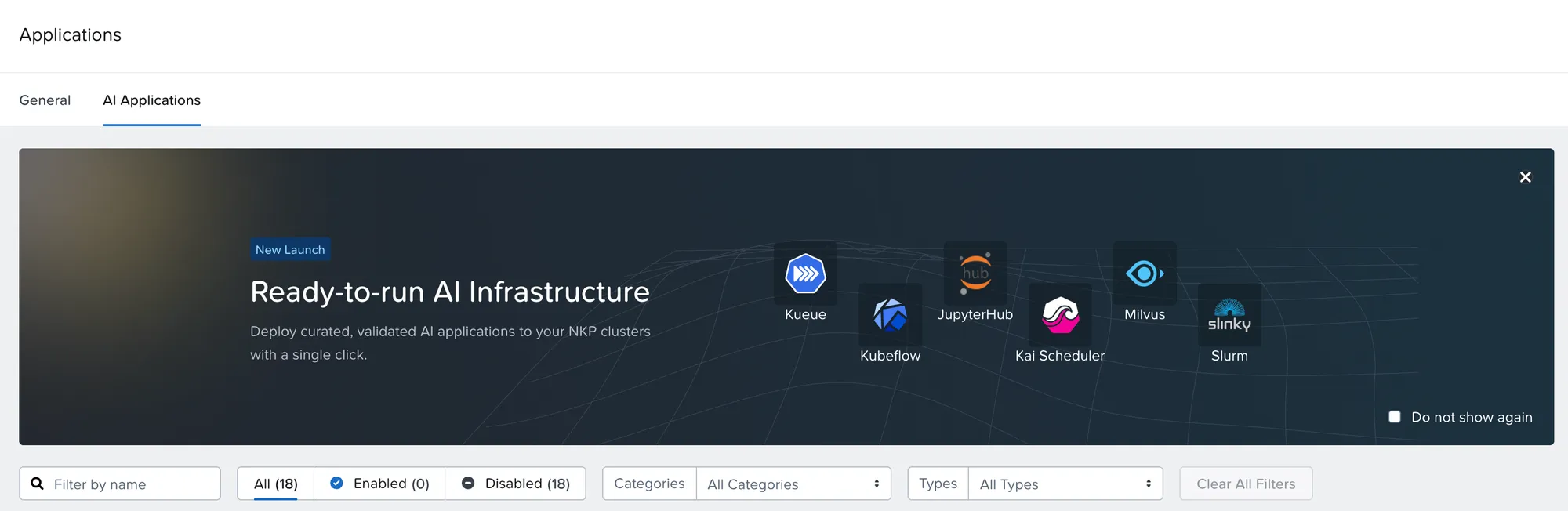
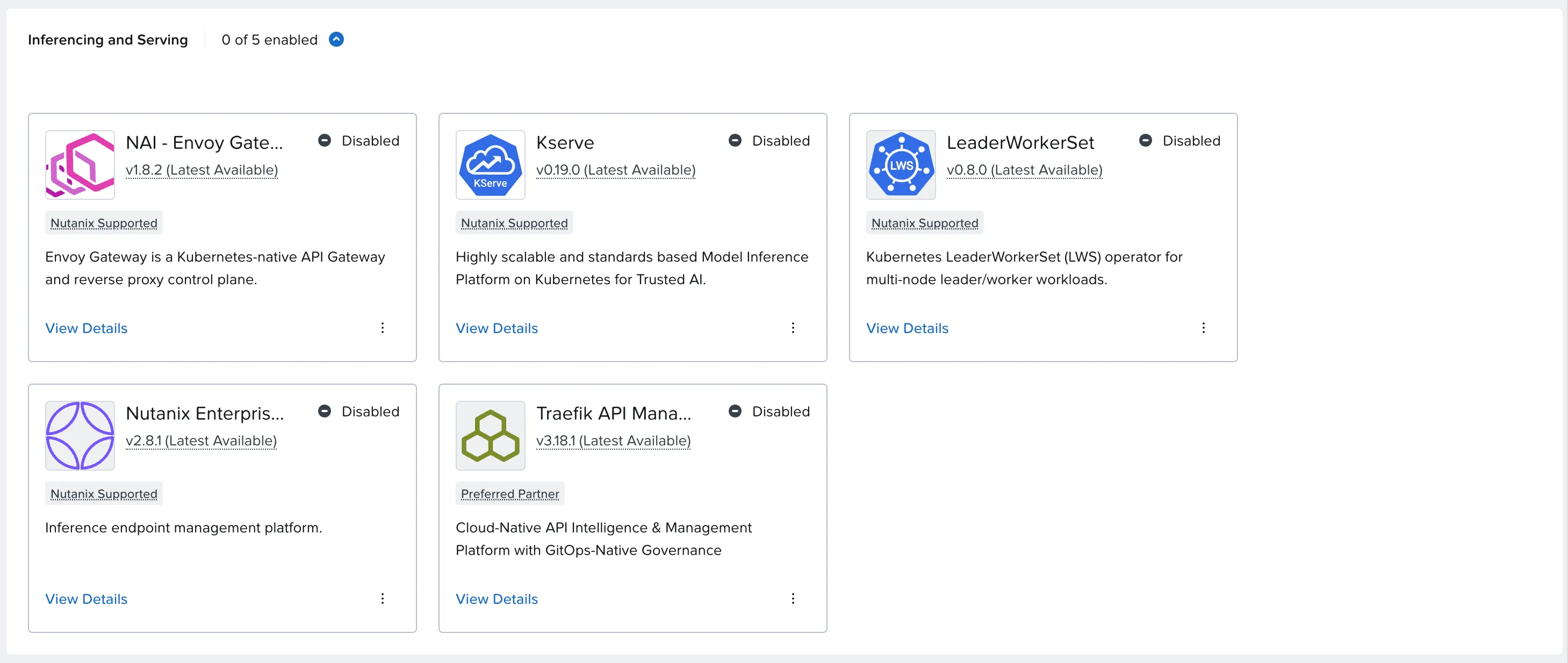
The current version is 2.8.1, and it already shows up in the NKP 2.19 catalog, on the AI Applications tab:
How the pieces fit
%3b%7d%23mermaid-0 .cluster rect%7bfill:hsl(0%2c 0%25%2c 98.9215686275%25)%3bstroke:%23707070%3bstroke-width:1px%3b%7d%23mermaid-0 .cluster text%7bfill:%23333%3b%7d%23mermaid-0 .cluster span%7bcolor:%23333%3b%7d%23mermaid-0 .node .collapsed-indicator%7bfill:%23707070%3bstroke:none%3bopacity:0.6%3b%7d%23mermaid-0 .node .collapsed-separator%7bstroke:%23707070%3bstroke-width:0.75px%3b%7d%23mermaid-0 div.mermaidTooltip%7bposition:absolute%3btext-align:center%3bmax-width:200px%3bpadding:2px%3bfont-family:arial%2csans-serif%3bfont-size:12px%3bbackground:hsl(-160%2c 0%25%2c 93.3333333333%25)%3bborder:1px solid %23707070%3bborder-radius:2px%3bpointer-events:none%3bz-index:100%3b%7d%23mermaid-0 .flowchartTitleText%7btext-anchor:middle%3bfont-size:18px%3bfill:black%3b%7d%23mermaid-0 rect.text%7bfill:none%3bstroke-width:0%3b%7d%23mermaid-0 .icon-shape%2c%23mermaid-0 .image-shape%7bbackground-color:white%3btext-align:center%3b%7d%23mermaid-0 .icon-shape p%2c%23mermaid-0 .image-shape p%7bbackground-color:white%3bpadding:2px%3b%7d%23mermaid-0 .icon-shape .label rect%2c%23mermaid-0 .image-shape .label rect%7bopacity:0.5%3bbackground-color:white%3bfill:white%3b%7d%23mermaid-0 .label-icon%7bdisplay:inline-block%3bheight:1em%3boverflow:visible%3bvertical-align:-0.125em%3b%7d%23mermaid-0 .node .label-icon path%7bfill:currentColor%3bstroke:revert%3bstroke-width:revert%3b%7d%23mermaid-0 .node .neo-node%7bstroke:%23999%3b%7d%23mermaid-0 %5bdata-look='neo'%5d.node rect%2c%23mermaid-0 %5bdata-look='neo'%5d.cluster rect%2c%23mermaid-0 %5bdata-look='neo'%5d.node polygon%7bstroke:url(%23mermaid-0-gradient)%3bfilter:drop-shadow( 1px 2px 2px rgba(185%2c185%2c185%2c1))%3b%7d%23mermaid-0 %5bdata-look='neo'%5d.swimlane.cluster rect%7bfilter:none%3b%7d%23mermaid-0 %5bdata-look='neo'%5d.node path%7bstroke:url(%23mermaid-0-gradient)%3bstroke-width:1px%3b%7d%23mermaid-0 %5bdata-look='neo'%5d.node .outer-path%7bfilter:drop-shadow( 1px 2px 2px rgba(185%2c185%2c185%2c1))%3b%7d%23mermaid-0 %5bdata-look='neo'%5d.node .neo-line path%7bstroke:%23999%3bfilter:none%3b%7d%23mermaid-0 %5bdata-look='neo'%5d.node circle%7bstroke:url(%23mermaid-0-gradient)%3bfilter:drop-shadow( 1px 2px 2px rgba(185%2c185%2c185%2c1))%3b%7d%23mermaid-0 %5bdata-look='neo'%5d.node circle .state-start%7bfill:black%3b%7d%23mermaid-0 %5bdata-look='neo'%5d.icon-shape .icon%7bfill:url(%23mermaid-0-gradient)%3bfilter:drop-shadow( 1px 2px 2px rgba(185%2c185%2c185%2c1))%3b%7d%23mermaid-0 %5bdata-look='neo'%5d.icon-shape .icon-neo path%7bstroke:url(%23mermaid-0-gradient)%3bfilter:drop-shadow( 1px 2px 2px rgba(185%2c185%2c185%2c1))%3b%7d%23mermaid-0 :root%7b--mermaid-font-family:arial%2csans-serif%3b%7d%3c/style%3e%3cg%3e%3cmarker id='mermaid-0_flowchart-v2-pointEnd' class='marker flowchart-v2' viewBox='0 0 10 10' refX='5' refY='5' markerUnits='userSpaceOnUse' markerWidth='8' markerHeight='8' orient='auto'%3e%3cpath d='M 0 0 L 10 5 L 0 10 z' class='arrowMarkerPath' style='stroke-width: 1%3b stroke-dasharray: 1%2c 0%3b'/%3e%3c/marker%3e%3cmarker id='mermaid-0_flowchart-v2-pointStart' class='marker flowchart-v2' viewBox='0 0 10 10' refX='4.5' refY='5' markerUnits='userSpaceOnUse' markerWidth='8' markerHeight='8' orient='auto'%3e%3cpath d='M 0 5 L 10 10 L 10 0 z' class='arrowMarkerPath' style='stroke-width: 1%3b stroke-dasharray: 1%2c 0%3b'/%3e%3c/marker%3e%3cmarker id='mermaid-0_flowchart-v2-pointEnd-margin' class='marker flowchart-v2' viewBox='0 0 11.5 14' refX='11.5' refY='7' markerUnits='userSpaceOnUse' markerWidth='10.5' markerHeight='14' orient='auto'%3e%3cpath d='M 0 0 L 11.5 7 L 0 14 z' class='arrowMarkerPath' style='stroke-width: 0%3b stroke-dasharray: 1%2c 0%3b'/%3e%3c/marker%3e%3cmarker id='mermaid-0_flowchart-v2-pointStart-margin' class='marker flowchart-v2' viewBox='0 0 11.5 14' refX='1' refY='7' markerUnits='userSpaceOnUse' markerWidth='11.5' markerHeight='14' orient='auto'%3e%3cpolygon points='0%2c7 11.5%2c14 11.5%2c0' class='arrowMarkerPath' style='stroke-width: 0%3b stroke-dasharray: 1%2c 0%3b'/%3e%3c/marker%3e%3cmarker id='mermaid-0_flowchart-v2-circleEnd' class='marker flowchart-v2' viewBox='0 0 10 10' refX='11' refY='5' markerUnits='userSpaceOnUse' markerWidth='11' markerHeight='11' orient='auto'%3e%3ccircle cx='5' cy='5' r='5' class='arrowMarkerPath' style='stroke-width: 1%3b stroke-dasharray: 1%2c 0%3b'/%3e%3c/marker%3e%3cmarker id='mermaid-0_flowchart-v2-circleStart' class='marker flowchart-v2' viewBox='0 0 10 10' refX='-1' refY='5' markerUnits='userSpaceOnUse' markerWidth='11' markerHeight='11' orient='auto'%3e%3ccircle cx='5' cy='5' r='5' class='arrowMarkerPath' style='stroke-width: 1%3b stroke-dasharray: 1%2c 0%3b'/%3e%3c/marker%3e%3cmarker id='mermaid-0_flowchart-v2-circleEnd-margin' class='marker flowchart-v2' viewBox='0 0 10 10' refY='5' refX='12.25' markerUnits='userSpaceOnUse' markerWidth='14' markerHeight='14' orient='auto'%3e%3ccircle cx='5' cy='5' r='5' class='arrowMarkerPath' style='stroke-width: 0%3b stroke-dasharray: 1%2c 0%3b'/%3e%3c/marker%3e%3cmarker id='mermaid-0_flowchart-v2-circleStart-margin' class='marker flowchart-v2' viewBox='0 0 10 10' refX='-2' refY='5' markerUnits='userSpaceOnUse' markerWidth='14' markerHeight='14' orient='auto'%3e%3ccircle cx='5' cy='5' r='5' class='arrowMarkerPath' style='stroke-width: 0%3b stroke-dasharray: 1%2c 0%3b'/%3e%3c/marker%3e%3cmarker id='mermaid-0_flowchart-v2-crossEnd' class='marker cross flowchart-v2' viewBox='0 0 11 11' refX='12' refY='5.2' markerUnits='userSpaceOnUse' markerWidth='11' markerHeight='11' orient='auto'%3e%3cpath d='M 1%2c1 l 9%2c9 M 10%2c1 l -9%2c9' class='arrowMarkerPath' style='stroke-width: 2%3b stroke-dasharray: 1%2c 0%3b'/%3e%3c/marker%3e%3cmarker id='mermaid-0_flowchart-v2-crossStart' class='marker cross flowchart-v2' viewBox='0 0 11 11' refX='-1' refY='5.2' markerUnits='userSpaceOnUse' markerWidth='11' markerHeight='11' orient='auto'%3e%3cpath d='M 1%2c1 l 9%2c9 M 10%2c1 l -9%2c9' class='arrowMarkerPath' style='stroke-width: 2%3b stroke-dasharray: 1%2c 0%3b'/%3e%3c/marker%3e%3cmarker id='mermaid-0_flowchart-v2-crossEnd-margin' class='marker cross flowchart-v2' viewBox='0 0 15 15' refX='17.7' refY='7.5' markerUnits='userSpaceOnUse' markerWidth='12' markerHeight='12' orient='auto'%3e%3cpath d='M 1%2c1 L 14%2c14 M 1%2c14 L 14%2c1' class='arrowMarkerPath' style='stroke-width: 2.5%3b'/%3e%3c/marker%3e%3cmarker id='mermaid-0_flowchart-v2-crossStart-margin' class='marker cross flowchart-v2' viewBox='0 0 15 15' refX='-3.5' refY='7.5' markerUnits='userSpaceOnUse' markerWidth='12' markerHeight='12' orient='auto'%3e%3cpath d='M 1%2c1 L 14%2c14 M 1%2c14 L 14%2c1' class='arrowMarkerPath' style='stroke-width: 2.5%3b stroke-dasharray: 1%2c 0%3b'/%3e%3c/marker%3e%3cg class='root'%3e%3cg class='clusters'/%3e%3cg class='edgePaths'%3e%3cpath d='M248.285%2c86L248.285%2c90.167C248.285%2c94.333%2c248.285%2c102.667%2c248.285%2c110.333C248.285%2c118%2c248.285%2c125%2c248.285%2c128.5L248.285%2c132' id='mermaid-0-L_A_G_0' class='edge-thickness-normal edge-pattern-solid edge-thickness-normal edge-pattern-solid flowchart-link' style='%3b' data-edge='true' data-et='edge' data-id='L_A_G_0' data-points='W3sieCI6MjQ4LjI4NTE1NjI1LCJ5Ijo4Nn0seyJ4IjoyNDguMjg1MTU2MjUsInkiOjExMX0seyJ4IjoyNDguMjg1MTU2MjUsInkiOjEzNn1d' data-look='classic' marker-end='url(%23mermaid-0_flowchart-v2-pointEnd)'/%3e%3cpath d='M166.746%2c214L158.034%2c218.167C149.323%2c222.333%2c131.9%2c230.667%2c123.188%2c238.333C114.477%2c246%2c114.477%2c253%2c114.477%2c256.5L114.477%2c260' id='mermaid-0-L_G_N_0' class='edge-thickness-normal edge-pattern-solid edge-thickness-normal edge-pattern-solid flowchart-link' style='%3b' data-edge='true' data-et='edge' data-id='L_G_N_0' data-points='W3sieCI6MTY2Ljc0NTU0NDQzMzU5Mzc1LCJ5IjoyMTR9LHsieCI6MTE0LjQ3NjU2MjUsInkiOjIzOX0seyJ4IjoxMTQuNDc2NTYyNSwieSI6MjY0fV0=' data-look='classic' marker-end='url(%23mermaid-0_flowchart-v2-pointEnd)'/%3e%3cpath d='M329.825%2c214L338.536%2c218.167C347.248%2c222.333%2c364.671%2c230.667%2c373.382%2c238.333C382.094%2c246%2c382.094%2c253%2c382.094%2c256.5L382.094%2c260' id='mermaid-0-L_G_K_0' class='edge-thickness-normal edge-pattern-solid edge-thickness-normal edge-pattern-solid flowchart-link' style='%3b' data-edge='true' data-et='edge' data-id='L_G_K_0' data-points='W3sieCI6MzI5LjgyNDc2ODA2NjQwNjI1LCJ5IjoyMTR9LHsieCI6MzgyLjA5Mzc1LCJ5IjoyMzl9LHsieCI6MzgyLjA5Mzc1LCJ5IjoyNjR9XQ==' data-look='classic' marker-end='url(%23mermaid-0_flowchart-v2-pointEnd)'/%3e%3cpath d='M296.65%2c342L287.522%2c346.167C278.393%2c350.333%2c260.136%2c358.667%2c251.007%2c366.333C241.879%2c374%2c241.879%2c381%2c241.879%2c384.5L241.879%2c388' id='mermaid-0-L_K_S_0' class='edge-thickness-normal edge-pattern-solid edge-thickness-normal edge-pattern-solid flowchart-link' style='%3b' data-edge='true' data-et='edge' data-id='L_K_S_0' data-points='W3sieCI6Mjk2LjY1MDMyOTU4OTg0Mzc1LCJ5IjozNDJ9LHsieCI6MjQxLjg3ODkwNjI1LCJ5IjozNjd9LHsieCI6MjQxLjg3ODkwNjI1LCJ5IjozOTJ9XQ==' data-look='classic' marker-end='url(%23mermaid-0_flowchart-v2-pointEnd)'/%3e%3cpath d='M467.537%2c342L476.666%2c346.167C485.794%2c350.333%2c504.051%2c358.667%2c513.18%2c368.333C522.309%2c378%2c522.309%2c389%2c522.309%2c394.5L522.309%2c400' id='mermaid-0-L_K_H_0' class='edge-thickness-normal edge-pattern-solid edge-thickness-normal edge-pattern-solid flowchart-link' style='%3b' data-edge='true' data-et='edge' data-id='L_K_H_0' data-points='W3sieCI6NDY3LjUzNzE3MDQxMDE1NjI1LCJ5IjozNDJ9LHsieCI6NTIyLjMwODU5Mzc1LCJ5IjozNjd9LHsieCI6NTIyLjMwODU5Mzc1LCJ5Ijo0MDR9XQ==' data-look='classic' marker-end='url(%23mermaid-0_flowchart-v2-pointEnd)'/%3e%3c/g%3e%3cg class='edgeLabels'%3e%3cg class='edgeLabel'%3e%3cg class='label' data-id='L_A_G_0' transform='translate(0%2c 0)'%3e%3cforeignObject width='0' height='0'%3e%3cdiv xmlns='http://www.w3.org/1999/xhtml' class='labelBkg' style='display: table-cell%3b white-space: nowrap%3b line-height: 1.5%3b max-width: 200px%3b text-align: center%3b'%3e%3cspan class='edgeLabel'%3e%3c/span%3e%3c/div%3e%3c/foreignObject%3e%3c/g%3e%3c/g%3e%3cg class='edgeLabel'%3e%3cg class='label' data-id='L_G_N_0' transform='translate(0%2c 0)'%3e%3cforeignObject width='0' height='0'%3e%3cdiv xmlns='http://www.w3.org/1999/xhtml' class='labelBkg' style='display: table-cell%3b white-space: nowrap%3b line-height: 1.5%3b max-width: 200px%3b text-align: center%3b'%3e%3cspan class='edgeLabel'%3e%3c/span%3e%3c/div%3e%3c/foreignObject%3e%3c/g%3e%3c/g%3e%3cg class='edgeLabel'%3e%3cg class='label' data-id='L_G_K_0' transform='translate(0%2c 0)'%3e%3cforeignObject width='0' height='0'%3e%3cdiv xmlns='http://www.w3.org/1999/xhtml' class='labelBkg' style='display: table-cell%3b white-space: nowrap%3b line-height: 1.5%3b max-width: 200px%3b text-align: center%3b'%3e%3cspan class='edgeLabel'%3e%3c/span%3e%3c/div%3e%3c/foreignObject%3e%3c/g%3e%3c/g%3e%3cg class='edgeLabel'%3e%3cg class='label' data-id='L_K_S_0' transform='translate(0%2c 0)'%3e%3cforeignObject width='0' height='0'%3e%3cdiv xmlns='http://www.w3.org/1999/xhtml' class='labelBkg' style='display: table-cell%3b white-space: nowrap%3b line-height: 1.5%3b max-width: 200px%3b text-align: center%3b'%3e%3cspan class='edgeLabel'%3e%3c/span%3e%3c/div%3e%3c/foreignObject%3e%3c/g%3e%3c/g%3e%3cg class='edgeLabel'%3e%3cg class='label' data-id='L_K_H_0' transform='translate(0%2c 0)'%3e%3cforeignObject width='0' height='0'%3e%3cdiv xmlns='http://www.w3.org/1999/xhtml' class='labelBkg' style='display: table-cell%3b white-space: nowrap%3b line-height: 1.5%3b max-width: 200px%3b text-align: center%3b'%3e%3cspan class='edgeLabel'%3e%3c/span%3e%3c/div%3e%3c/foreignObject%3e%3c/g%3e%3c/g%3e%3c/g%3e%3cg class='nodes'%3e%3cg class='node default' id='mermaid-0-flowchart-A-0' data-look='classic' transform='translate(248.28515625%2c 47)'%3e%3crect class='basic label-container' style='' x='-114.953125' y='-39' width='229.90625' height='78'/%3e%3cg class='label' style='' transform='translate(-84.953125%2c -24)'%3e%3crect/%3e%3cforeignObject width='169.90625' height='48'%3e%3cdiv xmlns='http://www.w3.org/1999/xhtml' style='display: table-cell%3b white-space: nowrap%3b line-height: 1.5%3b max-width: 200px%3b text-align: center%3b'%3e%3cspan class='nodeLabel'%3e%3cp%3eApplications and agents%3cbr /%3e(OpenAI SDK)%3c/p%3e%3c/span%3e%3c/div%3e%3c/foreignObject%3e%3c/g%3e%3c/g%3e%3cg class='node default' id='mermaid-0-flowchart-G-1' data-look='classic' transform='translate(248.28515625%2c 175)'%3e%3crect class='basic label-container' style='' x='-101.5859375' y='-39' width='203.171875' height='78'/%3e%3cg class='label' style='' transform='translate(-71.5859375%2c -24)'%3e%3crect/%3e%3cforeignObject width='143.171875' height='48'%3e%3cdiv xmlns='http://www.w3.org/1999/xhtml' style='display: table-cell%3b white-space: nowrap%3b line-height: 1.5%3b max-width: 200px%3b text-align: center%3b'%3e%3cspan class='nodeLabel'%3e%3cp%3eNAI Envoy Gateway%3cbr /%3eHTTPS%2c keys%2c limits%3c/p%3e%3c/span%3e%3c/div%3e%3c/foreignObject%3e%3c/g%3e%3c/g%3e%3cg class='node default' id='mermaid-0-flowchart-N-3' data-look='classic' transform='translate(114.4765625%2c 303)'%3e%3crect class='basic label-container' style='' x='-106.4765625' y='-39' width='212.953125' height='78'/%3e%3cg class='label' style='' transform='translate(-76.4765625%2c -24)'%3e%3crect/%3e%3cforeignObject width='152.953125' height='48'%3e%3cdiv xmlns='http://www.w3.org/1999/xhtml' style='display: table-cell%3b white-space: nowrap%3b line-height: 1.5%3b max-width: 200px%3b text-align: center%3b'%3e%3cspan class='nodeLabel'%3e%3cp%3eNAI: API%2c UI%2c IAM%3cbr /%3ePostgres%2c ClickHouse%3c/p%3e%3c/span%3e%3c/div%3e%3c/foreignObject%3e%3c/g%3e%3c/g%3e%3cg class='node default' id='mermaid-0-flowchart-K-5' data-look='classic' transform='translate(382.09375%2c 303)'%3e%3crect class='basic label-container' style='' x='-111.140625' y='-39' width='222.28125' height='78'/%3e%3cg class='label' style='' transform='translate(-81.140625%2c -24)'%3e%3crect/%3e%3cforeignObject width='162.28125' height='48'%3e%3cdiv xmlns='http://www.w3.org/1999/xhtml' style='display: table-cell%3b white-space: nowrap%3b line-height: 1.5%3b max-width: 200px%3b text-align: center%3b'%3e%3cspan class='nodeLabel'%3e%3cp%3eInference endpoints%3cbr /%3eKServe %2b vLLM or NIM%3c/p%3e%3c/span%3e%3c/div%3e%3c/foreignObject%3e%3c/g%3e%3c/g%3e%3cg class='node default' id='mermaid-0-flowchart-S-7' data-look='classic' transform='translate(241.87890625%2c 431)'%3e%3crect class='basic label-container' style='' x='-126.7890625' y='-39' width='253.578125' height='78'/%3e%3cg class='label' style='' transform='translate(-96.7890625%2c -24)'%3e%3crect/%3e%3cforeignObject width='193.578125' height='48'%3e%3cdiv xmlns='http://www.w3.org/1999/xhtml' style='display: table-cell%3b white-space: nowrap%3b line-height: 1.5%3b max-width: 200px%3b text-align: center%3b'%3e%3cspan class='nodeLabel'%3e%3cp%3eModels on an RWX volume%3cbr /%3e(Nutanix Files)%3c/p%3e%3c/span%3e%3c/div%3e%3c/foreignObject%3e%3c/g%3e%3c/g%3e%3cg class='node default' id='mermaid-0-flowchart-H-9' data-look='classic' transform='translate(522.30859375%2c 431)'%3e%3crect class='basic label-container' style='' x='-103.640625' y='-27' width='207.28125' height='54'/%3e%3cg class='label' style='' transform='translate(-73.640625%2c -12)'%3e%3crect/%3e%3cforeignObject width='147.28125' height='24'%3e%3cdiv xmlns='http://www.w3.org/1999/xhtml' style='display: table-cell%3b white-space: nowrap%3b line-height: 1.5%3b max-width: 200px%3b text-align: center%3b'%3e%3cspan class='nodeLabel'%3e%3cp%3eWorker GPU or CPU%3c/p%3e%3c/span%3e%3c/div%3e%3c/foreignObject%3e%3c/g%3e%3c/g%3e%3c/g%3e%3c/g%3e%3c/g%3e%3cdefs%3e%3cfilter id='mermaid-0-drop-shadow' height='130%25' width='130%25'%3e%3cfeDropShadow dx='4' dy='4' stdDeviation='0' flood-opacity='0.06' flood-color='black'/%3e%3c/filter%3e%3c/defs%3e%3cdefs%3e%3cfilter id='mermaid-0-drop-shadow-small' height='150%25' width='150%25'%3e%3cfeDropShadow dx='2' dy='2' stdDeviation='0' flood-opacity='0.06' flood-color='black'/%3e%3c/filter%3e%3c/defs%3e%3clinearGradient id='mermaid-0-gradient' gradientUnits='objectBoundingBox' x1='0%25' y1='0%25' x2='100%25' y2='0%25'%3e%3cstop offset='0%25' stop-color='hsl(0%2c 0%25%2c 83.3333333333%25)' stop-opacity='1'/%3e%3cstop offset='100%25' stop-color='hsl(0%2c 0%25%2c 88.9215686275%25)' stop-opacity='1'/%3e%3c/linearGradient%3e%3c/svg%3e)
| Layer | Components | What it does |
|---|---|---|
| Ingress | Envoy Gateway (with Gateway API) | Receives HTTPS calls, validates the key, applies limits |
| Control plane | nai-api, UI, IAM, PostgreSQL, ClickHouse, Valkey, OpenTelemetry | Catalog, keys, users, metrics and auditing |
| Inference | KServe, LeaderWorkerSet, vLLM or NIM | Brings each model up as a service, with one or more replicas |
| Data | RWX volume (Files) and RWO volumes | Model weights and platform data |
Licensing: separate from NKP, with a 2-day trial
Editions
| Edition | What it includes |
|---|---|
| NAI Standalone (Pro) | NAI only, on any CNCF Kubernetes: NKP, EKS, AKS, GKE |
| NAI-NKP (Pro or Ultimate) | NAI + NKP in one bundle |
| NAI Full-Stack / GPT-in-a-Box (Pro or Ultimate) | NAI + NCI + NKP + Unified Storage (+ NDK and NDB) |
NAI has its own license
NAI is licensed separately from NKP Ultimate, or it comes in an NAI-NKP or Full-Stack bundle.
The metric
NAI has three licenses, and you apply the one that matches your use:
| License | Metric | When to use |
|---|---|---|
| CPU | vCPUs used by inference endpoints | Cluster without GPU (the lab’s case) |
| GPU | GB of GPU memory, across all GPUs | Cluster with GPUs |
| Agent Gateway | Active access keys on Unified Endpoints and MCP | Gateway only, no local inference |
One detail that makes life easier: the CPU license counts what the endpoints use, not the node size. The NAI control plane is not counted.
The clock
| Rule | What the 2.8.1 User Guide says |
|---|---|
| Trial | 2 days after installation |
| POC license | 30 days (requested from Nutanix) |
| After expiry | 30-day grace period; then endpoints hibernate |
| When to apply CPU or GPU | Only on first installation, not on an upgrade |
| Switching | CPU → GPU with no prerequisite; to Agent Gateway, hibernate endpoints first |
Do this first: generate the key the same day
With a 2-day trial, the key must be ready right after installation. The path: support portal → Licenses → Manage Licenses → Manage NAI/NKP License → NAI → enter the cluster name or ID → Apply to Cluster → number of vCPUs or GB → Generate license keys. Then, in NAI: Settings → Licensing → Add License.
In the lab, licensing looks like this:
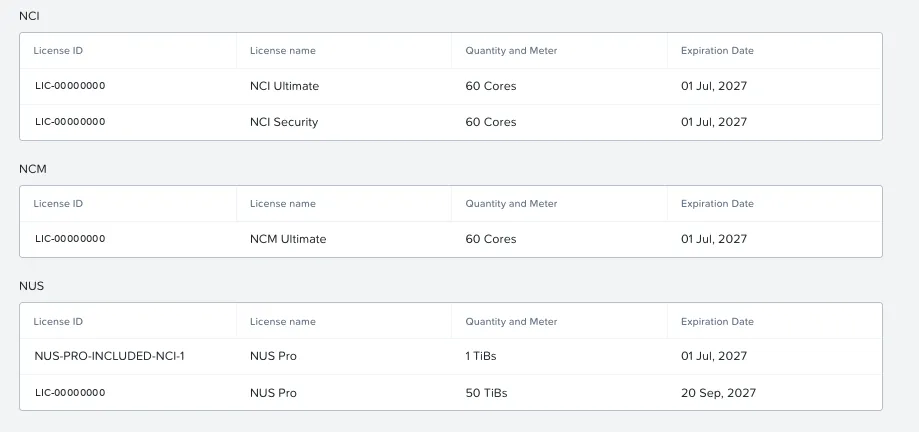
| License | Status in the lab |
|---|---|
| NKP Ultimate | 400 vCPU applied |
| NAI Pro | 600 available, not applied yet (Part 3) |
| NUS Pro | 50 TiB + 1 TiB included with NCI Ultimate (used in Part 2) |
| NDK | Included with NKP Ultimate, unlimited |
| Flow Network Security | Included with NCI Ultimate (shown as NCI Security) |
What the 2.8.1 User Guide requires
Platform
| Requirement | What the guide says | In the lab |
|---|---|---|
| Kubernetes | Version 1.35 | 1.36.2 |
| NKP | “You can install NAI 2.8.1 only on NKP 2.18” | NKP 2.19 |
| Node image | Ubuntu | Rocky Linux 9.8 |
| Other platforms | EKS, AKS and GKE; air-gapped only on NKP | — |
| Architecture | x86 only | x86 (the Nutanix hosts) |
| GPU | NVIDIA, with GPU Operator and the nvidia.com/gpu:NoSchedule taint | None |
NKP 2.18 or 2.19?
The User Guide is dated 10/16/2026, four days before NKP 2.19 shipped, and mentions only 2.18. At the same time, the 2.19 catalog itself ships NAI 2.8.1 with the Nutanix Supported badge. On 2.19, the path is the catalog app, not the guide’s manual Helm install: the app’s own annotation declares compatibility, nkp-version-support: >=2.18 <2.20 (details in Part 3). At a customer, check the compatibility matrix for the version before signing off on the scope.
The x86 requirement has a consequence in the lab: the NVIDIA GB10 GPU server we have is ARM, and cannot be an NAI node. It joins in Part 4 by another route.
Network, DNS and certificate
| Requirement | Detail |
|---|---|
| LoadBalancer | External IP for Envoy (on NKP, MetalLB) |
| FQDN | A DNS name that resolves to that IP |
| Certificate | CA-signed; NAI only accepts HTTPS. For testing, there is a self-signed option through cert-manager |
Storage
| Item | Minimum | For |
|---|---|---|
| Block (RWO) | 150 GiB | PostgreSQL (40), ClickHouse (50 + 10), NAI Labs (20), nai-api (20), Valkey (8), audit (1) |
| NFS (RWX) | 2 TiB, storage class with Immediate | Models |
| NFSv4 export | One share | Importing custom models |
| S3 | 1 TiB (optional) | Another way to import models |
NKP ships with RWO storage only. RWX is the whole subject of Part 2.
Dependencies
The guide installs them with Helm; the NKP 2.19 catalog already ships almost all of them:
| Component | Version in the guide | In the NKP 2.19 catalog |
|---|---|---|
| Envoy Gateway + Gateway API | 1.8.1 | NAI Envoy Gateway 1.8.2 |
| KServe | 0.19.0 (RawDeployment mode) | 0.19.0 |
| LeaderWorkerSet | 0.8.0 | 0.8.0 |
| OpenTelemetry Operator | 0.114.1 | 0.114.1 (Observability category) |
| CloudNativePG | NKP app | NKP app |
| Prometheus Monitoring | NKP app, minimal install | already present |
| cert-manager | ships with NKP | already present |
| NVIDIA GPU Operator | only with GPUs | not applicable |
You also need a Docker Hub access token generated in the Nutanix portal to pull the NAI images.
Sizing: the control plane comes first
The guide’s minimum
The guide assumes a cluster dedicated to NAI and counts only the control plane; inference is added on top.
| Nodes | Count | vCPU | Memory | Disk |
|---|---|---|---|---|
| Kubernetes control plane | 3 | 4 | 16 GB | 150 GB |
| NAI workers | 3 | 10 | 20 GB | 150 GB |
| Total | 6 | 42 | 108 GB | — |
The heaviest components:
| Component | vCPU | Memory |
|---|---|---|
nai-api | 5.1 | 7.1 GiB |
| Envoy (ingress gateway) | 5.1 | 10.3 GiB |
| ClickHouse (observability) | 4 | 8 GiB |
| OpenTelemetry Collector | 4 | 2 GiB |
| UI | 2 | 2 GiB |
| PostgreSQL | 2 | 2 GiB |
Profiles
| Profile | Capacity | Workers |
|---|---|---|
| Default | 300 concurrent requests, 100 keys | 3 × 10 vCPU / 20 GB |
c1k_k200 | 1,000 requests, 200 keys | 3 × 60 vCPU / 90 GB |
c5k_k1k | 5,000 requests, 1,000 keys | 3 × 90 vCPU / 150 GB |
Inference, on top
The guide’s reference for a 1-GPU endpoint:
| Engine | CPU | Memory |
|---|---|---|
| NVIDIA NIM | 12 cores | 32 GiB |
| vLLM | 8 cores | 16 GiB (1 GPU) to 128 GiB (8 GPUs) |
And without a GPU?
NAI supports CPU endpoints: when creating the endpoint, Acceleration Type → CPU, which shows up for models that support CPU execution. With a 4th-generation Xeon or newer, there is the Optimise endpoint to run on Intel AMX option, which uses the processor’s matrix acceleration.
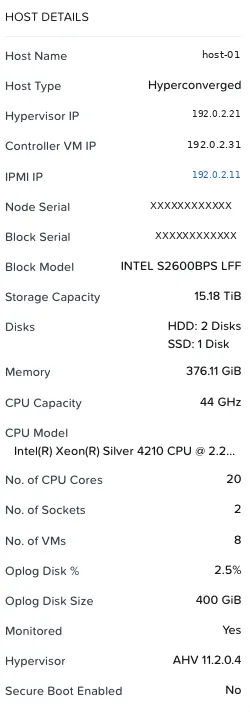
The lab host:
| Item | Value | Impact |
|---|---|---|
| CPU | 2 × Xeon Silver 4210 (Cascade Lake, 2nd gen), 2.2 GHz, 20 cores per host | No AMX; has AVX-512 and VNNI. CPU inference works, at lab performance |
| Memory | 376 GiB per host, 3 hosts | The lab’s real limit |
| Storage | Hybrid: 2 HDD + 1 SSD per host | Slower model loading when data lands on HDD |
What NAI on CPU delivers
Governance, catalog, keys, auditing, embeddings and reranking for RAG, and small text models. Text generation at scale needs a GPU, or at least a Xeon with AMX. The GPT-in-a-Box NVD cites AMX with OpenVINO doubling embedding speed: that is the argument for customers who do not have GPUs yet.
Candidates from the validated catalog for CPU, by size:
| Model | Type | Size |
|---|---|---|
ibm-granite/granite-embedding-107m-multilingual | Embeddings, 12 languages | ~2 GiB |
cross-encoder/ms-marco-MiniLM-L6-v2 | Reranker | ~4 GiB |
google/gemma-3-270m-it | Text | ~10 GiB |
meta-llama/Llama-3.2-1B-Instruct | Text (gated on Hugging Face) | ~10 GiB |
Which of them show the CPU option, only the UI will tell.
What the Nutanix Validated Designs say
I read two: NVD-2057 (Nutanix Enterprise AI Design, August 2026) and NVD-2115 (GPT-in-a-Box with NKP, January 2026).
Validated versions × lab
| Component | NVD-2057 | NVD-2115 | Lab |
|---|---|---|---|
| Prism Central / AOS | 7.5.1.6 | 2024.3.0.1 / 7.0 | 7.6 / 7.6 |
| NKP | 2.18.0 | 2.14 | 2.19 |
| NAI | 2.7 | 2.0 | 2.8.1 |
| Files | 5.2.2.1 | 5.1 | 5.4.0.1 |
The lab is ahead of everything that was validated. NVD-2057 itself says it is one example of a supported configuration, not the only one.
Patterns that apply to any customer
| Topic | What the NVD does |
|---|---|
| NAI cluster | Dedicated, in its own workspace. In NVD-2057, an nai-prod and an nai-stage |
| Control plane | CPU-only VM nodes on the management cluster; GPUs on Ubuntu 24.04 bare metal |
| NAI worker pool | NVD-2115: 12 vCPU / 40 GB / 100 GB |
| Database | External PostgreSQL, via NDB, one per NAI instance |
| Certificates | Private CA issuing through cert-manager, 1-year validity |
| Workspaces | gateway, prod, stage, qa and dev; NAI Labs only in qa and dev |
| High availability | 2 replicas of nai-api and Envoy in gateway, prod and stage |
| Observability | Central stack, vLLM ServiceMonitor and Envoy dashboards |
| Backup | Velero to Nutanix Objects, with replication |
Token as a Service
NVD-2057 describes NAI as a token platform: a single OpenAI-compatible API, with token quotas per tier (Free, Standard, Enterprise, Premium), that teams consume without seeing any GPU. In front of everything, the Agent Gateway spreads traffic between production and staging:
%3b%7d%23mermaid-1 .cluster rect%7bfill:hsl(0%2c 0%25%2c 98.9215686275%25)%3bstroke:%23707070%3bstroke-width:1px%3b%7d%23mermaid-1 .cluster text%7bfill:%23333%3b%7d%23mermaid-1 .cluster span%7bcolor:%23333%3b%7d%23mermaid-1 .node .collapsed-indicator%7bfill:%23707070%3bstroke:none%3bopacity:0.6%3b%7d%23mermaid-1 .node .collapsed-separator%7bstroke:%23707070%3bstroke-width:0.75px%3b%7d%23mermaid-1 div.mermaidTooltip%7bposition:absolute%3btext-align:center%3bmax-width:200px%3bpadding:2px%3bfont-family:arial%2csans-serif%3bfont-size:12px%3bbackground:hsl(-160%2c 0%25%2c 93.3333333333%25)%3bborder:1px solid %23707070%3bborder-radius:2px%3bpointer-events:none%3bz-index:100%3b%7d%23mermaid-1 .flowchartTitleText%7btext-anchor:middle%3bfont-size:18px%3bfill:black%3b%7d%23mermaid-1 rect.text%7bfill:none%3bstroke-width:0%3b%7d%23mermaid-1 .icon-shape%2c%23mermaid-1 .image-shape%7bbackground-color:white%3btext-align:center%3b%7d%23mermaid-1 .icon-shape p%2c%23mermaid-1 .image-shape p%7bbackground-color:white%3bpadding:2px%3b%7d%23mermaid-1 .icon-shape .label rect%2c%23mermaid-1 .image-shape .label rect%7bopacity:0.5%3bbackground-color:white%3bfill:white%3b%7d%23mermaid-1 .label-icon%7bdisplay:inline-block%3bheight:1em%3boverflow:visible%3bvertical-align:-0.125em%3b%7d%23mermaid-1 .node .label-icon path%7bfill:currentColor%3bstroke:revert%3bstroke-width:revert%3b%7d%23mermaid-1 .node .neo-node%7bstroke:%23999%3b%7d%23mermaid-1 %5bdata-look='neo'%5d.node rect%2c%23mermaid-1 %5bdata-look='neo'%5d.cluster rect%2c%23mermaid-1 %5bdata-look='neo'%5d.node polygon%7bstroke:url(%23mermaid-1-gradient)%3bfilter:drop-shadow( 1px 2px 2px rgba(185%2c185%2c185%2c1))%3b%7d%23mermaid-1 %5bdata-look='neo'%5d.swimlane.cluster rect%7bfilter:none%3b%7d%23mermaid-1 %5bdata-look='neo'%5d.node path%7bstroke:url(%23mermaid-1-gradient)%3bstroke-width:1px%3b%7d%23mermaid-1 %5bdata-look='neo'%5d.node .outer-path%7bfilter:drop-shadow( 1px 2px 2px rgba(185%2c185%2c185%2c1))%3b%7d%23mermaid-1 %5bdata-look='neo'%5d.node .neo-line path%7bstroke:%23999%3bfilter:none%3b%7d%23mermaid-1 %5bdata-look='neo'%5d.node circle%7bstroke:url(%23mermaid-1-gradient)%3bfilter:drop-shadow( 1px 2px 2px rgba(185%2c185%2c185%2c1))%3b%7d%23mermaid-1 %5bdata-look='neo'%5d.node circle .state-start%7bfill:black%3b%7d%23mermaid-1 %5bdata-look='neo'%5d.icon-shape .icon%7bfill:url(%23mermaid-1-gradient)%3bfilter:drop-shadow( 1px 2px 2px rgba(185%2c185%2c185%2c1))%3b%7d%23mermaid-1 %5bdata-look='neo'%5d.icon-shape .icon-neo path%7bstroke:url(%23mermaid-1-gradient)%3bfilter:drop-shadow( 1px 2px 2px rgba(185%2c185%2c185%2c1))%3b%7d%23mermaid-1 :root%7b--mermaid-font-family:arial%2csans-serif%3b%7d%3c/style%3e%3cg%3e%3cmarker id='mermaid-1_flowchart-v2-pointEnd' class='marker flowchart-v2' viewBox='0 0 10 10' refX='5' refY='5' markerUnits='userSpaceOnUse' markerWidth='8' markerHeight='8' orient='auto'%3e%3cpath d='M 0 0 L 10 5 L 0 10 z' class='arrowMarkerPath' style='stroke-width: 1%3b stroke-dasharray: 1%2c 0%3b'/%3e%3c/marker%3e%3cmarker id='mermaid-1_flowchart-v2-pointStart' class='marker flowchart-v2' viewBox='0 0 10 10' refX='4.5' refY='5' markerUnits='userSpaceOnUse' markerWidth='8' markerHeight='8' orient='auto'%3e%3cpath d='M 0 5 L 10 10 L 10 0 z' class='arrowMarkerPath' style='stroke-width: 1%3b stroke-dasharray: 1%2c 0%3b'/%3e%3c/marker%3e%3cmarker id='mermaid-1_flowchart-v2-pointEnd-margin' class='marker flowchart-v2' viewBox='0 0 11.5 14' refX='11.5' refY='7' markerUnits='userSpaceOnUse' markerWidth='10.5' markerHeight='14' orient='auto'%3e%3cpath d='M 0 0 L 11.5 7 L 0 14 z' class='arrowMarkerPath' style='stroke-width: 0%3b stroke-dasharray: 1%2c 0%3b'/%3e%3c/marker%3e%3cmarker id='mermaid-1_flowchart-v2-pointStart-margin' class='marker flowchart-v2' viewBox='0 0 11.5 14' refX='1' refY='7' markerUnits='userSpaceOnUse' markerWidth='11.5' markerHeight='14' orient='auto'%3e%3cpolygon points='0%2c7 11.5%2c14 11.5%2c0' class='arrowMarkerPath' style='stroke-width: 0%3b stroke-dasharray: 1%2c 0%3b'/%3e%3c/marker%3e%3cmarker id='mermaid-1_flowchart-v2-circleEnd' class='marker flowchart-v2' viewBox='0 0 10 10' refX='11' refY='5' markerUnits='userSpaceOnUse' markerWidth='11' markerHeight='11' orient='auto'%3e%3ccircle cx='5' cy='5' r='5' class='arrowMarkerPath' style='stroke-width: 1%3b stroke-dasharray: 1%2c 0%3b'/%3e%3c/marker%3e%3cmarker id='mermaid-1_flowchart-v2-circleStart' class='marker flowchart-v2' viewBox='0 0 10 10' refX='-1' refY='5' markerUnits='userSpaceOnUse' markerWidth='11' markerHeight='11' orient='auto'%3e%3ccircle cx='5' cy='5' r='5' class='arrowMarkerPath' style='stroke-width: 1%3b stroke-dasharray: 1%2c 0%3b'/%3e%3c/marker%3e%3cmarker id='mermaid-1_flowchart-v2-circleEnd-margin' class='marker flowchart-v2' viewBox='0 0 10 10' refY='5' refX='12.25' markerUnits='userSpaceOnUse' markerWidth='14' markerHeight='14' orient='auto'%3e%3ccircle cx='5' cy='5' r='5' class='arrowMarkerPath' style='stroke-width: 0%3b stroke-dasharray: 1%2c 0%3b'/%3e%3c/marker%3e%3cmarker id='mermaid-1_flowchart-v2-circleStart-margin' class='marker flowchart-v2' viewBox='0 0 10 10' refX='-2' refY='5' markerUnits='userSpaceOnUse' markerWidth='14' markerHeight='14' orient='auto'%3e%3ccircle cx='5' cy='5' r='5' class='arrowMarkerPath' style='stroke-width: 0%3b stroke-dasharray: 1%2c 0%3b'/%3e%3c/marker%3e%3cmarker id='mermaid-1_flowchart-v2-crossEnd' class='marker cross flowchart-v2' viewBox='0 0 11 11' refX='12' refY='5.2' markerUnits='userSpaceOnUse' markerWidth='11' markerHeight='11' orient='auto'%3e%3cpath d='M 1%2c1 l 9%2c9 M 10%2c1 l -9%2c9' class='arrowMarkerPath' style='stroke-width: 2%3b stroke-dasharray: 1%2c 0%3b'/%3e%3c/marker%3e%3cmarker id='mermaid-1_flowchart-v2-crossStart' class='marker cross flowchart-v2' viewBox='0 0 11 11' refX='-1' refY='5.2' markerUnits='userSpaceOnUse' markerWidth='11' markerHeight='11' orient='auto'%3e%3cpath d='M 1%2c1 l 9%2c9 M 10%2c1 l -9%2c9' class='arrowMarkerPath' style='stroke-width: 2%3b stroke-dasharray: 1%2c 0%3b'/%3e%3c/marker%3e%3cmarker id='mermaid-1_flowchart-v2-crossEnd-margin' class='marker cross flowchart-v2' viewBox='0 0 15 15' refX='17.7' refY='7.5' markerUnits='userSpaceOnUse' markerWidth='12' markerHeight='12' orient='auto'%3e%3cpath d='M 1%2c1 L 14%2c14 M 1%2c14 L 14%2c1' class='arrowMarkerPath' style='stroke-width: 2.5%3b'/%3e%3c/marker%3e%3cmarker id='mermaid-1_flowchart-v2-crossStart-margin' class='marker cross flowchart-v2' viewBox='0 0 15 15' refX='-3.5' refY='7.5' markerUnits='userSpaceOnUse' markerWidth='12' markerHeight='12' orient='auto'%3e%3cpath d='M 1%2c1 L 14%2c14 M 1%2c14 L 14%2c1' class='arrowMarkerPath' style='stroke-width: 2.5%3b stroke-dasharray: 1%2c 0%3b'/%3e%3c/marker%3e%3cg class='root'%3e%3cg class='clusters'/%3e%3cg class='edgePaths'%3e%3cpath d='M153.484%2c62L153.484%2c66.167C153.484%2c70.333%2c153.484%2c78.667%2c153.484%2c86.333C153.484%2c94%2c153.484%2c101%2c153.484%2c104.5L153.484%2c108' id='mermaid-1-L_A_G_0' class='edge-thickness-normal edge-pattern-solid edge-thickness-normal edge-pattern-solid flowchart-link' style='%3b' data-edge='true' data-et='edge' data-id='L_A_G_0' data-points='W3sieCI6MTUzLjQ4NDM3NSwieSI6NjJ9LHsieCI6MTUzLjQ4NDM3NSwieSI6ODd9LHsieCI6MTUzLjQ4NDM3NSwieSI6MTEyfV0=' data-look='classic' marker-end='url(%23mermaid-1_flowchart-v2-pointEnd)'/%3e%3cpath d='M109.285%2c190L102.296%2c196.167C95.307%2c202.333%2c81.329%2c214.667%2c74.34%2c226.333C67.352%2c238%2c67.352%2c249%2c67.352%2c254.5L67.352%2c260' id='mermaid-1-L_G_P_0' class='edge-thickness-normal edge-pattern-solid edge-thickness-normal edge-pattern-solid flowchart-link' style='%3b' data-edge='true' data-et='edge' data-id='L_G_P_0' data-points='W3sieCI6MTA5LjI4NDY0MjI2OTczNjg1LCJ5IjoxOTB9LHsieCI6NjcuMzUxNTYyNSwieSI6MjI3fSx7IngiOjY3LjM1MTU2MjUsInkiOjI2NH1d' data-look='classic' marker-end='url(%23mermaid-1_flowchart-v2-pointEnd)'/%3e%3cpath d='M197.684%2c190L204.673%2c196.167C211.662%2c202.333%2c225.639%2c214.667%2c232.628%2c226.333C239.617%2c238%2c239.617%2c249%2c239.617%2c254.5L239.617%2c260' id='mermaid-1-L_G_S_0' class='edge-thickness-normal edge-pattern-solid edge-thickness-normal edge-pattern-solid flowchart-link' style='%3b' data-edge='true' data-et='edge' data-id='L_G_S_0' data-points='W3sieCI6MTk3LjY4NDEwNzczMDI2MzE1LCJ5IjoxOTB9LHsieCI6MjM5LjYxNzE4NzUsInkiOjIyN30seyJ4IjoyMzkuNjE3MTg3NSwieSI6MjY0fV0=' data-look='classic' marker-end='url(%23mermaid-1_flowchart-v2-pointEnd)'/%3e%3c/g%3e%3cg class='edgeLabels'%3e%3cg class='edgeLabel'%3e%3cg class='label' data-id='L_A_G_0' transform='translate(0%2c 0)'%3e%3cforeignObject width='0' height='0'%3e%3cdiv xmlns='http://www.w3.org/1999/xhtml' class='labelBkg' style='display: table-cell%3b white-space: nowrap%3b line-height: 1.5%3b max-width: 200px%3b text-align: center%3b'%3e%3cspan class='edgeLabel'%3e%3c/span%3e%3c/div%3e%3c/foreignObject%3e%3c/g%3e%3c/g%3e%3cg class='edgeLabel' transform='translate(67.3515625%2c 227)'%3e%3cg class='label' data-id='L_G_P_0' transform='translate(-16.015625%2c -12)'%3e%3cforeignObject width='32.03125' height='24'%3e%3cdiv xmlns='http://www.w3.org/1999/xhtml' class='labelBkg' style='display: table-cell%3b white-space: nowrap%3b line-height: 1.5%3b max-width: 200px%3b text-align: center%3b'%3e%3cspan class='edgeLabel'%3e%3cp%3e75%25%3c/p%3e%3c/span%3e%3c/div%3e%3c/foreignObject%3e%3c/g%3e%3c/g%3e%3cg class='edgeLabel' transform='translate(239.6171875%2c 227)'%3e%3cg class='label' data-id='L_G_S_0' transform='translate(-16.015625%2c -12)'%3e%3cforeignObject width='32.03125' height='24'%3e%3cdiv xmlns='http://www.w3.org/1999/xhtml' class='labelBkg' style='display: table-cell%3b white-space: nowrap%3b line-height: 1.5%3b max-width: 200px%3b text-align: center%3b'%3e%3cspan class='edgeLabel'%3e%3cp%3e25%25%3c/p%3e%3c/span%3e%3c/div%3e%3c/foreignObject%3e%3c/g%3e%3c/g%3e%3c/g%3e%3cg class='nodes'%3e%3cg class='node default' id='mermaid-1-flowchart-A-0' data-look='classic' transform='translate(153.484375%2c 35)'%3e%3crect class='basic label-container' style='' x='-114.953125' y='-27' width='229.90625' height='54'/%3e%3cg class='label' style='' transform='translate(-84.953125%2c -12)'%3e%3crect/%3e%3cforeignObject width='169.90625' height='24'%3e%3cdiv xmlns='http://www.w3.org/1999/xhtml' style='display: table-cell%3b white-space: nowrap%3b line-height: 1.5%3b max-width: 200px%3b text-align: center%3b'%3e%3cspan class='nodeLabel'%3e%3cp%3eApplications and agents%3c/p%3e%3c/span%3e%3c/div%3e%3c/foreignObject%3e%3c/g%3e%3c/g%3e%3cg class='node default' id='mermaid-1-flowchart-G-1' data-look='classic' transform='translate(153.484375%2c 151)'%3e%3crect class='basic label-container' style='' x='-88.7109375' y='-39' width='177.421875' height='78'/%3e%3cg class='label' style='' transform='translate(-58.7109375%2c -24)'%3e%3crect/%3e%3cforeignObject width='117.421875' height='48'%3e%3cdiv xmlns='http://www.w3.org/1999/xhtml' style='display: table-cell%3b white-space: nowrap%3b line-height: 1.5%3b max-width: 200px%3b text-align: center%3b'%3e%3cspan class='nodeLabel'%3e%3cp%3eAgent Gateway%3cbr /%3eUnified Endpoint%3c/p%3e%3c/span%3e%3c/div%3e%3c/foreignObject%3e%3c/g%3e%3c/g%3e%3cg class='node default' id='mermaid-1-flowchart-P-3' data-look='classic' transform='translate(67.3515625%2c 291)'%3e%3crect class='basic label-container' style='' x='-59.3515625' y='-27' width='118.703125' height='54'/%3e%3cg class='label' style='' transform='translate(-29.3515625%2c -12)'%3e%3crect/%3e%3cforeignObject width='58.703125' height='24'%3e%3cdiv xmlns='http://www.w3.org/1999/xhtml' style='display: table-cell%3b white-space: nowrap%3b line-height: 1.5%3b max-width: 200px%3b text-align: center%3b'%3e%3cspan class='nodeLabel'%3e%3cp%3enai-prod%3c/p%3e%3c/span%3e%3c/div%3e%3c/foreignObject%3e%3c/g%3e%3c/g%3e%3cg class='node default' id='mermaid-1-flowchart-S-5' data-look='classic' transform='translate(239.6171875%2c 291)'%3e%3crect class='basic label-container' style='' x='-62.9140625' y='-27' width='125.828125' height='54'/%3e%3cg class='label' style='' transform='translate(-32.9140625%2c -12)'%3e%3crect/%3e%3cforeignObject width='65.828125' height='24'%3e%3cdiv xmlns='http://www.w3.org/1999/xhtml' style='display: table-cell%3b white-space: nowrap%3b line-height: 1.5%3b max-width: 200px%3b text-align: center%3b'%3e%3cspan class='nodeLabel'%3e%3cp%3enai-stage%3c/p%3e%3c/span%3e%3c/div%3e%3c/foreignObject%3e%3c/g%3e%3c/g%3e%3c/g%3e%3c/g%3e%3c/g%3e%3cdefs%3e%3cfilter id='mermaid-1-drop-shadow' height='130%25' width='130%25'%3e%3cfeDropShadow dx='4' dy='4' stdDeviation='0' flood-opacity='0.06' flood-color='black'/%3e%3c/filter%3e%3c/defs%3e%3cdefs%3e%3cfilter id='mermaid-1-drop-shadow-small' height='150%25' width='150%25'%3e%3cfeDropShadow dx='2' dy='2' stdDeviation='0' flood-opacity='0.06' flood-color='black'/%3e%3c/filter%3e%3c/defs%3e%3clinearGradient id='mermaid-1-gradient' gradientUnits='objectBoundingBox' x1='0%25' y1='0%25' x2='100%25' y2='0%25'%3e%3cstop offset='0%25' stop-color='hsl(0%2c 0%25%2c 83.3333333333%25)' stop-opacity='1'/%3e%3cstop offset='100%25' stop-color='hsl(0%2c 0%25%2c 88.9215686275%25)' stop-opacity='1'/%3e%3c/linearGradient%3e%3c/svg%3e)
| Model | Role | Production : staging |
|---|---|---|
openai/gpt-oss-120b (MoE) | Architect: plans | 75 : 25 |
google/gemma-4-26B-A4B-it (MoE) | Developer: writes the code | 75 : 25 |
google/gemma-4-31B-it (dense) | Reviewer: checks | 90 : 10 |
| Embeddings, reranker, Llama Guard | RAG support and safety | 50 : 50 |
The validated design: 16 nodes with 128 RTX PRO 6000 Blackwell GPUs, for about 1,750 concurrent users. Small models run on MIG 1g.24gb slices (4 per GPU); large ones on full GPUs.
KV cache: what limits users
Each active session reserves GPU memory for the KV cache. The NVD uses these numbers:
| Usage profile | Context | KV cache per session |
|---|---|---|
| Chat and coding assistant | 8K tokens | ~0.6 GB |
| RAG and structured extraction | 17K tokens | ~1.5 GB |
| Summarization, research, agents | 106K tokens | ~8 GB |
This math sets how many users fit in a replica, and it is the first question when sizing GPUs at a customer.
The lab’s decision: a dedicated cluster
With the guide and the NVDs in hand, I compared two options. The limit is memory: with 3 hosts of 376 GiB, I want everything to keep running if one host fails (N+1), which leaves about 752 GiB usable. The lab already uses ~591 GiB, including the Files from Part 2.
| A: node pool on the services cluster | B: dedicated cluster | |
|---|---|---|
| Shape | +3 workers with 12 vCPU / 40 GiB | 1 control plane 4/16 + 3 workers 12/40, own workspace |
| Memory added | 120 GiB | 136 GiB |
| Projected total | ~711 GiB (94.5% of N+1) | ~727 GiB (96.7% of N+1) |
| Follows the NVDs | No | Yes |
| Ubuntu nodes | No (existing cluster on Rocky) | Possible, if 2.19 offers the image |
| Isolation | Shares the cluster with other services | Can be deleted without affecting anything |
I chose B. It costs 16 GiB more, follows the Nutanix design, isolates the experiment and allows the Ubuntu image the guide asks for. The trade-off: a single control plane (acceptable in a lab) and almost no memory headroom while NAI is up.
Do the math before Enable
Adding up the guide (30 vCPU and 60 GB just for the control plane), Files and a new cluster, the lab went from comfortable to 96.7% of the N+1 limit. At a customer, this math comes before the proposal, not after installation.
What I learned
- NAI is a separate license, apart from NKP Ultimate; the metric is inference vCPU (CPU) or GB of GPU memory.
- The trial is 2 days, and the CPU or GPU license only goes in on first installation. Get the key from the portal the same day.
- The 2.8.1 guide mentions NKP 2.18. On 2.19, the path is the catalog app, compatible with
>=2.18 <2.20per the app’s own annotation. - The control plane needs 30 vCPU and 60 GB on 3 workers, before any model.
- NAI needs RWX. NKP’s default storage class is RWO; RWX comes from Nutanix Files (Part 2).
- An FQDN and a CA certificate are mandatory. Without internal DNS, that becomes a project prerequisite.
- The NVDs put NAI on a dedicated cluster, with the control plane on VMs and the GPUs on bare metal.
- Without a GPU, NAI is for governance, embeddings and small models. With AMX, CPU performance improves; my lab hardware does not have it.
Pre-sales checklist
- Edition defined: Standalone, NAI-NKP or Full-Stack
- Metric estimated: inference vCPU or GPU GB
- NKP version checked against the NAI app’s
nkp-version-supportannotation and the compatibility matrix - Dedicated cluster sized: control plane (30 vCPU / 60 GB) + inference
- GPU: model, count, MIG or full GPU; or CPU with AMX
- KV cache estimated from the usage profile (chat, RAG or agents)
- Storage: RWO 150 GiB, RWX 2 TiB (Files), export for custom models, optional S3
- Network: LoadBalancer IP, FQDN and CA certificate
- Docker Hub token and a Hugging Face account (gated models)
- License key generated on installation day
What I haven’t tested yet
- GPU endpoints in NAI. The lab hosts have no GPU, and the GB10 GPU server is ARM, while NAI requires x86; it joins in Part 4 by another route. The GPU inside NKP itself is the lab’s next step.
- The Intel AMX-optimized endpoint option. It needs a 4th-generation Xeon or newer, and the lab hosts are Cascade Lake (2nd gen).
- The NAI cluster with 3 control planes, as in the guide’s table. In the lab, the dedicated cluster has a single control plane, which is enough for a lab.
Next part
In Part 2, RWX storage: Nutanix Files built from scratch and connected to Kubernetes, with the detail of the CSI in Prism Central mode.
References
Nutanix
- Nutanix Validated Design: Nutanix Enterprise AI (NVD-2057)
- Nutanix Cloud Platform: software options and licensing
- Nutanix Enterprise AI: FAQ
- Nutanix Enterprise AI Guide 2.8 (Nutanix portal), requirements, licensing and NKP deployment sections
- NVD-2115: Nutanix GPT-in-a-Box with Nutanix Kubernetes Platform Design (Nutanix portal)
Independent
Comments
Comments use GitHub Discussions; you need a GitHub account.