Nutanix Enterprise AI on NKPPart 2: Nutanix Files for Kubernetes
Tested onNKP 2.19Nutanix Files 5.4.0.1Nutanix CSI 3.9.0Prism Central 7.6Lab date On a different version, check the compatibility matrix and the release notes before applying.
Summary: Nutanix Enterprise AI stores models on a ReadWriteMany (RWX) volume, and NKP’s default storage class is Nutanix Volumes, ReadWriteOnce; RWX comes from Nutanix Files. In this part I deploy Nutanix Files 5.4.0.1 from Prism Central (3 FSVMs, 5 TiB, 27 minutes), enable NFS v3 and v4, test the mount from a VM and connect Files to Kubernetes. A configuration detail worth knowing: the NKP 2.19 CSI runs in Prism Central mode, and dynamic Files provisioning needs its own secret with a REST API user from the file server. In the end, an RWX volume is ready in 6 seconds, and two pods on different nodes write to the same file. This is part 2 of 4.
Where we are
The series follows the enablement of Nutanix Enterprise AI (NAI) in a lab with NKP 2.19 and a Nutanix HCI cluster with no GPU.
| Part | Topic |
|---|---|
| 1 | NAI: architecture, licensing and sizing |
| 2 | Nutanix Files for Kubernetes: the RWX NAI requires (this post) |
| 3 | From the catalog to the first token: dedicated cluster, NAI 2.8.1 and license |
| 4 | CPU, GPU and MCP: NAI in a hybrid architecture |
Before installing NAI, I read the 2.8.1 User Guide and the two Nutanix Validated Designs that cover it. All three agree on one prerequisite NKP does not ship ready: shared NFS storage. This part solves it end to end, and it applies to any NKP application that needs RWX, not just NAI.
Why NAI needs RWX
A Kubernetes volume has an access mode. The two that matter here:
| Mode | Short | Who mounts | Example on NKP |
|---|---|---|---|
| ReadWriteOnce | RWO | One node at a time | nutanix-volume (Nutanix Volumes, iSCSI), the default storage class |
| ReadWriteMany | RWX | Several nodes at once | Needs NFS: Nutanix Files with the CSI |
NAI downloads each model once and keeps it on a shared volume. When an endpoint gets a second replica, or when a pod is recreated on another node, it reads the weights from the same place, without downloading everything again. That is why the model volume must be RWX.
What the NAI 2.8.1 User Guide asks for in storage:
| Item | Requirement | For |
|---|---|---|
| Block (RWO) | ≥ 150 GiB | PostgreSQL, ClickHouse, Valkey, audit logs |
| NFS (RWX) | ≥ 2 TiB, storage class with volumeBindingMode: Immediate | Validated or custom models |
| NFSv4 export | A separate share | Importing custom or manually downloaded models |
| S3 | 1 TiB (optional) | Another way to import models |
Useful beyond NAI
JupyterHub with shared directories, ML pipelines reading the same dataset from several pods, CMSs with shared uploads: anything that needs RWX on NKP goes through the same path as this post.
The architecture
Nutanix Files runs as a set of VMs on the HCI cluster itself, the FSVMs (File Server VMs). They serve NFS to clients and store data in a storage container on the cluster. On the Kubernetes side, the Nutanix CSI does two different things: through the Files REST API, it creates one share per requested volume; through NFS, it mounts that share on the node where the pod runs.
%3b%7d%23mermaid-0 .cluster rect%7bfill:hsl(0%2c 0%25%2c 98.9215686275%25)%3bstroke:%23707070%3bstroke-width:1px%3b%7d%23mermaid-0 .cluster text%7bfill:%23333%3b%7d%23mermaid-0 .cluster span%7bcolor:%23333%3b%7d%23mermaid-0 .node .collapsed-indicator%7bfill:%23707070%3bstroke:none%3bopacity:0.6%3b%7d%23mermaid-0 .node .collapsed-separator%7bstroke:%23707070%3bstroke-width:0.75px%3b%7d%23mermaid-0 div.mermaidTooltip%7bposition:absolute%3btext-align:center%3bmax-width:200px%3bpadding:2px%3bfont-family:arial%2csans-serif%3bfont-size:12px%3bbackground:hsl(-160%2c 0%25%2c 93.3333333333%25)%3bborder:1px solid %23707070%3bborder-radius:2px%3bpointer-events:none%3bz-index:100%3b%7d%23mermaid-0 .flowchartTitleText%7btext-anchor:middle%3bfont-size:18px%3bfill:black%3b%7d%23mermaid-0 rect.text%7bfill:none%3bstroke-width:0%3b%7d%23mermaid-0 .icon-shape%2c%23mermaid-0 .image-shape%7bbackground-color:white%3btext-align:center%3b%7d%23mermaid-0 .icon-shape p%2c%23mermaid-0 .image-shape p%7bbackground-color:white%3bpadding:2px%3b%7d%23mermaid-0 .icon-shape .label rect%2c%23mermaid-0 .image-shape .label rect%7bopacity:0.5%3bbackground-color:white%3bfill:white%3b%7d%23mermaid-0 .label-icon%7bdisplay:inline-block%3bheight:1em%3boverflow:visible%3bvertical-align:-0.125em%3b%7d%23mermaid-0 .node .label-icon path%7bfill:currentColor%3bstroke:revert%3bstroke-width:revert%3b%7d%23mermaid-0 .node .neo-node%7bstroke:%23999%3b%7d%23mermaid-0 %5bdata-look='neo'%5d.node rect%2c%23mermaid-0 %5bdata-look='neo'%5d.cluster rect%2c%23mermaid-0 %5bdata-look='neo'%5d.node polygon%7bstroke:url(%23mermaid-0-gradient)%3bfilter:drop-shadow( 1px 2px 2px rgba(185%2c185%2c185%2c1))%3b%7d%23mermaid-0 %5bdata-look='neo'%5d.swimlane.cluster rect%7bfilter:none%3b%7d%23mermaid-0 %5bdata-look='neo'%5d.node path%7bstroke:url(%23mermaid-0-gradient)%3bstroke-width:1px%3b%7d%23mermaid-0 %5bdata-look='neo'%5d.node .outer-path%7bfilter:drop-shadow( 1px 2px 2px rgba(185%2c185%2c185%2c1))%3b%7d%23mermaid-0 %5bdata-look='neo'%5d.node .neo-line path%7bstroke:%23999%3bfilter:none%3b%7d%23mermaid-0 %5bdata-look='neo'%5d.node circle%7bstroke:url(%23mermaid-0-gradient)%3bfilter:drop-shadow( 1px 2px 2px rgba(185%2c185%2c185%2c1))%3b%7d%23mermaid-0 %5bdata-look='neo'%5d.node circle .state-start%7bfill:black%3b%7d%23mermaid-0 %5bdata-look='neo'%5d.icon-shape .icon%7bfill:url(%23mermaid-0-gradient)%3bfilter:drop-shadow( 1px 2px 2px rgba(185%2c185%2c185%2c1))%3b%7d%23mermaid-0 %5bdata-look='neo'%5d.icon-shape .icon-neo path%7bstroke:url(%23mermaid-0-gradient)%3bfilter:drop-shadow( 1px 2px 2px rgba(185%2c185%2c185%2c1))%3b%7d%23mermaid-0 :root%7b--mermaid-font-family:arial%2csans-serif%3b%7d%3c/style%3e%3cg%3e%3cmarker id='mermaid-0_flowchart-v2-pointEnd' class='marker flowchart-v2' viewBox='0 0 10 10' refX='5' refY='5' markerUnits='userSpaceOnUse' markerWidth='8' markerHeight='8' orient='auto'%3e%3cpath d='M 0 0 L 10 5 L 0 10 z' class='arrowMarkerPath' style='stroke-width: 1%3b stroke-dasharray: 1%2c 0%3b'/%3e%3c/marker%3e%3cmarker id='mermaid-0_flowchart-v2-pointStart' class='marker flowchart-v2' viewBox='0 0 10 10' refX='4.5' refY='5' markerUnits='userSpaceOnUse' markerWidth='8' markerHeight='8' orient='auto'%3e%3cpath d='M 0 5 L 10 10 L 10 0 z' class='arrowMarkerPath' style='stroke-width: 1%3b stroke-dasharray: 1%2c 0%3b'/%3e%3c/marker%3e%3cmarker id='mermaid-0_flowchart-v2-pointEnd-margin' class='marker flowchart-v2' viewBox='0 0 11.5 14' refX='11.5' refY='7' markerUnits='userSpaceOnUse' markerWidth='10.5' markerHeight='14' orient='auto'%3e%3cpath d='M 0 0 L 11.5 7 L 0 14 z' class='arrowMarkerPath' style='stroke-width: 0%3b stroke-dasharray: 1%2c 0%3b'/%3e%3c/marker%3e%3cmarker id='mermaid-0_flowchart-v2-pointStart-margin' class='marker flowchart-v2' viewBox='0 0 11.5 14' refX='1' refY='7' markerUnits='userSpaceOnUse' markerWidth='11.5' markerHeight='14' orient='auto'%3e%3cpolygon points='0%2c7 11.5%2c14 11.5%2c0' class='arrowMarkerPath' style='stroke-width: 0%3b stroke-dasharray: 1%2c 0%3b'/%3e%3c/marker%3e%3cmarker id='mermaid-0_flowchart-v2-circleEnd' class='marker flowchart-v2' viewBox='0 0 10 10' refX='11' refY='5' markerUnits='userSpaceOnUse' markerWidth='11' markerHeight='11' orient='auto'%3e%3ccircle cx='5' cy='5' r='5' class='arrowMarkerPath' style='stroke-width: 1%3b stroke-dasharray: 1%2c 0%3b'/%3e%3c/marker%3e%3cmarker id='mermaid-0_flowchart-v2-circleStart' class='marker flowchart-v2' viewBox='0 0 10 10' refX='-1' refY='5' markerUnits='userSpaceOnUse' markerWidth='11' markerHeight='11' orient='auto'%3e%3ccircle cx='5' cy='5' r='5' class='arrowMarkerPath' style='stroke-width: 1%3b stroke-dasharray: 1%2c 0%3b'/%3e%3c/marker%3e%3cmarker id='mermaid-0_flowchart-v2-circleEnd-margin' class='marker flowchart-v2' viewBox='0 0 10 10' refY='5' refX='12.25' markerUnits='userSpaceOnUse' markerWidth='14' markerHeight='14' orient='auto'%3e%3ccircle cx='5' cy='5' r='5' class='arrowMarkerPath' style='stroke-width: 0%3b stroke-dasharray: 1%2c 0%3b'/%3e%3c/marker%3e%3cmarker id='mermaid-0_flowchart-v2-circleStart-margin' class='marker flowchart-v2' viewBox='0 0 10 10' refX='-2' refY='5' markerUnits='userSpaceOnUse' markerWidth='14' markerHeight='14' orient='auto'%3e%3ccircle cx='5' cy='5' r='5' class='arrowMarkerPath' style='stroke-width: 0%3b stroke-dasharray: 1%2c 0%3b'/%3e%3c/marker%3e%3cmarker id='mermaid-0_flowchart-v2-crossEnd' class='marker cross flowchart-v2' viewBox='0 0 11 11' refX='12' refY='5.2' markerUnits='userSpaceOnUse' markerWidth='11' markerHeight='11' orient='auto'%3e%3cpath d='M 1%2c1 l 9%2c9 M 10%2c1 l -9%2c9' class='arrowMarkerPath' style='stroke-width: 2%3b stroke-dasharray: 1%2c 0%3b'/%3e%3c/marker%3e%3cmarker id='mermaid-0_flowchart-v2-crossStart' class='marker cross flowchart-v2' viewBox='0 0 11 11' refX='-1' refY='5.2' markerUnits='userSpaceOnUse' markerWidth='11' markerHeight='11' orient='auto'%3e%3cpath d='M 1%2c1 l 9%2c9 M 10%2c1 l -9%2c9' class='arrowMarkerPath' style='stroke-width: 2%3b stroke-dasharray: 1%2c 0%3b'/%3e%3c/marker%3e%3cmarker id='mermaid-0_flowchart-v2-crossEnd-margin' class='marker cross flowchart-v2' viewBox='0 0 15 15' refX='17.7' refY='7.5' markerUnits='userSpaceOnUse' markerWidth='12' markerHeight='12' orient='auto'%3e%3cpath d='M 1%2c1 L 14%2c14 M 1%2c14 L 14%2c1' class='arrowMarkerPath' style='stroke-width: 2.5%3b'/%3e%3c/marker%3e%3cmarker id='mermaid-0_flowchart-v2-crossStart-margin' class='marker cross flowchart-v2' viewBox='0 0 15 15' refX='-3.5' refY='7.5' markerUnits='userSpaceOnUse' markerWidth='12' markerHeight='12' orient='auto'%3e%3cpath d='M 1%2c1 L 14%2c14 M 1%2c14 L 14%2c1' class='arrowMarkerPath' style='stroke-width: 2.5%3b stroke-dasharray: 1%2c 0%3b'/%3e%3c/marker%3e%3cg class='root'%3e%3cg class='clusters'%3e%3cg class='cluster' id='mermaid-0-F' data-look='classic'%3e%3crect style='' x='8' y='338' width='437.5' height='128'/%3e%3cg class='cluster-label' transform='translate(140.0625%2c 338)'%3e%3cforeignObject width='173.375' height='24'%3e%3cdiv xmlns='http://www.w3.org/1999/xhtml' style='display: table-cell%3b white-space: nowrap%3b line-height: 1.5%3b'%3e%3cspan class='nodeLabel'%3e%3cp%3eNutanix Files (3 FSVMs)%3c/p%3e%3c/span%3e%3c/div%3e%3c/foreignObject%3e%3c/g%3e%3c/g%3e%3cg class='cluster' id='mermaid-0-K' data-look='classic'%3e%3crect style='' x='24.4296875' y='8' width='396.71875' height='232'/%3e%3cg class='cluster-label' transform='translate(180.6953125%2c 8)'%3e%3cforeignObject width='84.1875' height='24'%3e%3cdiv xmlns='http://www.w3.org/1999/xhtml' style='display: table-cell%3b white-space: nowrap%3b line-height: 1.5%3b'%3e%3cspan class='nodeLabel'%3e%3cp%3eNKP cluster%3c/p%3e%3c/span%3e%3c/div%3e%3c/foreignObject%3e%3c/g%3e%3c/g%3e%3c/g%3e%3cg class='edgePaths'%3e%3cpath d='M227.789%2c87L227.789%2c91.167C227.789%2c95.333%2c227.789%2c103.667%2c227.789%2c111.333C227.789%2c119%2c227.789%2c126%2c227.789%2c129.5L227.789%2c133' id='mermaid-0-L_P_C_0' class='edge-thickness-normal edge-pattern-solid edge-thickness-normal edge-pattern-solid flowchart-link' style='%3b' data-edge='true' data-et='edge' data-id='L_P_C_0' data-points='W3sieCI6MjI3Ljc4OTA2MjUsInkiOjg3fSx7IngiOjIyNy43ODkwNjI1LCJ5IjoxMTJ9LHsieCI6MjI3Ljc4OTA2MjUsInkiOjEzN31d' data-look='classic' marker-end='url(%23mermaid-0_flowchart-v2-pointEnd)'/%3e%3cpath d='M161.824%2c215L154.777%2c219.167C147.729%2c223.333%2c133.634%2c231.667%2c126.587%2c244C119.539%2c256.333%2c119.539%2c272.667%2c119.539%2c289C119.539%2c305.333%2c119.539%2c321.667%2c119.539%2c333.333C119.539%2c345%2c119.539%2c352%2c119.539%2c355.5L119.539%2c359' id='mermaid-0-L_C_A_0' class='edge-thickness-normal edge-pattern-solid edge-thickness-normal edge-pattern-solid flowchart-link' style='%3b' data-edge='true' data-et='edge' data-id='L_C_A_0' data-points='W3sieCI6MTYxLjgyNDIxODc1LCJ5IjoyMTV9LHsieCI6MTE5LjUzOTA2MjUsInkiOjI0MH0seyJ4IjoxMTkuNTM5MDYyNSwieSI6Mjg5fSx7IngiOjExOS41MzkwNjI1LCJ5IjozMzh9LHsieCI6MTE5LjUzOTA2MjUsInkiOjM2M31d' data-look='classic' marker-end='url(%23mermaid-0_flowchart-v2-pointEnd)'/%3e%3cpath d='M293.754%2c215L300.801%2c219.167C307.849%2c223.333%2c321.944%2c231.667%2c328.992%2c244C336.039%2c256.333%2c336.039%2c272.667%2c336.039%2c289C336.039%2c305.333%2c336.039%2c321.667%2c336.039%2c333.333C336.039%2c345%2c336.039%2c352%2c336.039%2c355.5L336.039%2c359' id='mermaid-0-L_C_N_0' class='edge-thickness-normal edge-pattern-solid edge-thickness-normal edge-pattern-solid flowchart-link' style='%3b' data-edge='true' data-et='edge' data-id='L_C_N_0' data-points='W3sieCI6MjkzLjc1MzkwNjI1LCJ5IjoyMTV9LHsieCI6MzM2LjAzOTA2MjUsInkiOjI0MH0seyJ4IjozMzYuMDM5MDYyNSwieSI6Mjg5fSx7IngiOjMzNi4wMzkwNjI1LCJ5IjozMzh9LHsieCI6MzM2LjAzOTA2MjUsInkiOjM2M31d' data-look='classic' marker-end='url(%23mermaid-0_flowchart-v2-pointEnd)'/%3e%3cpath d='M336.039%2c441L336.039%2c445.167C336.039%2c449.333%2c336.039%2c457.667%2c336.039%2c466C336.039%2c474.333%2c336.039%2c482.667%2c336.039%2c490.333C336.039%2c498%2c336.039%2c505%2c336.039%2c508.5L336.039%2c512' id='mermaid-0-L_N_S_0' class='edge-thickness-normal edge-pattern-solid edge-thickness-normal edge-pattern-solid flowchart-link' style='%3b' data-edge='true' data-et='edge' data-id='L_N_S_0' data-points='W3sieCI6MzM2LjAzOTA2MjUsInkiOjQ0MX0seyJ4IjozMzYuMDM5MDYyNSwieSI6NDY2fSx7IngiOjMzNi4wMzkwNjI1LCJ5Ijo0OTF9LHsieCI6MzM2LjAzOTA2MjUsInkiOjUxNn1d' data-look='classic' marker-end='url(%23mermaid-0_flowchart-v2-pointEnd)'/%3e%3c/g%3e%3cg class='edgeLabels'%3e%3cg class='edgeLabel'%3e%3cg class='label' data-id='L_P_C_0' transform='translate(0%2c 0)'%3e%3cforeignObject width='0' height='0'%3e%3cdiv xmlns='http://www.w3.org/1999/xhtml' class='labelBkg' style='display: table-cell%3b white-space: nowrap%3b line-height: 1.5%3b max-width: 200px%3b text-align: center%3b'%3e%3cspan class='edgeLabel'%3e%3c/span%3e%3c/div%3e%3c/foreignObject%3e%3c/g%3e%3c/g%3e%3cg class='edgeLabel' transform='translate(119.5390625%2c 289)'%3e%3cg class='label' data-id='L_C_A_0' transform='translate(-96.5%2c -12)'%3e%3cforeignObject width='193' height='24'%3e%3cdiv xmlns='http://www.w3.org/1999/xhtml' class='labelBkg' style='display: table-cell%3b white-space: nowrap%3b line-height: 1.5%3b max-width: 200px%3b text-align: center%3b'%3e%3cspan class='edgeLabel'%3e%3cp%3ecreates one share per PVC%3c/p%3e%3c/span%3e%3c/div%3e%3c/foreignObject%3e%3c/g%3e%3c/g%3e%3cg class='edgeLabel' transform='translate(336.0390625%2c 289)'%3e%3cg class='label' data-id='L_C_N_0' transform='translate(-100%2c -24)'%3e%3cforeignObject width='200' height='48'%3e%3cdiv xmlns='http://www.w3.org/1999/xhtml' class='labelBkg' style='display: table%3b white-space: break-spaces%3b line-height: 1.5%3b max-width: 200px%3b text-align: center%3b width: 200px%3b'%3e%3cspan class='edgeLabel'%3e%3cp%3emounts NFS 4.2 on the node%3c/p%3e%3c/span%3e%3c/div%3e%3c/foreignObject%3e%3c/g%3e%3c/g%3e%3cg class='edgeLabel'%3e%3cg class='label' data-id='L_N_S_0' transform='translate(0%2c 0)'%3e%3cforeignObject width='0' height='0'%3e%3cdiv xmlns='http://www.w3.org/1999/xhtml' class='labelBkg' style='display: table-cell%3b white-space: nowrap%3b line-height: 1.5%3b max-width: 200px%3b text-align: center%3b'%3e%3cspan class='edgeLabel'%3e%3c/span%3e%3c/div%3e%3c/foreignObject%3e%3c/g%3e%3c/g%3e%3c/g%3e%3cg class='nodes'%3e%3cg class='node default' id='mermaid-0-flowchart-P-0' data-look='classic' transform='translate(227.7890625%2c 60)'%3e%3crect class='basic label-container' style='' x='-115.21875' y='-27' width='230.4375' height='54'/%3e%3cg class='label' style='' transform='translate(-85.21875%2c -12)'%3e%3crect/%3e%3cforeignObject width='170.4375' height='24'%3e%3cdiv xmlns='http://www.w3.org/1999/xhtml' style='display: table-cell%3b white-space: nowrap%3b line-height: 1.5%3b max-width: 200px%3b text-align: center%3b'%3e%3cspan class='nodeLabel'%3e%3cp%3ePods with an RWX PVC%3c/p%3e%3c/span%3e%3c/div%3e%3c/foreignObject%3e%3c/g%3e%3c/g%3e%3cg class='node default' id='mermaid-0-flowchart-C-1' data-look='classic' transform='translate(227.7890625%2c 176)'%3e%3crect class='basic label-container' style='' x='-98.4921875' y='-39' width='196.984375' height='78'/%3e%3cg class='label' style='' transform='translate(-68.4921875%2c -24)'%3e%3crect/%3e%3cforeignObject width='136.984375' height='48'%3e%3cdiv xmlns='http://www.w3.org/1999/xhtml' style='display: table-cell%3b white-space: nowrap%3b line-height: 1.5%3b max-width: 200px%3b text-align: center%3b'%3e%3cspan class='nodeLabel'%3e%3cp%3eNutanix CSI%3cbr /%3econtroller and node%3c/p%3e%3c/span%3e%3c/div%3e%3c/foreignObject%3e%3c/g%3e%3c/g%3e%3cg class='node default' id='mermaid-0-flowchart-A-2' data-look='classic' transform='translate(119.5390625%2c 402)'%3e%3crect class='basic label-container' style='' x='-76.5390625' y='-39' width='153.078125' height='78'/%3e%3cg class='label' style='' transform='translate(-46.5390625%2c -24)'%3e%3crect/%3e%3cforeignObject width='93.078125' height='48'%3e%3cdiv xmlns='http://www.w3.org/1999/xhtml' style='display: table-cell%3b white-space: nowrap%3b line-height: 1.5%3b max-width: 200px%3b text-align: center%3b'%3e%3cspan class='nodeLabel'%3e%3cp%3eREST API v4%3cbr /%3eport 9440%3c/p%3e%3c/span%3e%3c/div%3e%3c/foreignObject%3e%3c/g%3e%3c/g%3e%3cg class='node default' id='mermaid-0-flowchart-N-3' data-look='classic' transform='translate(336.0390625%2c 402)'%3e%3crect class='basic label-container' style='' x='-74.4609375' y='-39' width='148.921875' height='78'/%3e%3cg class='label' style='' transform='translate(-44.4609375%2c -24)'%3e%3crect/%3e%3cforeignObject width='88.921875' height='48'%3e%3cdiv xmlns='http://www.w3.org/1999/xhtml' style='display: table-cell%3b white-space: nowrap%3b line-height: 1.5%3b max-width: 200px%3b text-align: center%3b'%3e%3cspan class='nodeLabel'%3e%3cp%3eNFS exports%3cbr /%3eport 2049%3c/p%3e%3c/span%3e%3c/div%3e%3c/foreignObject%3e%3c/g%3e%3c/g%3e%3cg class='node default' id='mermaid-0-flowchart-S-11' data-look='classic' transform='translate(336.0390625%2c 555)'%3e%3crect class='basic label-container' style='' x='-94.03125' y='-39' width='188.0625' height='78'/%3e%3cg class='label' style='' transform='translate(-64.03125%2c -24)'%3e%3crect/%3e%3cforeignObject width='128.0625' height='48'%3e%3cdiv xmlns='http://www.w3.org/1999/xhtml' style='display: table-cell%3b white-space: nowrap%3b line-height: 1.5%3b max-width: 200px%3b text-align: center%3b'%3e%3cspan class='nodeLabel'%3e%3cp%3eStorage container%3cbr /%3eon the HCI cluster%3c/p%3e%3c/span%3e%3c/div%3e%3c/foreignObject%3e%3c/g%3e%3c/g%3e%3c/g%3e%3c/g%3e%3c/g%3e%3cdefs%3e%3cfilter id='mermaid-0-drop-shadow' height='130%25' width='130%25'%3e%3cfeDropShadow dx='4' dy='4' stdDeviation='0' flood-opacity='0.06' flood-color='black'/%3e%3c/filter%3e%3c/defs%3e%3cdefs%3e%3cfilter id='mermaid-0-drop-shadow-small' height='150%25' width='150%25'%3e%3cfeDropShadow dx='2' dy='2' stdDeviation='0' flood-opacity='0.06' flood-color='black'/%3e%3c/filter%3e%3c/defs%3e%3clinearGradient id='mermaid-0-gradient' gradientUnits='objectBoundingBox' x1='0%25' y1='0%25' x2='100%25' y2='0%25'%3e%3cstop offset='0%25' stop-color='hsl(0%2c 0%25%2c 83.3333333333%25)' stop-opacity='1'/%3e%3cstop offset='100%25' stop-color='hsl(0%2c 0%25%2c 88.9215686275%25)' stop-opacity='1'/%3e%3c/linearGradient%3e%3c/svg%3e)
| Piece | Role |
|---|---|
| FSVM | File server VM; with 3, an export stays online if one FSVM fails |
| Client network | Where clients (Kubernetes nodes, VMs) mount NFS |
| Storage network | Internal: FSVMs talking to the CVMs and to each other |
| Storage container | Created by the wizard just for the file server |
| CSI controller | Talks to the Files API to create, expand and delete shares |
| CSI node | Mounts NFS on the node for the pod to use |
Planning: the decisions before the wizard
Size
The Nutanix NVDs use FSVMs with 12 vCPU and 64 GB in production. In a lab, the scarce resource is memory, so I went with the supported minimum.
| Item | NVD (production) | Lab | Why |
|---|---|---|---|
| FSVMs | 3 | 3 | Minimum for file server high availability |
| vCPU / memory per FSVM | 12 / 64 GB | 4 / 12 GB | Supported minimum; can grow later, online |
| Capacity | — | 5 TiB | Above the 2 TiB NAI asks for, with room for models and other apps |
The 3 FSVMs add up to 36 GB of RAM. I ran the cluster math first: the lab has 3 hosts, and I want everything to keep running if one host fails (N+1), which caps usage at about two thirds of total memory.
Network
The wizard asks for two networks. The lab has a single VLAN, managed by AHV IPAM, so both went there.
| Network | IPs needed (3 FSVMs) | In the lab |
|---|---|---|
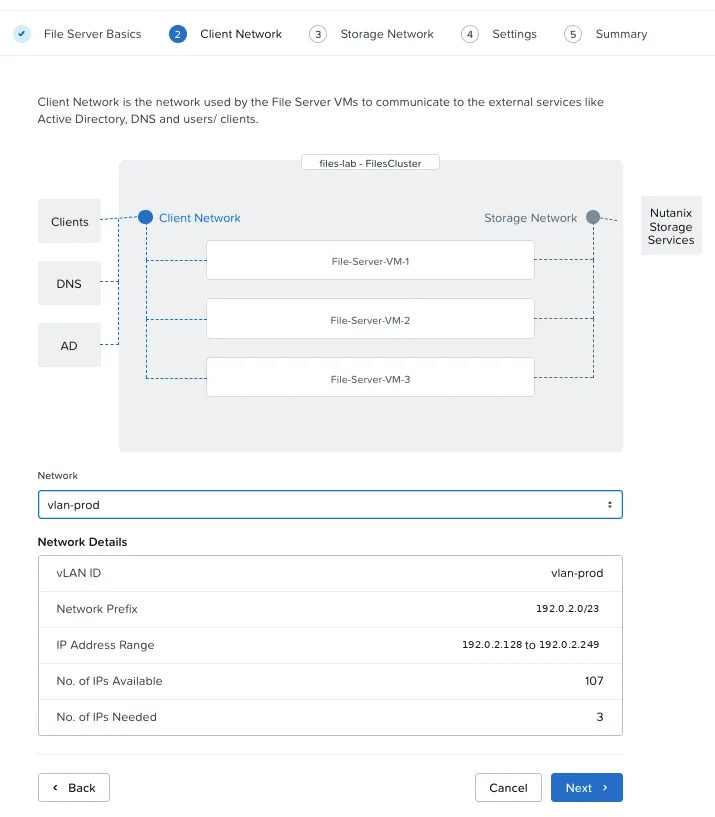
| Client | 3 (one per FSVM) | Same VLAN as the VMs, IPs from IPAM |
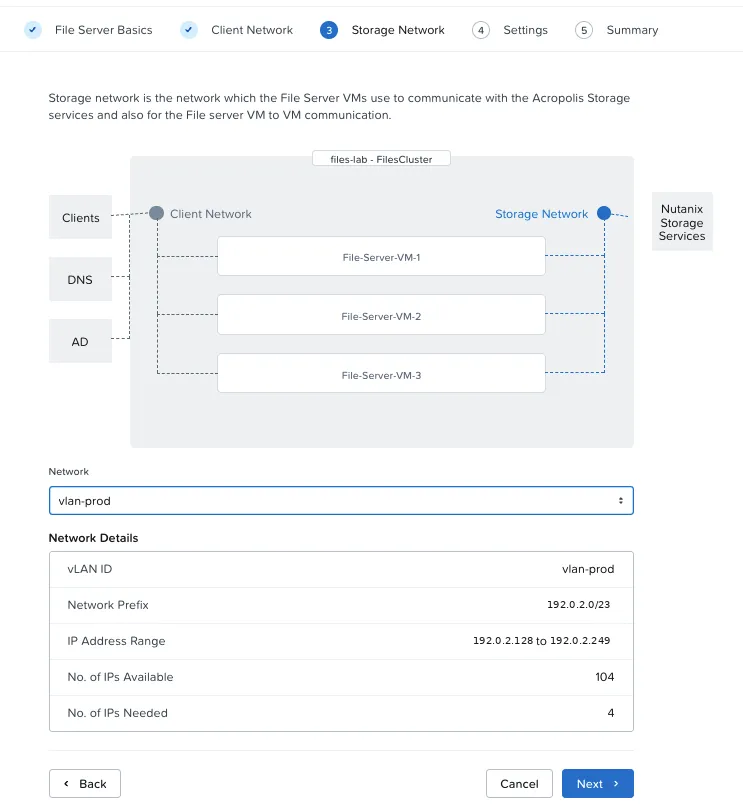
| Storage | 4 (FSVMs + 1) | Same VLAN, IPs from IPAM |
Files requires a subnet with IPAM
The wizard only lists managed subnets (with IPAM). IPs come from the pool automatically; write them down after the deployment and record them in your addressing plan. In production, the NVDs recommend the client network on a separate subnet for security; in the lab, this is a conscious deviation.
DNS and NTP
Files asks for DNS and NTP servers. The lab has no internal DNS, and I wanted to confirm what the gateway resolved before filling in the form:
$ dig @192.0.2.1 pe.lab.example.local;; WARNING: .local is reserved for Multicast DNS;; ->>HEADER<<- opcode: QUERY, status: NXDOMAIN;; AUTHORITY SECTION:. 86400 IN SOA a.root-servers.net. nstld.verisign-grs.com. ...NXDOMAIN with the internet root SOA: the gateway only forwards queries out and does not know the internal domain. The practical consequence: clients will mount Files by IP, not by name. It works well, and the CSI accepts an IP normally.
Warning
.local is reserved
dig itself warns about it: the .local suffix belongs to mDNS (RFC 6762). In customer environments, prefer a subdomain of a real domain, such as lab.company.com.
License
Files is licensed through Nutanix Unified Storage (NUS), metered in usable TiB. Before deploying, I checked what was applied to the cluster:
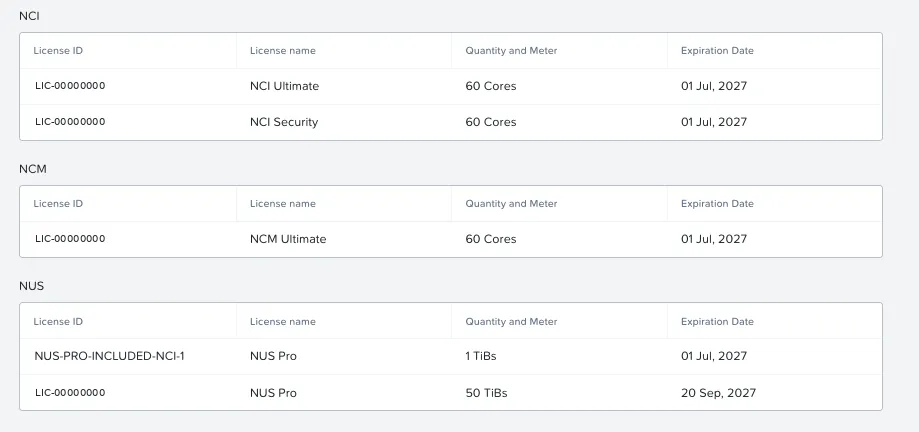
| License | Quantity | Note |
|---|---|---|
| NUS Pro included with NCI Ultimate | 1 TiB | Comes with NCI Ultimate |
| NUS Pro | 50 TiB | The lab license |
| NCI Security | 60 cores | This is Flow Network Security |
If you have NCI Ultimate
NCI Ultimate already includes 1 TiB of NUS Pro. You can start a small file server without buying anything else.
Deploying the file server from Prism Central
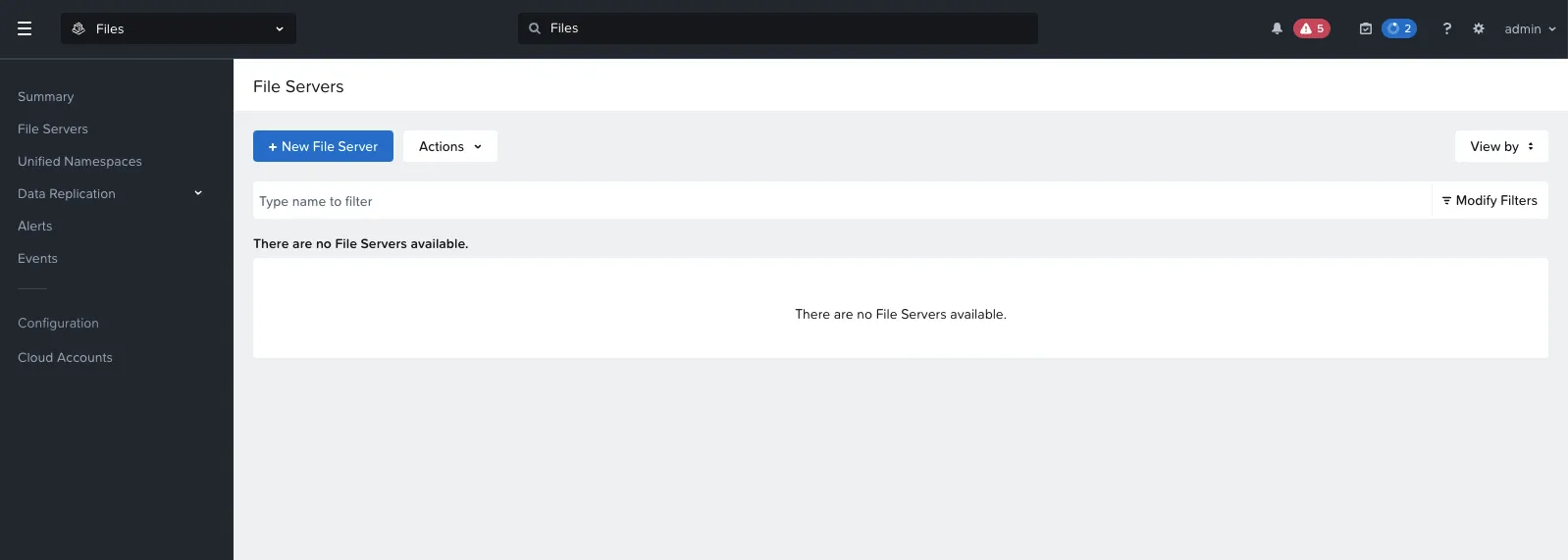
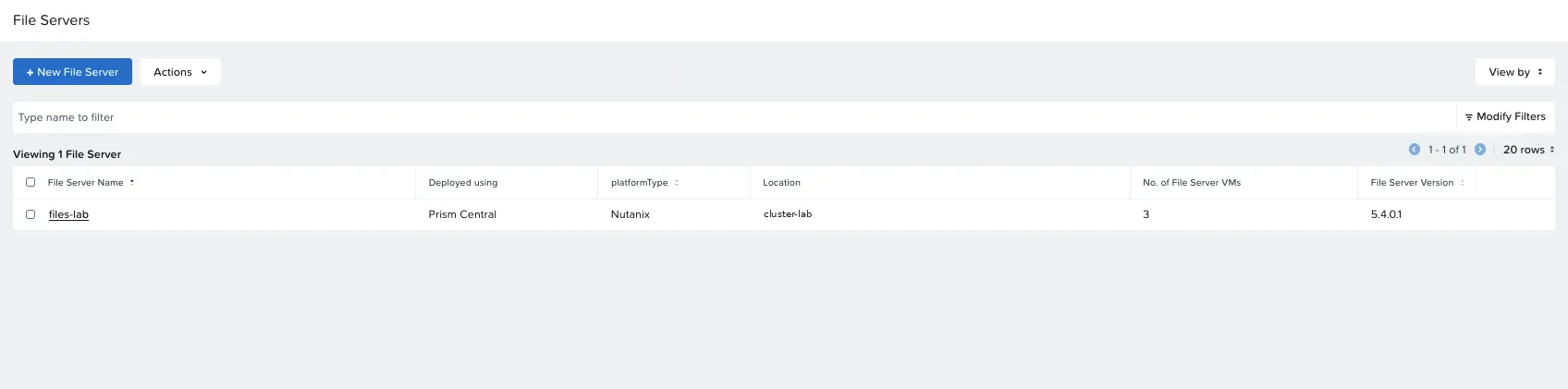
Goal: a file server with 3 FSVMs, 5 TiB and NFS, created through the Prism Central wizard (Files → File Servers → New File Server).
The starting point, with no file server:
1. Location: Prism Central or Prism Element
The first screen asks for the provider (Nutanix, AWS or Azure) and already shows a warning: some features are not supported on file servers deployed through Prism Central; to use them, deploy from Prism Element.
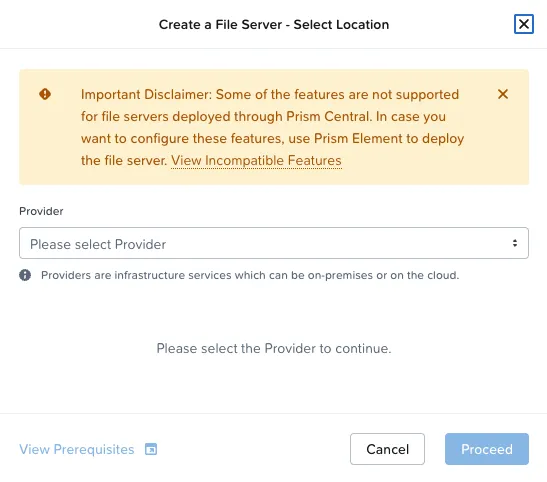
I went ahead with Prism Central. This warning matters for the protection choice (see the protection section).
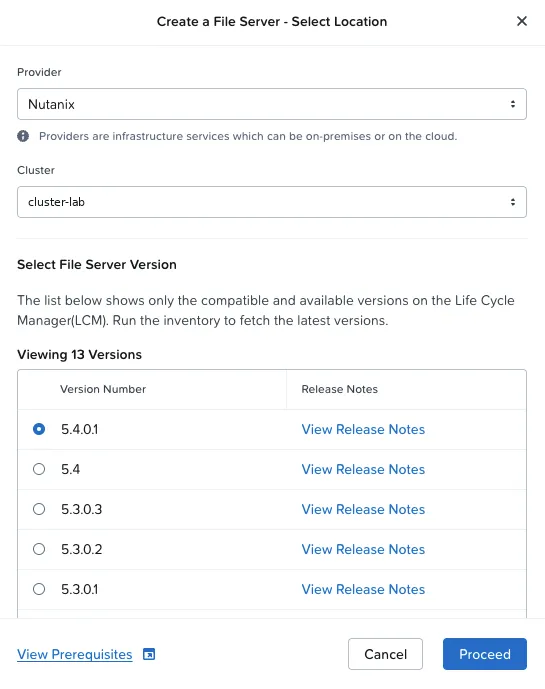
2. Cluster and version
The wizard only lists versions that are compatible and available in LCM. There were 13; I picked the newest, 5.4.0.1.
3. Basics and sizing
Name (up to 15 characters, no dots), DNS domain, logical capacity and FSVM size.
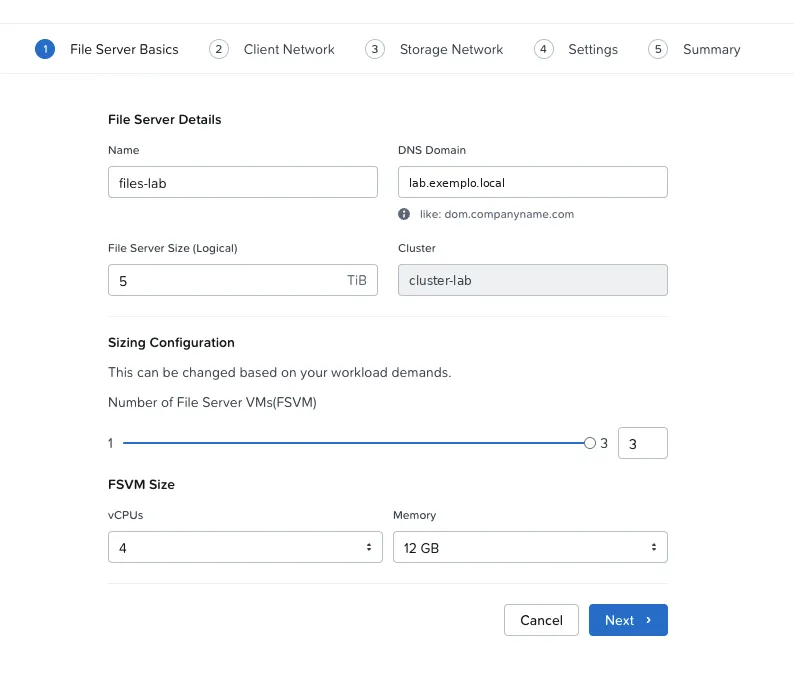
| Field | Value |
|---|---|
| Name | files-lab |
| DNS Domain | lab.example.local |
| File Server Size (Logical) | 5 TiB |
| Number of FSVMs | 3 |
| vCPUs / Memory | 4 / 12 GB |
4. Client and storage networks
Both screens show the IPAM range, how many IPs are free and how many the file server will use: 3 on client, 4 on storage.
5. Settings: DNS, NTP and two switches for Kubernetes
This is the most important screen, because nothing here can change after deployment.
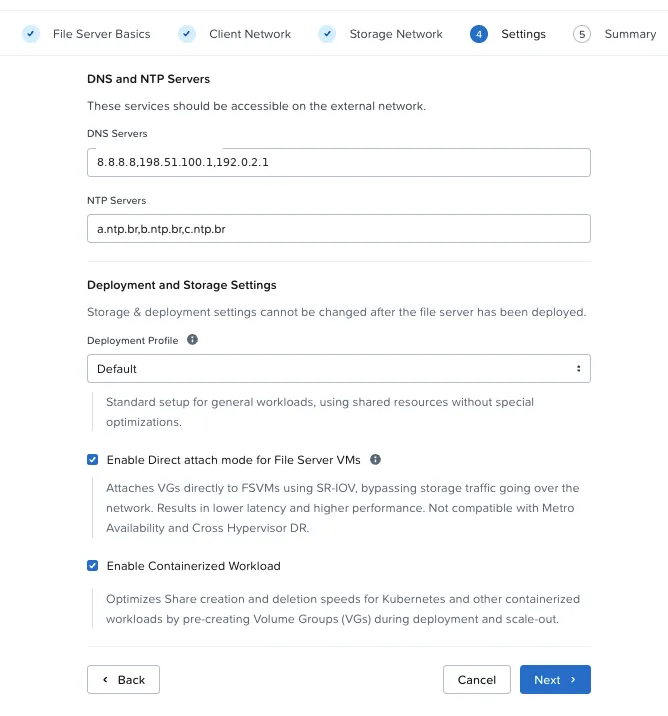
The Deployment Profile field has three options:
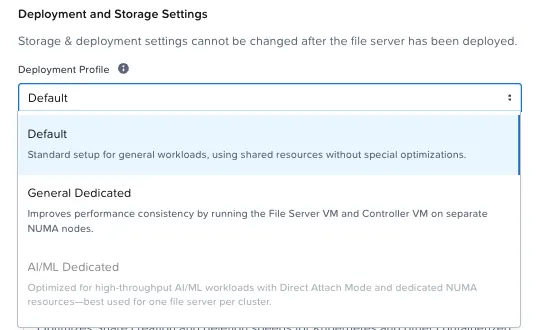
| Profile | What it does | When to use |
|---|---|---|
| Default | Shared resources, no special optimization | General use (the lab’s choice) |
| General Dedicated | FSVM and CVM on separate NUMA nodes | More predictable performance |
| AI/ML Dedicated | Direct Attach + dedicated NUMA, one file server per cluster | High-throughput AI workloads (disabled in the lab) |
And the two switches:
| Option | What it does | Decision |
|---|---|---|
| Direct Attach mode | Attaches volume groups directly to the FSVMs, keeping storage traffic off the network. Lower latency. Not compatible with Metro Availability or cross-hypervisor DR | On (the lab uses neither) |
| Containerized Workload | Pre-creates volume groups during deployment and scale-out to speed up share creation and deletion by Kubernetes | On: exactly the CSI use case |
6. Summary
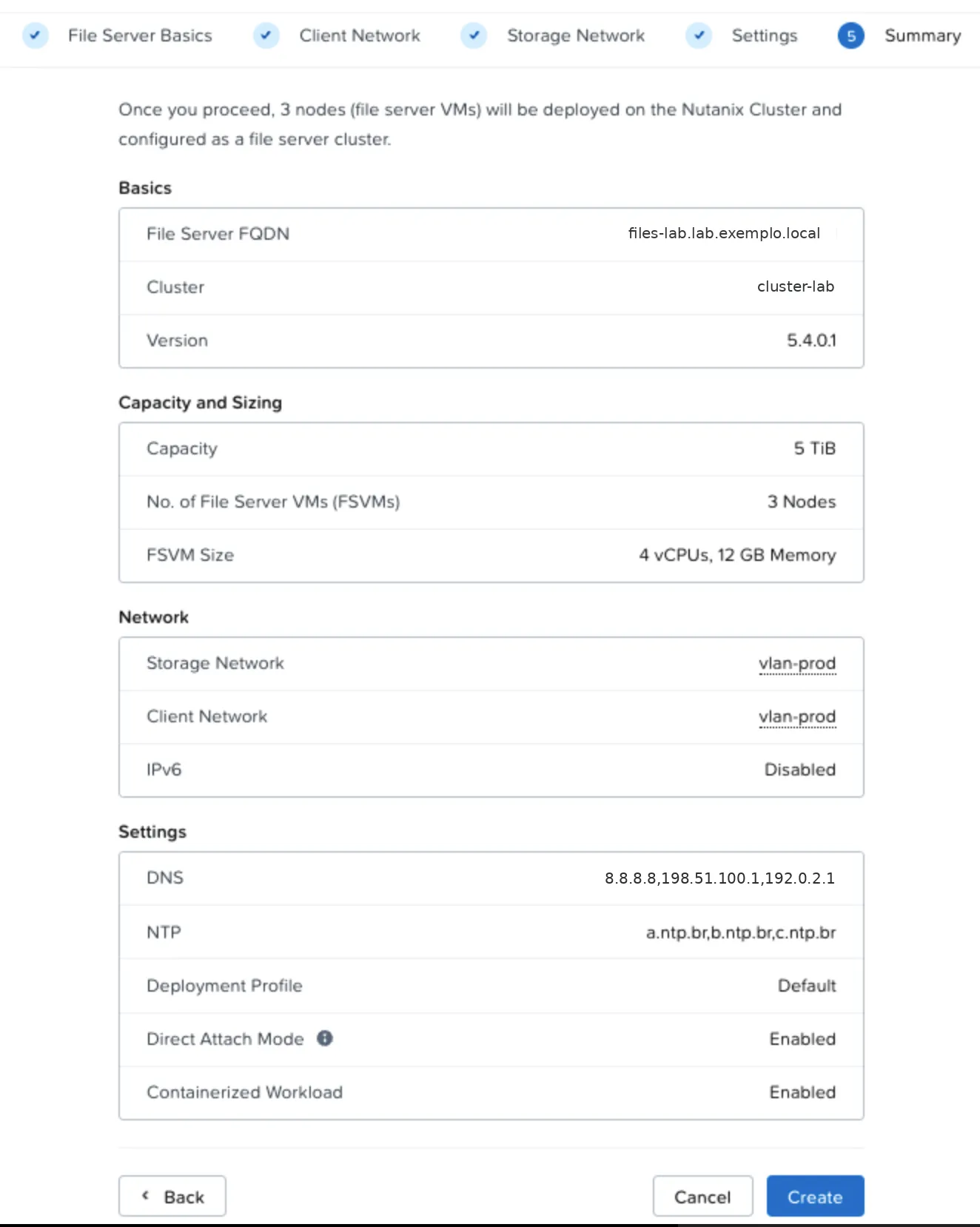
The deployment: 27 minutes
Prism Central created the 3 FSVMs in the first 90 seconds, then mounted the Files image and configured the file server cluster.
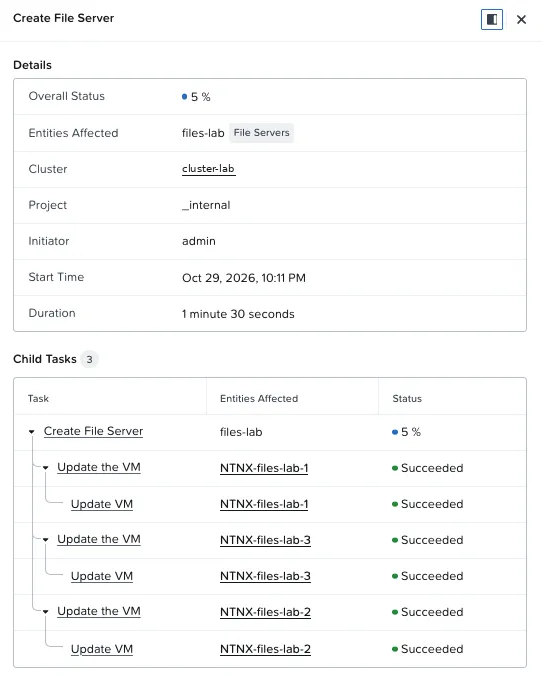
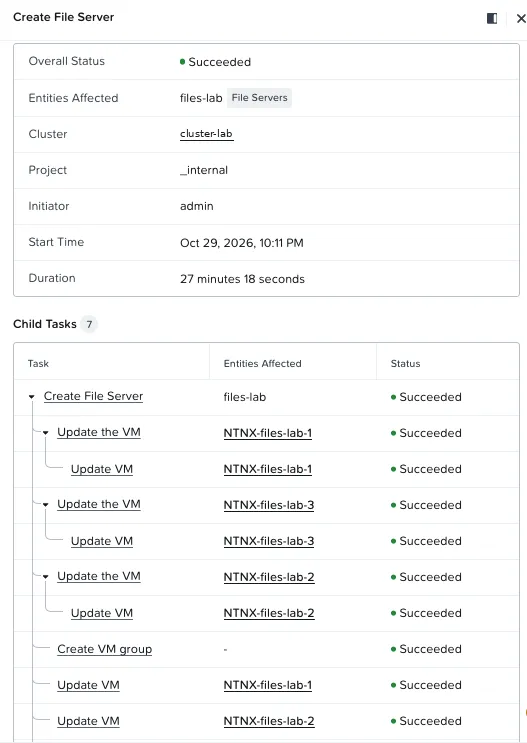
| Time | Event |
|---|---|
| 22:11 | Create File Server task starts |
| 22:12 | 3 FSVMs created (one per host) |
| 22:15 | Artifacts downloaded and 5.4.0.1 image mounted |
| 22:38 | Succeeded (27 min 18 s) |
| 22:37 to 22:42 | Volume groups pre-created (Containerized Workload) |
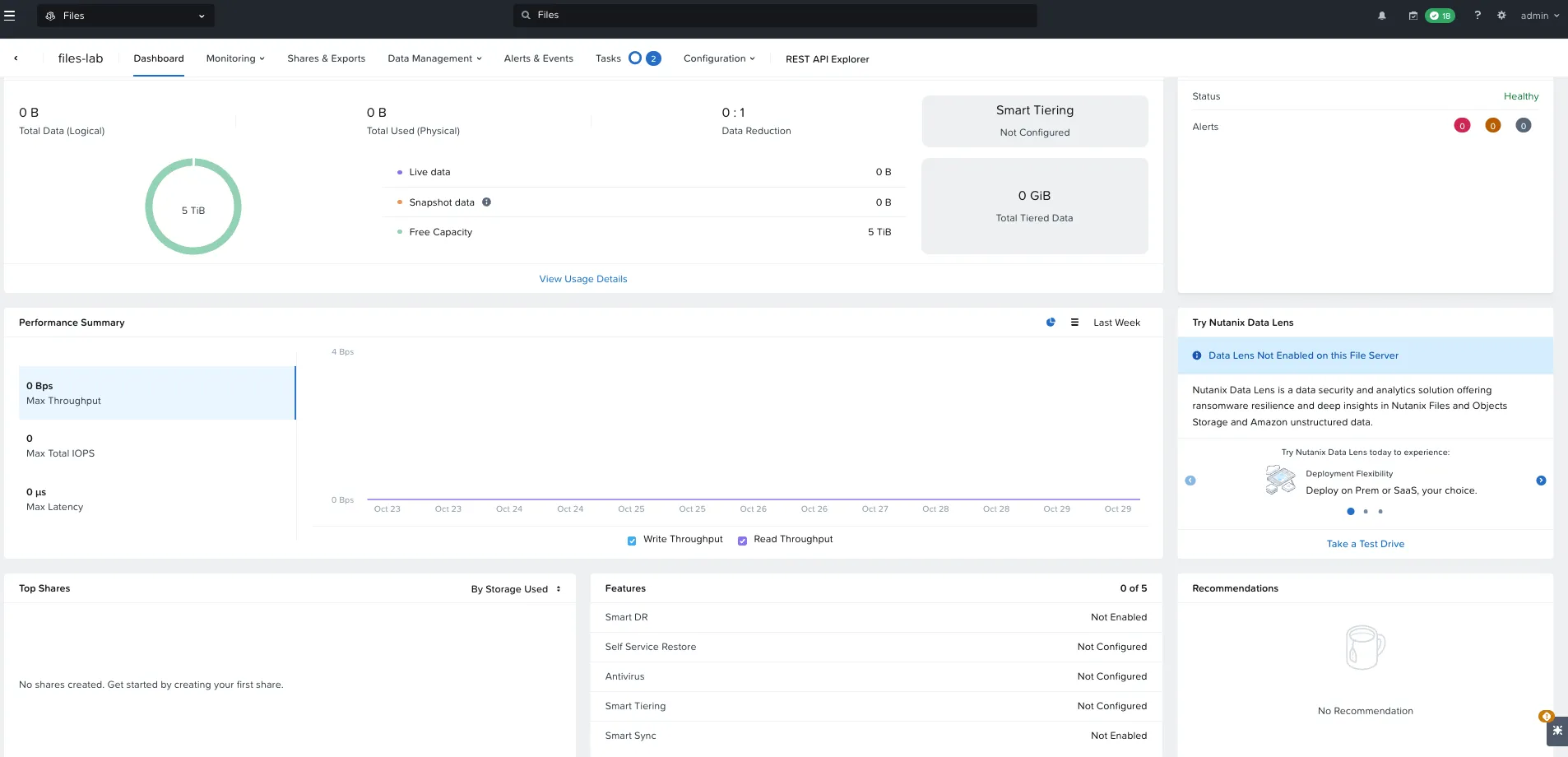
The file server dashboard opened Healthy, with no alerts and 5 TiB free:
Right after Succeeded, Files ran two more tasks: FS Deploy VG Create and Volume Group Manage. That is Containerized Workload at work, pre-creating the volume groups Kubernetes shares will use.
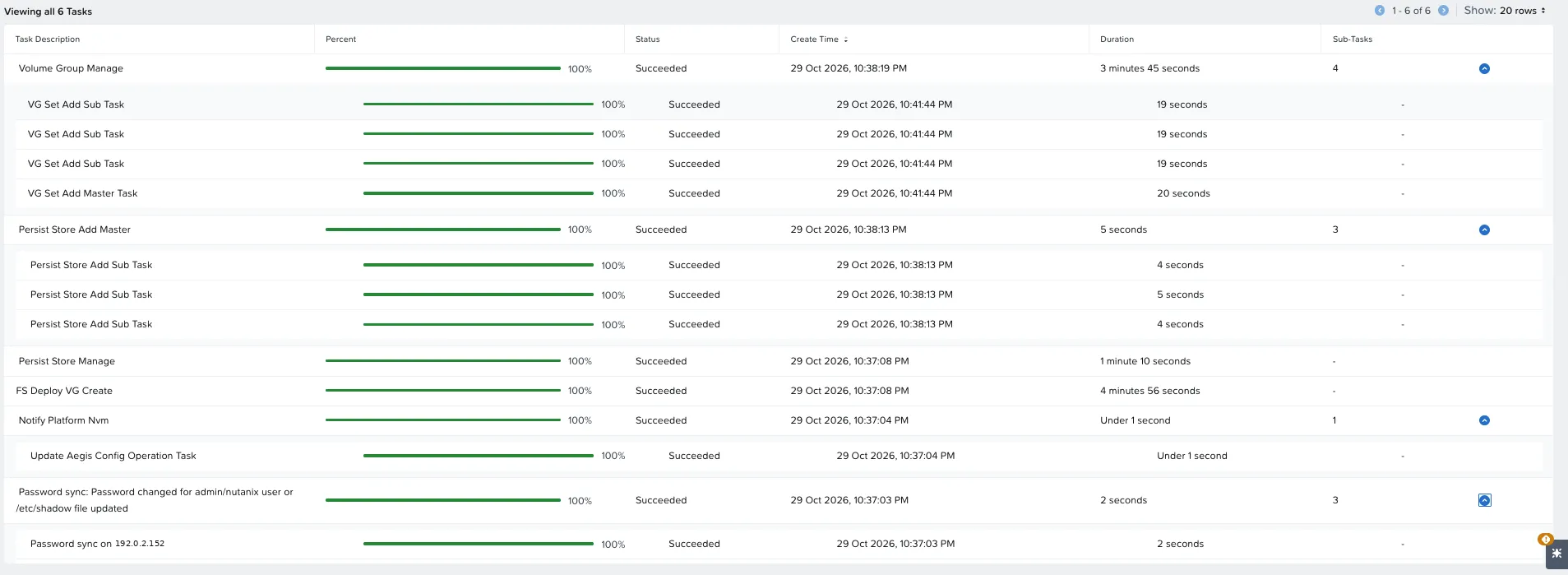
Wait for the post-deployment tasks
Create the first share only after FS Deploy VG Create and Volume Group Manage reach 100%. In the lab, that took another 5 minutes.
The file server network
The network screen shows the layout and the IPs IPAM handed out:
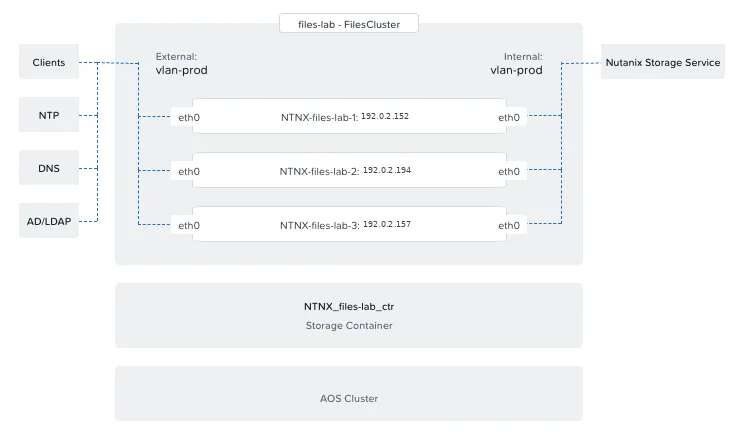
| FSVM | Client IP (NFS mount) | Storage IP |
|---|---|---|
| NTNX-files-lab-1 | 192.0.2.128 | 192.0.2.152 |
| NTNX-files-lab-2 | 192.0.2.132 | 192.0.2.194 |
| NTNX-files-lab-3 | 192.0.2.129 | 192.0.2.157 |
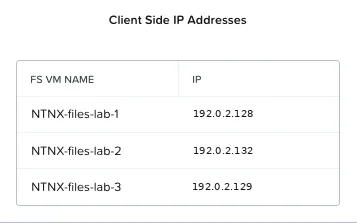
The fourth storage IP (the wizard’s “+1”) does not show in the UI table. It exists; look it up in the subnet IPAM if you need to record it.
The container Files creates
The wizard creates a storage container just for the file server, NTNX_files-lab_ctr. I checked its properties against the GPT-in-a-Box NVD:
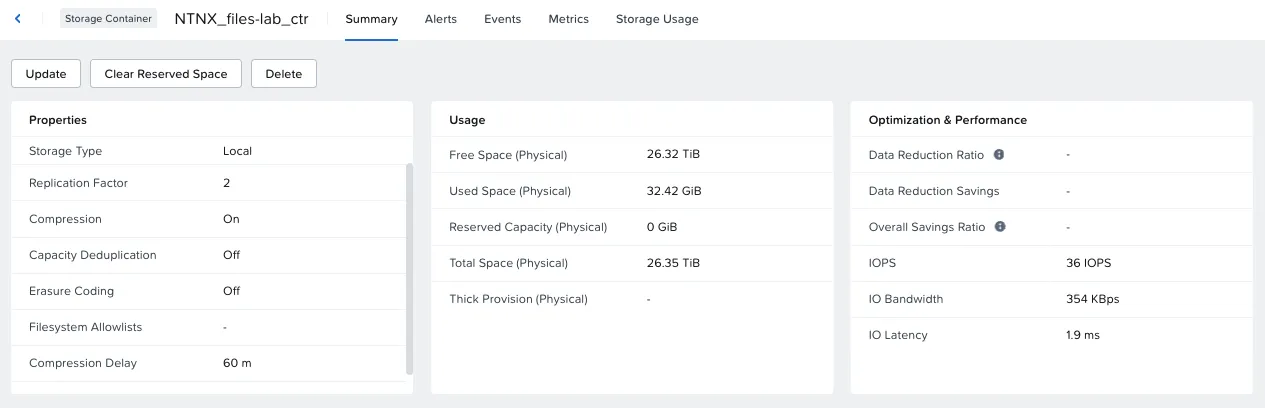
| Property | Lab | NVD |
|---|---|---|
| Replication Factor | 2 | 2 |
| Compression | On (60 min delay) | On (60 min) |
| Deduplication | Off | Off |
| Erasure Coding | Off | Off |
Same as recommended, without touching anything. The 32 GiB already used right after deployment are the pre-created volume groups.
Enabling NFS
The file server starts with no protocol. Under Configuration → Authentication, I enabled NFS only:
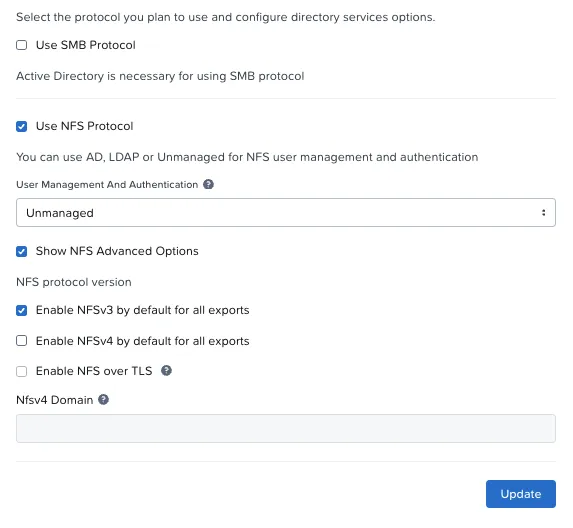
| Option | Value | Why |
|---|---|---|
| SMB | Off | Requires Active Directory; not needed for Kubernetes |
| User Management | Unmanaged | No AD and no LDAP; access is controlled by client IP, as the CSI expects |
| NFSv3 | On (default) | Compatibility |
| NFSv4 | On | Unchecked by default. Needed for mount -t nfs4 |
| NFS over TLS | Off | Internal lab network |
Enable NFSv4 before the exports
The factory default is NFSv3 only. Check Enable NFSv4 by default for all exports before creating exports, or every export is born without v4.
First export and the manual test
Before involving Kubernetes, I tested Files on its own, with a 10 GiB export mounted from a Linux VM.
Standard or Distributed
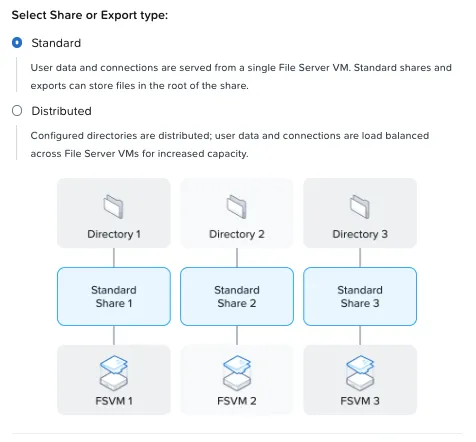
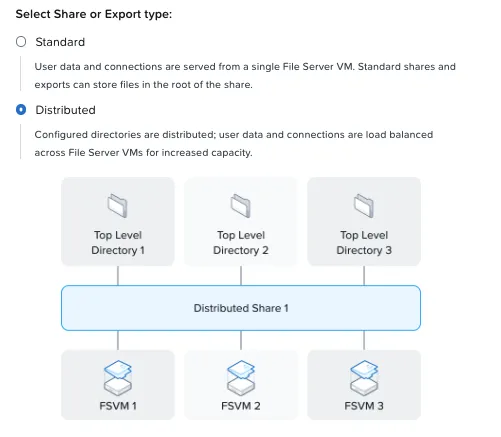
| Type | How it works | When to use |
|---|---|---|
| Standard | One FSVM serves the whole export | Most cases; this is what the CSI creates |
| Distributed | Top-level directories are spread across FSVMs | Many clients or large capacity, such as user home directories |
Squash and sudo
On the permissions screen, the default is Root Squash:
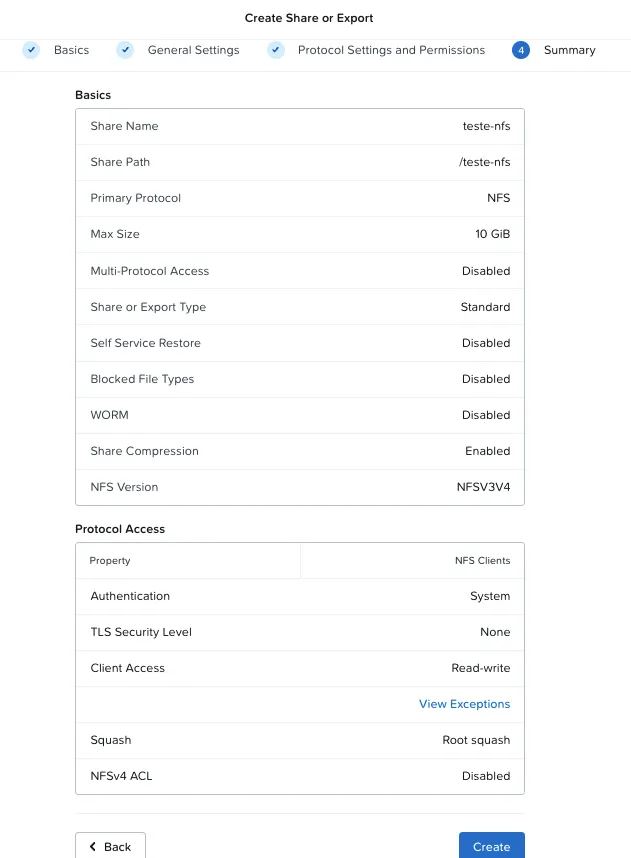
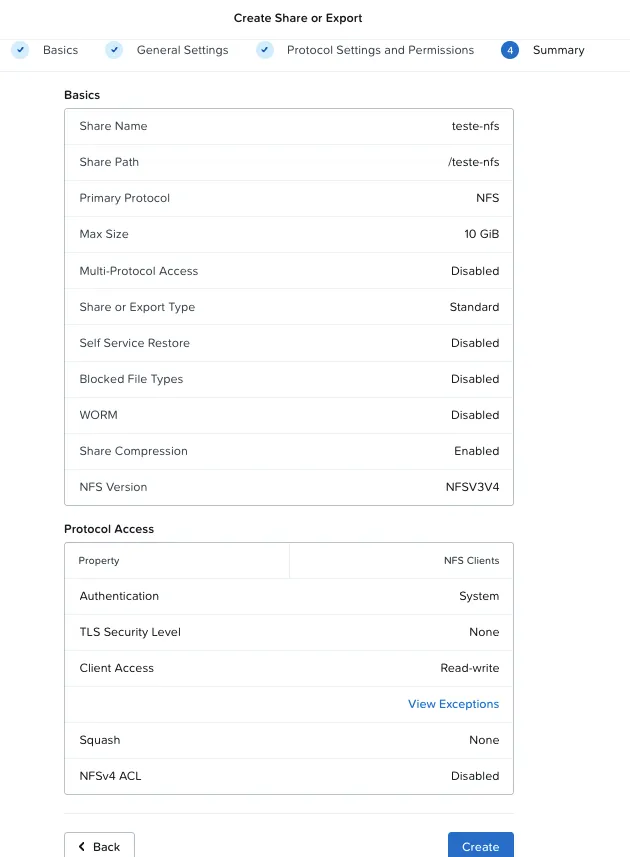
With root squash, the client’s root becomes an anonymous user on the server. Since my test wrote with sudo, it would fail with Permission denied. For the test, I switched it to None:
Mounting from a VM
$ sudo apt install -y nfs-common$ sudo mount -t nfs4 192.0.2.128:/teste-nfs /mnt/teste-nfs$ echo "ok $(date)" | sudo tee /mnt/teste-nfs/teste.txtok Fri Oct 30 01:56:55 AM UTC 2026$ df -h /mnt/teste-nfsFilesystem Size Used Avail Use% Mounted on192.0.2.132:/teste-nfs 0 0 0 - /mnt/teste-nfs$ mount | grep teste-nfs192.0.2.132:/teste-nfs on /mnt/teste-nfs type nfs4 (rw,vers=4.2,proto=tcp,sec=sys,addr=192.0.2.132)Three things to notice:
- I mounted through
.128and ended up on.132. On a Standard export, a single FSVM serves the whole export, and Files uses NFSv4 redirection to send the client to it. The client can use any client IP. - NFS 4.2, negotiated automatically.
dfshows size 0. Files does not expose the export quota to the NFS client. It is not an error; good to know so it does not surprise you.
Kubernetes seeing Files
What NKP already has
NKP installs the Nutanix CSI on every cluster. The workload cluster inventory:
$ kubectl get scNAME                       PROVISIONER                              VOLUMEBINDINGMODE      ALLOWVOLUMEEXPANSIONdkp-object-store           <workspace>.ceph.rook.io/bucket          Immediate              falsenutanix-volume (default)   csi.nutanix.com                          WaitForFirstConsumer   true
$ kubectl get csidriversNAME              ATTACHREQUIRED   PODINFOONMOUNT   MODEScsi.nutanix.com   true             true             Persistent
$ kubectl -n ntnx-system get ds,deploy -o wide | grep csidaemonset.apps/nutanix-csi-node         6 6 6 ...  docker.io/nutanix/ntnx-csi:3.9.0deployment.apps/nutanix-csi-controller  2/2 ...    docker.io/nutanix/ntnx-csi:3.9.0
The driver is 3.9.0, the default storage class is Volumes (RWO), and there is a single credentials secret, ntnx-system/nutanix-csi-credentials.
The detail: the CSI runs in Prism Central mode
The CSI 3.x documentation shows dynamic Files with the driver talking to Prism Element, and a secret with a second key, files-key. Before copying the example, I checked who the NKP CSI talks to, without exposing any password:
# Only the secret key names$ kubectl -n ntnx-system get secret nutanix-csi-credentials \    -o go-template='{{range $k,$v := .data}}{{$k}}{{"\n"}}{{end}}'key
# Only host and port of the key (the command cuts user and password)$ kubectl -n ntnx-system get secret nutanix-csi-credentials \    -o jsonpath='{.data.key}' | base64 -d | cut -d: -f1,2192.0.2.88:9440
$ kubectl -n ntnx-system get deploy nutanix-csi-controller -o yaml \    | grep -iE 'usepc|use_pc|management-plane|mixed'    app.kubernetes.io/management-plane: PrismCentral        - name: USE_PC        - --use-mixed-mode=false
The address is Prism Central’s, and the controller has USE_PC. The NKP 2.19 CSI runs in PC mode.
How dynamic Files works in PC mode
The main documentation shows PE mode. PC mode also supports dynamic Files with its own secret holding the Prism Central key (key) and the file server key (files-key: <file server>:<user>:<password>). The CSI log confirms it: “Using Files secrets available in PC Mode”.
Do not edit the NKP secret
nutanix-csi-credentials is managed by NKP. Create a separate secret just for the Files storage class.
1. REST API user on the file server
The files-key uses a user of the file server’s own API, not a Prism user. It is created in the file server console, under Configuration → Manage Roles → REST API access users:
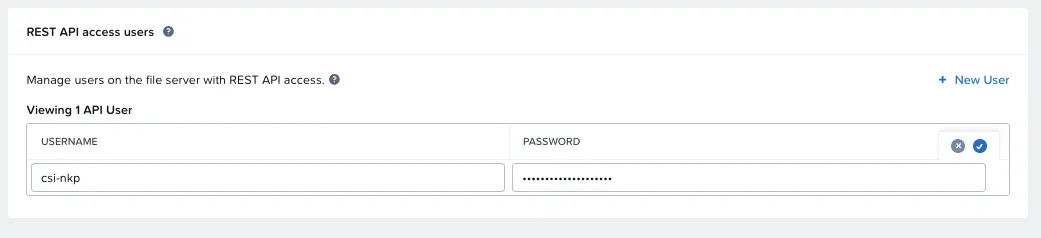
Click the ✓
The user row stays in edit mode until you click the ✓ on the right. Without it, the user is not saved.
2. Dedicated secret
The script reads the Prism Central key from the NKP secret and builds the new secret without printing anything:
read -rp "File server REST API user: " FUread -rsp "Password (hidden): " FP; echoPCKEY=$(kubectl -n ntnx-system get secret nutanix-csi-credentials \ -o jsonpath='{.data.key}' | base64 -d)kubectl -n ntnx-system create secret generic nutanix-files-csi \ --from-literal=key="$PCKEY" \ --from-literal=files-key="192.0.2.128:$FU:$FP"unset PCKEY FPI used the client IP in files-key, not the name, because the lab nodes cannot resolve the internal domain.
3. The storage class
apiVersion: storage.k8s.io/v1kind: StorageClassmetadata: name: nai-nfsprovisioner: csi.nutanix.comparameters: storageType: NutanixFiles dynamicProv: ENABLED nfsServerName: files-lab # file server name in Prism nfsServer: 192.0.2.128 # client IP: mount and API squashType: "none" csi.storage.k8s.io/provisioner-secret-name: nutanix-files-csi csi.storage.k8s.io/provisioner-secret-namespace: ntnx-system csi.storage.k8s.io/node-publish-secret-name: nutanix-files-csi csi.storage.k8s.io/node-publish-secret-namespace: ntnx-system csi.storage.k8s.io/controller-expand-secret-name: nutanix-files-csi csi.storage.k8s.io/controller-expand-secret-namespace: ntnx-systemallowVolumeExpansion: truereclaimPolicy: DeletevolumeBindingMode: Immediate # required by NAI| Parameter | Value | Why |
|---|---|---|
dynamicProv: ENABLED | A new share per PVC | Each volume isolated, deleted with its PVC |
nfsServerName | files-lab | The CSI looks up the file server by name |
nfsServer | Client IP | Used for the mount and, with files-key, for the API |
squashType | none | Lab; consider root-squash in production depending on the images that will write |
volumeBindingMode | Immediate | Required by NAI; the NKP default is WaitForFirstConsumer |
The RWX test: two nodes, one file
The test creates a 2 GiB RWX PVC and a deployment with 2 replicas, forced onto different nodes (podAntiAffinity). Each replica writes a line every 5 seconds to the same file:
apiVersion: v1kind: PersistentVolumeClaimmetadata: { name: rwx-teste }spec: accessModes: [ReadWriteMany] storageClassName: nai-nfs resources: { requests: { storage: 2Gi } }---apiVersion: apps/v1kind: Deploymentmetadata: { name: rwx-escritor }spec: replicas: 2 selector: { matchLabels: { app: rwx-escritor } } template: metadata: { labels: { app: rwx-escritor } } spec: affinity: podAntiAffinity: requiredDuringSchedulingIgnoredDuringExecution: - labelSelector: { matchLabels: { app: rwx-escritor } } topologyKey: kubernetes.io/hostname containers: - name: c image: busybox:1.36 command: ["sh","-c","while true; do echo \"$(date -u +%H:%M:%S) $(hostname) no nó $NODE\" >> /dados/log.txt; sleep 5; done"] env: [{ name: NODE, valueFrom: { fieldRef: { fieldPath: spec.nodeName } } }] volumeMounts: [{ name: d, mountPath: /dados }] volumes: [{ name: d, persistentVolumeClaim: { claimName: rwx-teste } }]The result (the log lines are in Portuguese, as in the lab script: “no nó” means “on node”):
$ kubectl -n files-teste get pvc rwx-testeNAME        STATUS   VOLUME                                     CAPACITY   ACCESS MODES   STORAGECLASS   AGErwx-teste   Bound    pvc-bc03c1b0-8456-4cda-a43c-3a5f70b446ea   2Gi        RWX            nai-nfs        6s
$ kubectl -n files-teste get pods -o wideNAME                            READY   STATUS    NODErwx-escritor-68f798cf6d-v5s5s   1/1     Running   worker-arwx-escritor-68f798cf6d-wrlph   1/1     Running   worker-b
$ kubectl -n files-teste exec <pod> -- tail -6 /dados/log.txt02:38:48 rwx-escritor-68f798cf6d-wrlph no nó worker-b02:38:50 rwx-escritor-68f798cf6d-v5s5s no nó worker-a02:38:53 rwx-escritor-68f798cf6d-wrlph no nó worker-b02:38:55 rwx-escritor-68f798cf6d-v5s5s no nó worker-a02:38:58 rwx-escritor-68f798cf6d-wrlph no nó worker-b02:39:00 rwx-escritor-68f798cf6d-v5s5s no nó worker-a
lines per pod:      5 rwx-escritor-68f798cf6d-v5s5s      5 rwx-escritor-68f798cf6d-wrlph
$ kubectl -n files-teste exec <pod> -- mount | grep /dados192.0.2.128:/pvc-bc03c1b0-... on /dados type nfs4 (rw,vers=4.2,proto=tcp,...)
The lines from both replicas interleave: two nodes writing to the same file. That is RWX.
What the CSI did under the hood
The controller log shows the full path, in about 2.6 seconds:
Using Files secrets available in PC ModeGET https://192.0.2.128:9440/api/files/v4.0/config/file-serversPOST https://192.0.2.128:9440/api/files/v4.0/config/file-servers/<uuid>/mount-targetsTask completed with status: SUCCEEDED, progress: 100%Setting cfg.volumePath with value: pvc-bc03c1b0-8456-4cda-a43c-3a5f70b446eaControllerPublishVolume called ... nfsServer:192.0.2.128 nfsServerName:files-lab provNFSShare:ENABLED| Step | What happened |
|---|---|
| 1 | The CSI found files-lab through the Files v4 API, using files-key |
| 2 | It created a mount target (the share) named after the PV |
| 3 | It waited for the task to finish (SUCCEEDED) |
| 4 | It published the volume to both nodes, which mounted it over NFS 4.2 |
Three informational messages worth knowing:
| Message | What it means |
|---|---|
FailedScheduling ... pod has unbound immediate PersistentVolumeClaims | The pods tried to start before the PVC was Bound. Gone in seconds |
NutanixFiles: Unknown option "storageType" | Informational log; the parameter is ignored at that point |
df with size 0 | Files does not expose the quota to the NFS client; the PV shows 2 GiB |
The lifecycle, seen from Files
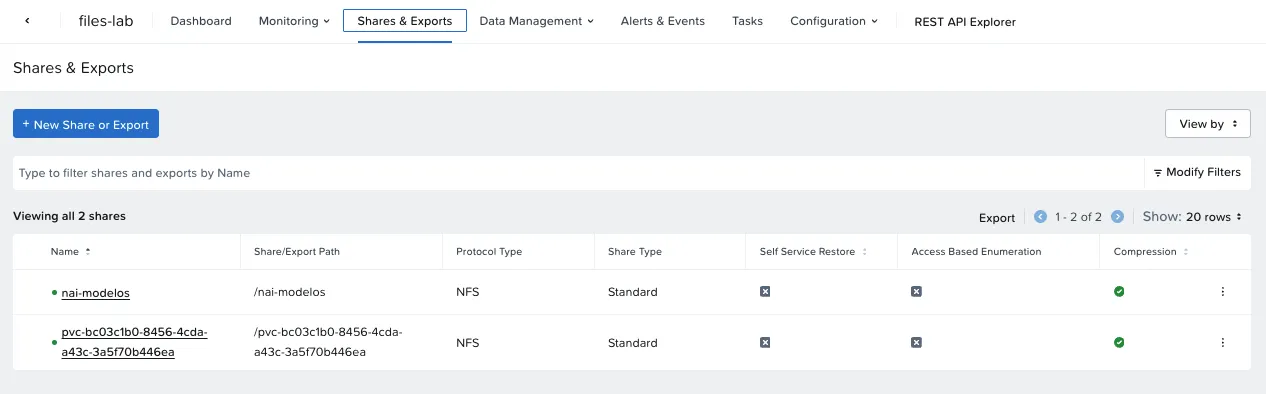
With the test running, the volume shows up in the Files console as a share named after the PV:
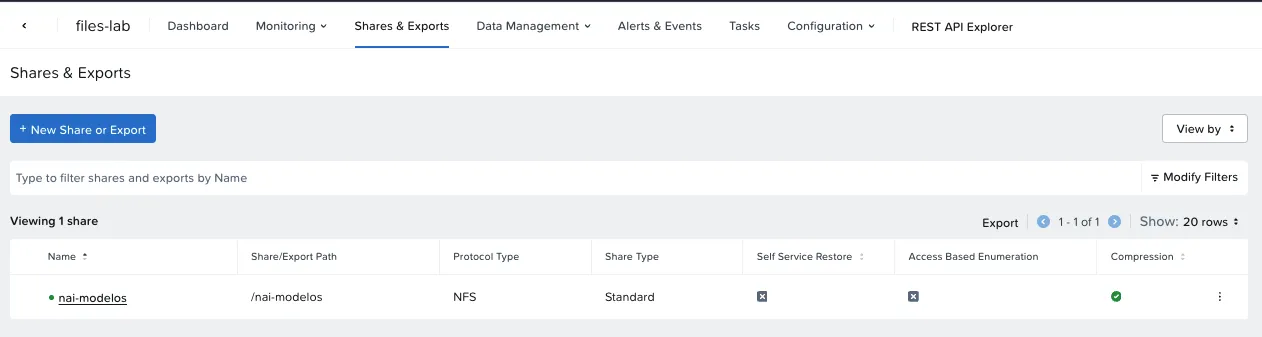
I deleted the test namespace. With reclaimPolicy: Delete, the CSI removed the share on its own:
The NAI model export
NAI also asks for a separate NFSv4 export to import custom or manually downloaded models. I created nai-modelos (Portuguese for “nai-models”): Standard, NFS v3 and v4, Read-Write, squash None, no size limit.
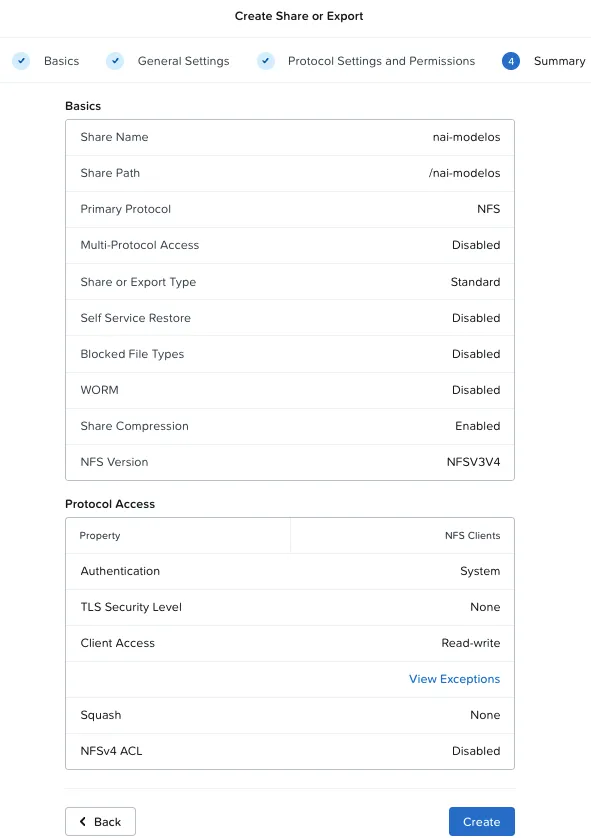
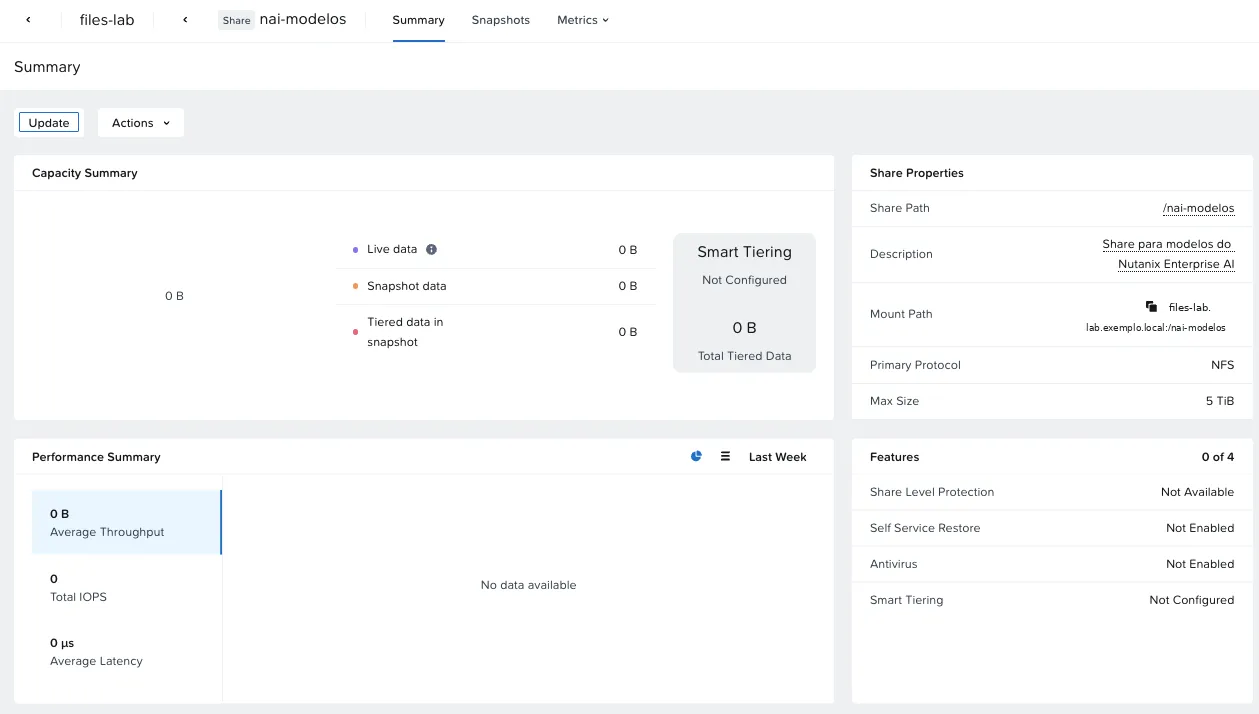
“Max Size 5 TiB” means the export can use the whole file server. The Mount Path shows the DNS name; without internal DNS, use the client IP.
Protection: Protection Domain, Smart DR or SSR
The file server console offers two kinds of protection:
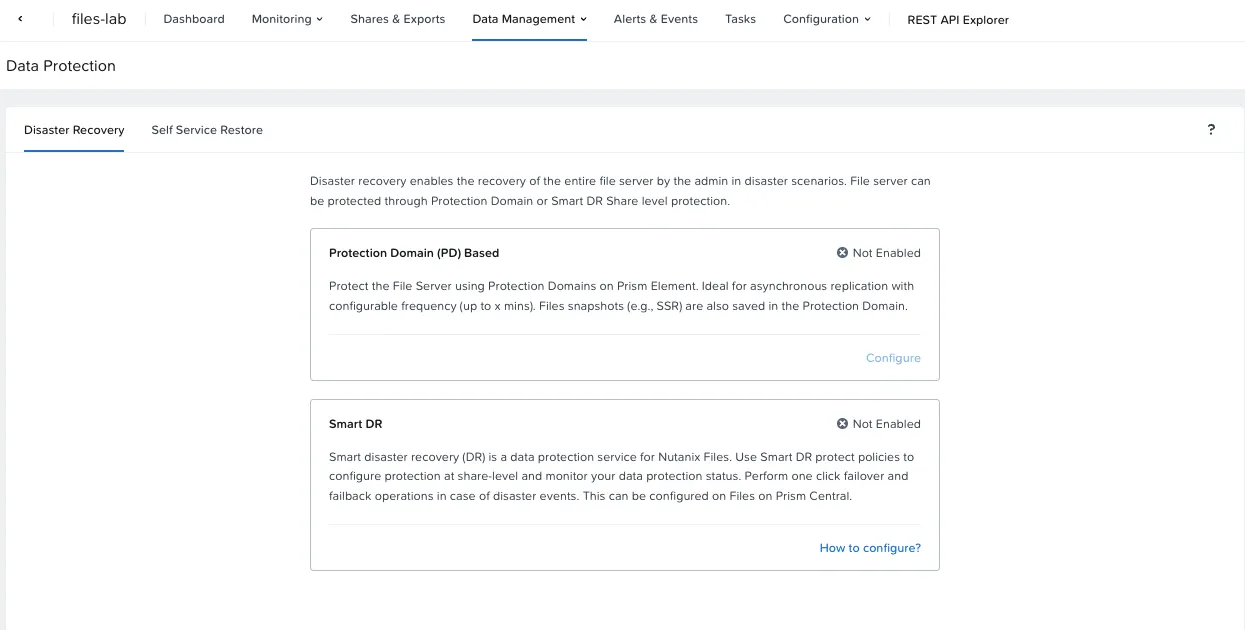
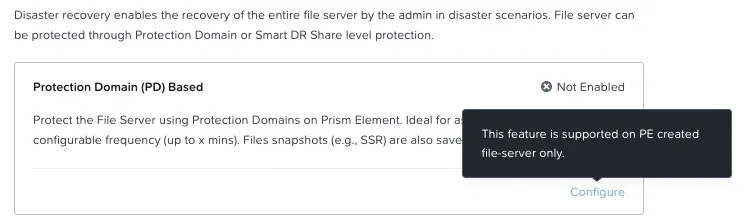
When configuring the Protection Domain, the screen shows it applies to file servers created from Prism Element:
| Option | What it does | In the lab |
|---|---|---|
| Protection Domain | Snapshot of the whole file server, with optional async replication | Doesn’t apply to the lab: it’s for file servers created from Prism Element |
| Smart DR | Per-share replication to another file server, with one-click failover | Requires a second file server |
| Self Service Restore | Per-share snapshots so users can restore files | Possible; of little use for models, which can be downloaded again |
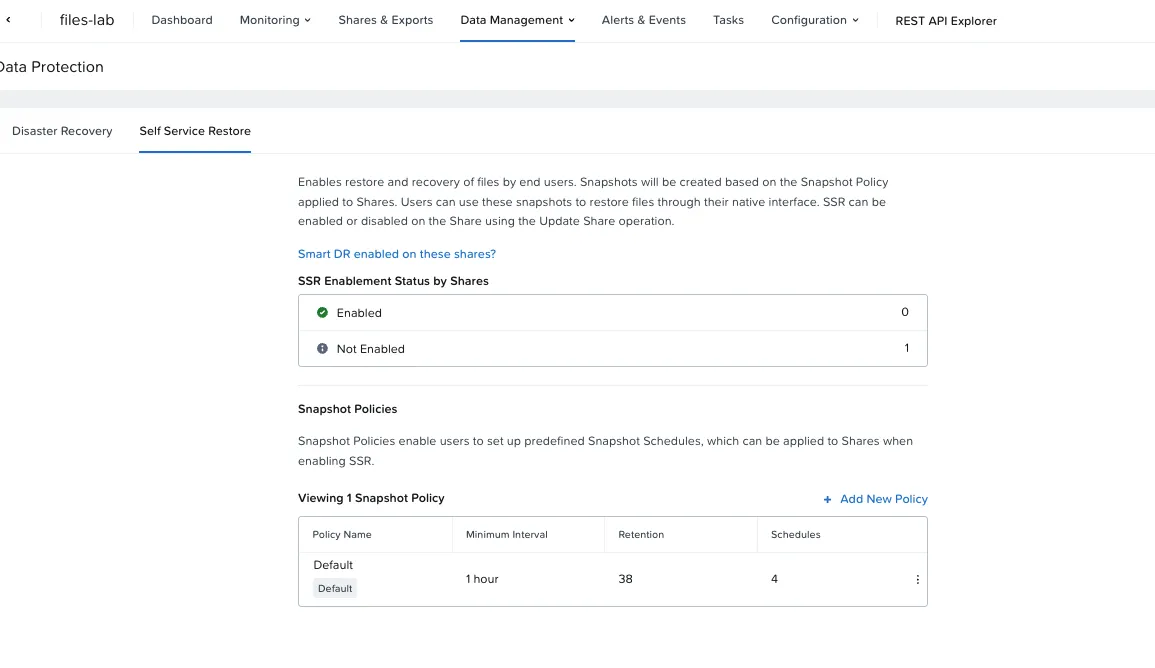
In the lab, I decided not to protect the file server: models can be downloaded again, and the NAI data that matters (database, metrics, cache) lives on RWO volumes, on Nutanix Volumes. Protecting those volumes is a job for NDK and Velero.
Decide in the wizard: Prism Central or Prism Element
If the file server needs a Protection Domain or async replication, deploy it from Prism Element. From Prism Central, protection is Smart DR, per share and with a second file server. Read the View Incompatible Features link on the first wizard screen before deciding.
Lab × Nutanix Validated Design
| Topic | NVD | Lab | Status |
|---|---|---|---|
| FSVMs | 3 | 3 | Same |
| FSVM size | 12 vCPU / 64 GB | 4 vCPU / 12 GB | Conscious deviation |
| Storage network | Same subnet as the CVMs | Same VLAN | Same |
| Client network | Separate subnet | Same VLAN | Conscious deviation |
| IPs | 4 storage + 3 client | 4 + 3 | Same |
| Container | Separate, RF2, compression, no dedup or EC | Same | Same |
| Protocol and CSI | NFS, dynamic provisioning | NFS, dynamic | Same |
| Export for custom models | Yes | nai-modelos | Same |
| Objects (S3) | 3 workers + 2 load balancers | Not installed | Later (~104 GB of RAM) |
The numbers
| Measure | Value |
|---|---|
| File server deployment | 27 min 18 s |
| Post-deployment tasks (volume groups) | ~5 min |
| Share creation by the CSI (v4 API) | ~2.6 s |
RWX PVC Bound | 6 s |
| Pods ready (including image pull) | ~22 s |
| Memory of the 3 FSVMs | 36 GB |
| Capacity | 5 TiB logical |
What I learned
- NKP’s RWX comes from Nutanix Files. The default storage class is Nutanix Volumes (RWO); for NAI, and for any app with a shared volume, add Files and a dedicated storage class.
- The NKP 2.19 CSI runs in Prism Central mode. Dynamic Files works in that mode with a dedicated secret holding
key(PC) andfiles-key(file server REST API user). - Containerized Workload and Direct Attach are the right options for Kubernetes, and they cannot change after deployment.
- Enable NFSv4 before creating exports. The factory default is NFSv3 only.
- Root squash and
sudodo not mix in a manual test; choose the squash setting consciously in the storage class. - For a Protection Domain, deploy the file server from Prism Element. From Prism Central, protection is Smart DR.
- Without internal DNS, mount by IP. Files redirects the client to the right FSVM.
Checklist: Nutanix Files for NKP
- NUS license applied to the cluster (NCI Ultimate includes 1 TiB)
- Memory for the FSVMs within the cluster’s N+1
- Subnet with IPAM and free IPs (FSVMs on client; FSVMs + 1 on storage)
- DNS and NTP reachable from the client network
- Decided: Prism Central or Prism Element (protection)
- Containerized Workload and Direct Attach enabled in the wizard
- Post-deployment tasks finished before the first share
- NFSv4 enabled
- REST API user created (and saved with the ✓)
- Dedicated secret with
keyandfiles-key, without touching the NKP secret - RWX storage class with
Immediate - Test with 2 pods on different nodes, and the share gone after cleanup
- Separate export for custom models (if you will use NAI)
What I haven’t tested yet
- Nutanix Objects (S3), which the NVD uses in its design: I did not install it in the lab, and it is planned for later (~104 GB of RAM).
- File server protection with Smart DR, which needs a second file server. In the lab, I chose not to protect Files, because the models can be downloaded again.
- The NVD’s production sizing: 12 vCPU / 64 GB FSVMs and the client network on a separate subnet. In the lab, I stayed at the supported minimum and on a single VLAN, as a conscious deviation.
Next part
In Part 3, the cluster dedicated to NAI on NKP 2.19, the catalog dependencies, NAI 2.8.1 and the license, which has only a 2-day trial after installation.
References
Nutanix
- Nutanix Validated Design: Nutanix Enterprise AI (NVD-2057)
- Nutanix CSI Operator: storage classes and secrets (opendocs.nutanix.com)
- Files and AOS version compatibility (Nutanix Community)
- Nutanix Enterprise AI Guide 2.8 (Nutanix portal), requirements and NKP deployment sections
Projects and community
Independent
Comments
Comments use GitHub Discussions; you need a GitHub account.