NKP 2.19.1 from the UI: management and workload upgraded without the CLI
Tested onNKP 2.19.0 → 2.19.1Kubernetes 1.36.2Rocky Linux 9.8Lab date Applies toNKP 2.19.0 → 2.19.1 upgrade from the UIOn a different version, check the compatibility matrix and the release notes before applying.
Summary: in the 2.18 → 2.19 upgrade, Kommander and the management cluster had to go through the CLI. For 2.19.0 → 2.19.1, the dashboard itself flagged the new version, much like Prism Central LCM, and I did everything from the UI: the management cluster and the workload cluster, on the same Administration → Upgrades page, with the same wizard. 2.19.1 is a fix patch, with a CVE in the UI and a security fix in the NKP MCP Server. Preparation took about an hour. The two clusters took 1 h 02 min, from the first click until every app was ready, with all 14 VMs recreated, and the test application answered all 4,089 requests sent during the window.
Where we are
In October I took the lab from NKP 2.18 to 2.19, in a three-part series: the preparation, the upgrade and the post-upgrade. Back then, the management cluster went through the CLI and only the workload cluster used the UI. On November 10, 2026, Nutanix released 2.19.1. This post covers the two clusters from that series:
| Cluster | Role | Nodes | Node OS |
|---|---|---|---|
| Management | Kommander, Cluster API, MCP Server, AI Navigator | 3 control planes + 5 workers | Rocky Linux 9.8 |
| Services workload | Internal services and the test podinfo | 3 control planes + 3 workers | Rocky Linux 9.8 |
Both were on NKP 2.19.0 and Kubernetes 1.36.2.
What’s new: the whole upgrade from the UI
2.19 brought per-cluster upgrades in the UI. Leaving 2.18, that only applied to workload clusters: the guide required the CLI for Kommander and the management cluster. With the management cluster already on 2.19, the Administration → Upgrades page lists the management cluster and the workload clusters, each with its status, current and target versions, and an Upgrade button.

The wizard has two steps:
- Select Version: the target version (here, NKP v2.19.1 & Kubernetes v1.36.2), with summary notes: supported upgrade path, Prism Central and AOS compatibility, and known issues.
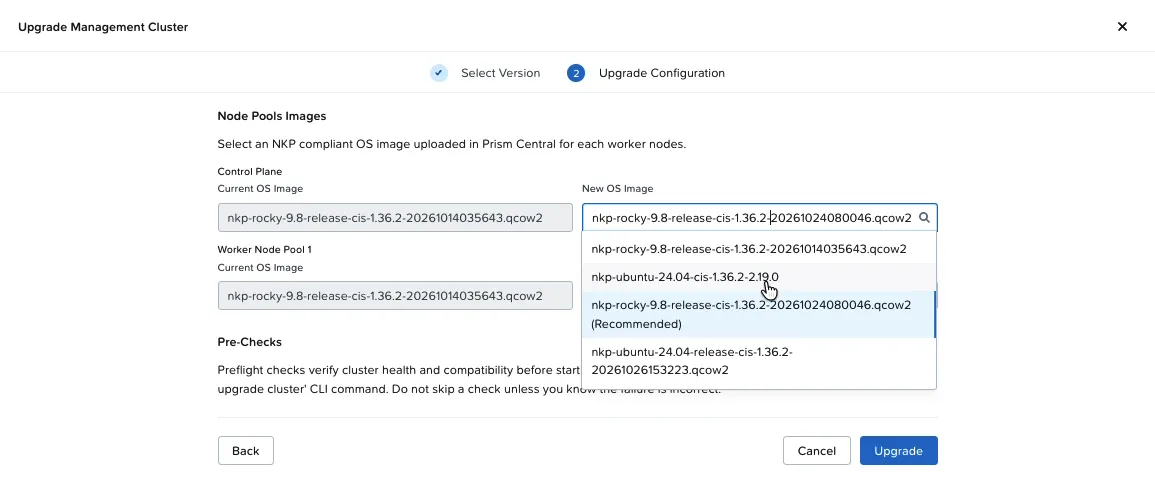
- Upgrade Configuration: the new node image for the control plane and for each node pool. The UI shows the current image next to it and marks one of the Prism Central images as (Recommended).
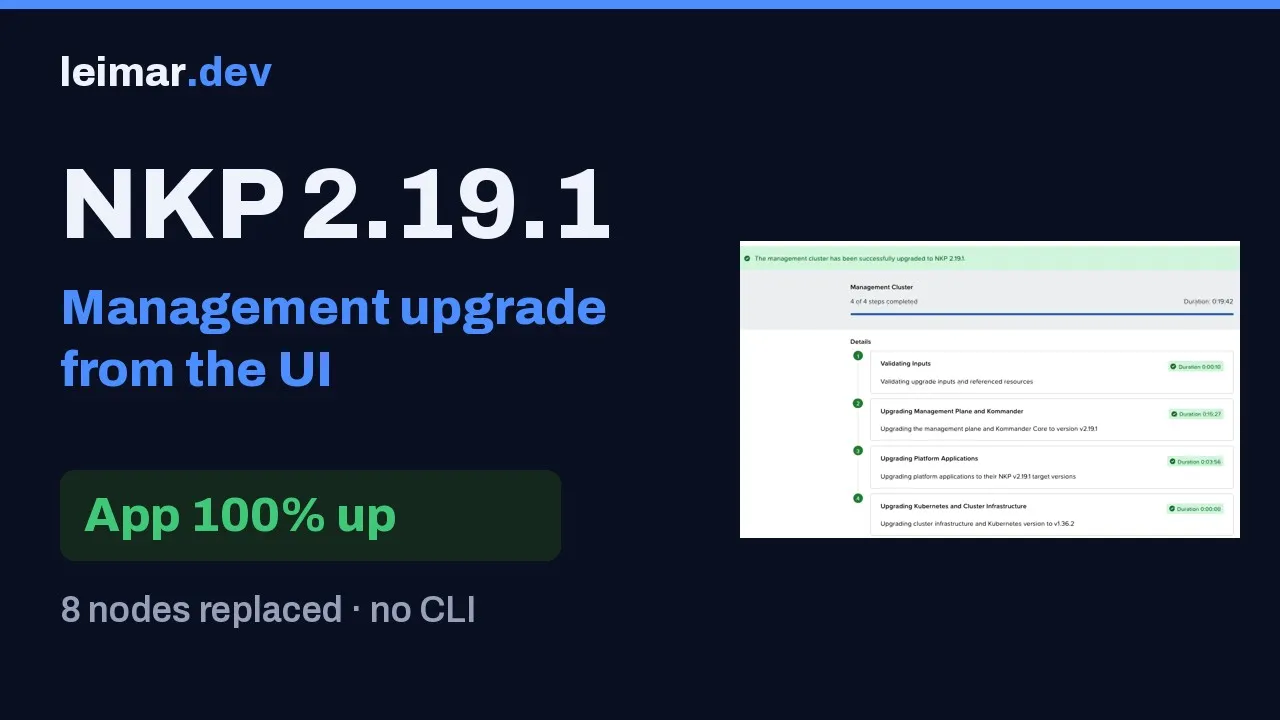
After the click, the Cluster Upgrade Tracker shows four steps, each with its duration: validation, Kommander (management only), platform applications, and Kubernetes and infrastructure.
The dashboard tells you, like Prism Central LCM
If you run Prism Central, you know LCM: an inventory that tells you what has a new version and whether you can upgrade. Starting with 2.19, NKP has the equivalent in its own dashboard. When you open Kommander, a banner says “You have cluster(s) that are ready for an upgrade”, and a panel shows the new version with summary notes: supported Kubernetes versions, upgrade path and Prism Central and AOS compatibility.
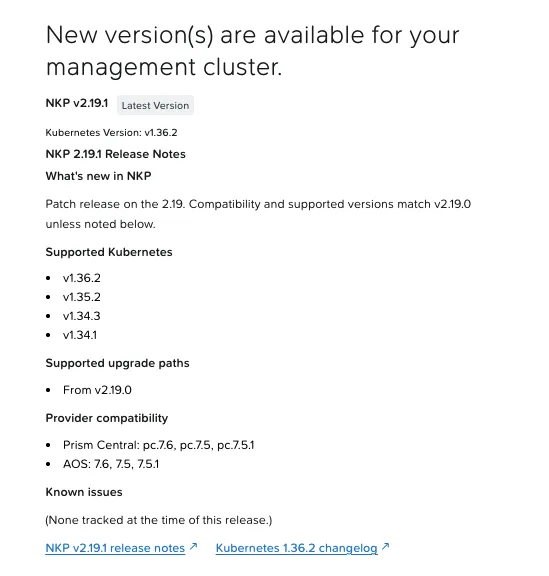
The notice doesn’t depend on you downloading anything. Kommander keeps this inventory through Flux:
- On the management cluster, a Flux
OCIRepositorynamedrelease-metadata(namespacekommander) reads the public artifactoci://ghcr.io/nutanix-cloud-native/nkp-release-specs/releases:latestevery hour. - That artifact becomes one
Releaseobject per version (releases.release.nkp.nutanix.com), with the summary notes, the supported upgrade paths and the Prism Central and AOS compatibility. - The UI compares each cluster’s version with these objects and shows the possible target: on the management cluster, v2.19.0 → v2.19.1.
kubectl get releases.release.nkp.nutanix.comkubectl -n kommander get ocirepository release-metadataIn my lab, the v2.19.1 object existed days before I downloaded the CLI or imported the image. The Prism Central image only comes in at the wizard’s second step, in the per-node-pool mapping.
Three practical consequences:
- The wizard’s notes are a snapshot of release day. That’s why they said None tracked, while the portal already listed two known issues.
- Workload clusters show Newest Version until the management cluster is upgraded. A workload cluster can’t go past the management cluster’s version, so 2.19.1 only shows up for them afterwards.
- In an air-gapped environment, without access to
ghcr.io, the new-version notice depends on the metadata shipped with the bundle. Confirm that before promising that “the UI will tell you”.
What the guide describes and what the UI offers
On the window date, the 2.19 guide (updated November 11) describes the management upgrade through the CLI (nkp upgrade kommander and nkp upgrade cluster), and the release notes announce UI upgrades for workload clusters. The 2.19.0 UI already offered the management cluster. I used the UI and kept the target-version CLI ready on the bastion, as the documented way out if the wizard stalled. I didn’t need it.
Minor or patch? The name changes the plan
NKP uses semantic versioning (major.minor.patch). Day to day, many people call the 2.18 → 2.19 jump a “major” and 2.19.0 → 2.19.1 a “minor”. By the numbering rule, the first is a minor release and the second is a patch. The name matters less than what each one brings:
| Aspect | 2.18 → 2.19 (minor) | 2.19.0 → 2.19.1 (patch) |
|---|---|---|
| What it brings | Features: Kubernetes 1.36, Rocky 9.8, UI upgrades, AI catalog, MCP, Headlamp | Fixes: 1 CVE, 1 security fix, 6 bugs |
| What gets upgraded | Kommander, platform applications, Kubernetes and the node operating system | Kommander, platform applications and the node image (same Kubernetes, same OS, new build) |
| Path | Only from 2.18.x | Patches can be skipped (2.18 → 2.19.1 directly) |
| Changes that need action | Projects 2.0, end of GitRepository catalogs, Nutanix registry credentials, removed flags | None new. Watch NCN-118728 if you use a mirror |
| Planning | Assessment, cleanup, capacity, IPAM, new OS | Release notes, image, backup and pre-check |
| Preparation time | About 2 days | About 1 hour |
| Tool | Kommander and management CLI only, workload clusters from the UI | Everything from the UI, management included. CLI as the way out |
| Node replacement | All of them (new Kubernetes and OS) | All of them too (new image, same Kubernetes) |
| End shown by the UI | Together with the node replacement | Before the node replacement ends: check the machines |
| User impact | Unstable UI during Kommander, logout and new kubeconfig | The same |
| Going back | No downgrade: the way back is the backup | Same |
Two path rules:
- From 2.19.0 you go to 2.19.1, and the wizard shows the path From v2.19.0.
- From 2.18 you can go straight to 2.19.1: you can’t skip a minor, but you can skip patches. The release notes mention upgrading “from NKP 2.18 to NKP 2.19.0 or 2.19.1”. In that case, Kommander and the management cluster go through the CLI.
The point that misleads planning the most is the node replacement. Whenever the image changes, Cluster API replaces every node, one at a time, with a drain. For a patch, the work before the window shrinks a lot, but the rolling update is still there.
What 2.19.1 fixes
The release notes describe 2.19.1 as “a patch release that delivers resolved issues”.
| What it fixes or improves | ID |
|---|---|
| Security: the NKP MCP Server on the management cluster could grant cluster-admin access without authenticating the caller | NCN-118494 |
| CVE-2026-111497: remote code execution through the Node.js Brotli decoder in the NKP UI. The UI moves to Node.js 24.22.1 | NCN-118610 |
| 2.18 → 2.19 upgrade of pre-provisioned clusters didn’t finish | NCN-118843 |
| On a management cluster created on 2.17, nodes replaced during the upgrade had no Nutanix registry credentials | NCN-118551 |
| Preflight failed with a registry mirror that doesn’t require credentials | NCN-118548 |
| UI upgrade with the registry preflight skipped (Harbor as the global registry, public project) | NCN-118471 |
| The Workspace Admin role couldn’t see the Metal Host Inventory | NCN-118452 |
In the air-gapped bundle, nkp diagnose didn’t collect node logs | NCN-116547 |
Kubernetes stays on 1.36.2. What changes on the nodes is the image: a new Rocky Linux 9.8 build (from October 14 to October 24), still with Kubernetes 1.36.2.
Known issues: read them on the portal, not only in the wizard
On the window date, the wizard panel said Known issues: None tracked. The release notes on the portal listed two:
| ID | When it happens | Adjustment |
|---|---|---|
| NCN-118728 | Workload cluster with a public registry mirror created without username and password: the upgrade stops at UpgradingPlatformApplications | Create an empty <cluster>-oci-creds secret in the workspace namespace, on the managed cluster (never on the management cluster), and continue |
| NCN-118934 | Prism Central 7.6 with AOS earlier than 7.6: the UI only offers GPU “None” when creating a cluster or node pool | GPU profiles require PC 7.6, AOS 7.6 and AHV 11.2 |
export WORKSPACE_NAMESPACE=<workspace-namespace>export MANAGED_CLUSTER=<managed-cluster-name>kubectl create secret generic "${MANAGED_CLUSTER}-oci-creds" \ --namespace "${WORKSPACE_NAMESPACE}" \ --kubeconfig <managed-cluster-kubeconfig>1. Before the upgrade: one hour of preparation
| Activity | What I did in the lab |
|---|---|
| Read the release notes | On the portal, checking Last Updated, and matched against what’s enabled on the clusters (details below) |
| Downloads | The 2.19.1 node image imported into Prism Central and the nkp 2.19.1 CLI on a bastion, as the way out |
| Free capacity | Headroom on the Nutanix cluster for the extra VMs of the node replacement, and free IPs on the node network (math below) |
| Healthy Prism Central | NKP’s Cluster API and CSI talk to PC all the time. I upgraded PC through LCM the day before and tested volume creation afterwards |
| Cluster health | Nodes Ready, every HelmRelease ready and PDBs allowing at least one disruption |
| Backup | A recent, Completed Velero backup, and an etcd snapshot of the management cluster copied outside the cluster |
About the backup: VM snapshots don’t count. NKP nodes are recreated by Cluster API, and restoring a node’s disk doesn’t bring the cluster back to a consistent state.
The checks I ran the day before and again before the click:
kubectl get nodes # all Readykubectl get helmreleases -A --no-headers | grep -vc True # 0kubectl get pdb -A | awk '$5==0' # PDBs that would hold a drainvelero backup get # the latest one CompletedHow to read a patch’s release notes
The dashboard panel is a summary. The full release notes are on the Nutanix portal, and I read them with four questions:
- What changes? In 2.19.1, Kubernetes stays on 1.36.2. So the upgrade replaces the node image and the platform applications, with no new Kubernetes API to test.
- Where can I come from? Supported upgrade paths: From v2.19.0, and from 2.18 directly, through the CLI.
- Is my environment compatible? Prism Central 7.6, 7.5 or 7.5.1 and AOS 7.6, 7.5 or 7.5.1.
- What applies to me? Every fix and every known issue matched against what’s enabled. In my lab, two fixes mattered: the MCP Server, which I had enabled, and the UI CVE. No known issue applied: I don’t use a registry mirror or GPUs on these clusters.
The page’s Last Updated tells you whether anything changed since you last read it. Read it again the day before.
Downloads
- Node image, imported from the Prism Central UI, with its original name. Both clusters run Rocky, so one image was enough:
nkp-rocky-9.8-release-cis-1.36.2-20261024080046.qcow2. The import took about 25 minutes. - Target-version
nkpCLI, on a bastion with access to the clusters. I didn’t need it, and it’s what you use if the wizard stalls.
Free capacity for the node replacement
NKP’s rolling update creates the new VM before deleting the old one (maxSurge: 1, maxUnavailable: 0). The control plane and each node pool roll at the same time, one VM at a time. So, during the replacement, each cluster has one extra VM per group.
In my lab, both clusters have the same VM profile:
| Group | VM | Extra VM during the replacement |
|---|---|---|
| Control plane | 4 vCPU, 16 GiB, 80 GiB | 1 |
| Workers | 8 vCPU, 32 GiB, 80 GiB | 1 |
| Headroom needed per cluster | 12 vCPU, 48 GiB of RAM, 160 GiB of disk and 2 IPs |
Upgrading one cluster at a time, that’s the headroom for the whole window. Check three things:
- CPU and memory on the Nutanix cluster, after the HA reservation, if it’s enabled.
- Space in the storage container where the NKP VMs are created.
- Free IPs in the node network pool (Prism IPAM or DHCP). Without an IP, the new VM doesn’t join the cluster and the rolling update stops at the first replacement.
What if the image weren’t in Prism Central?
The new-version notice would have shown up just the same. It comes from Kommander’s version inventory, not from Prism Central. The notice answers “is there a new version?”. The imported image answers a different question: “is the environment ready for it?”.
The difference shows up at the wizard’s second step, Upgrade Configuration. Each node pool’s image list shows what exists in Prism Central. Without the 2.19.1 image, the right option isn’t there.
What the documentation says:
- Importing the target version’s images into Prism Central is a prerequisite for the upgrade, from the UI or the CLI.
- The image is the target version’s, with its original name, not renamed.
- The UI may preselect a recommended image. If it isn’t the right one, change it.
I didn’t test the upgrade without the image. From what the page shows and how Cluster API works, you can expect the following:
- With no image in the list, the safe path is to cancel, import it and come back to the wizard.
- Accepting the old image that happens to be selected would recreate the nodes without the new version’s operating system fixes, an unsupported combination.
- If the image disappears mid-upgrade (deleted or renamed), creating the first new VM fails. Since the rolling update creates before deleting, the old nodes stay up, but the upgrade waits until the image is back.
And there’s the time cost: in my Prism Central, importing an image took about 25 minutes. Without doing it ahead of time, that time lands inside the window, once per operating system in use.
The backup before the window
The Velero backup goes through a phase that alarms anyone seeing it for the first time: WaitingForPluginOperations. It’s normal. The Kubernetes objects have been exported and each PVC already has a CSI snapshot on Nutanix storage. What’s left is the data mover copying those snapshots’ contents to object storage. The copy comes from the snapshot, not the live volume, so applications keep running. The backup can only restore volumes once it reaches Completed.
Metrics volumes, such as Prometheus’s, tend to be the largest and dominate upload time. In a pre-upgrade backup, it’s worth excluding them: metrics history isn’t what you restore if the upgrade goes wrong. The window’s backups took about 15 minutes in total.
2. How I watched the window
The UI drives the upgrade, and the terminal only watched. I recorded the screen with Kommander on one side and two terminal panes on the other, running on a bastion inside tmux, so as not to depend on the laptop’s VPN:
- Machines: every Cluster API
Machinewith its phase and node image build. That’s what shows the real rolling update: new VMs coming up with build 20261024 and the old ones, on 20261014, leaving one by one. - Application: one HTTP request per second to the services workload cluster’s
podinfo, from outside the cluster, logging the response code to a file.
# phase and image of each machine (the image lives on the NutanixMachine object)kubectl get machines -A -o custom-columns=MACHINE:.metadata.name,PHASE:.status.phase,INFRA:.spec.infrastructureRef.namekubectl get nutanixmachines -A -o custom-columns=NAME:.metadata.name,IMAGE:.spec.image.name
# application thermometerwhile true; do printf "%s " "$(date +%T)"; curl -s -m 2 -o /dev/null -w "%{http_code}\n" http://<podinfo-ip>/ || echo FAIL; sleep 1; done | tee -a thermometer.log
Prism Central shows the same rolling update in its VM list, if you’d rather not open a terminal at all.
3. Management cluster from the UI
Administration → Upgrades → Management Cluster → Upgrade.
- Select Version: NKP v2.19.1 & Kubernetes v1.36.2 (Recommended).
- Upgrade Configuration: the 2.19.1 Rocky image on the control plane and on the worker node pool. The UI marked the right image as (Recommended), but the list includes every image in Prism Central, Ubuntu ones and the old Rocky build included. Check group by group.
- Upgrade, and watch.
Watch the node replacement in real time
I recorded the management upgrade from the click to the last VM. On one side, the UI tracker. On the other, the machines being replaced one by one and the podinfo thermometer answering 200 the whole time.
The tracker
The management tracker recorded:
| Tracker step | Duration |
|---|---|
| Validating Inputs | 10 s |
| Upgrading Management Plane and Kommander | 15 min 27 s |
| Upgrading Platform Applications | 3 min 56 s |
| Upgrading Kubernetes and Cluster Infrastructure | 0 s |
| Total on screen | 19 min 42 s |
During the Kommander step, Kommander itself is upgraded. The guide warns that the UI and APIs may be inconsistent for a few minutes, and reloading the page doesn’t restart the upgrade. After the Kommander upgrade, the token changes: users of attached clusters log in again and download a new kubeconfig.
On my management cluster, the UI didn’t log out during the Kommander step: the tracker stayed on screen for all 15 minutes. The point worth noting came at the end of the worker replacement. Twice, for about a minute each (at 03:37 and 03:40, right after the last two workers were drained), the page showed “Error fetching NKP” with HTTP 500, while the UI pod came up on another node. Both times, reloading the page brought the Upgrades page back, with the management cluster already Completed.
“Completed” doesn’t mean the nodes have been replaced
The last step took zero seconds, and the page showed “The management cluster has been successfully upgraded to NKP 2.19.1”. At that moment, the VM replacement had barely started: Cluster API had created the first 2 new VMs 7 seconds earlier, and 8 old ones were waiting their turn.
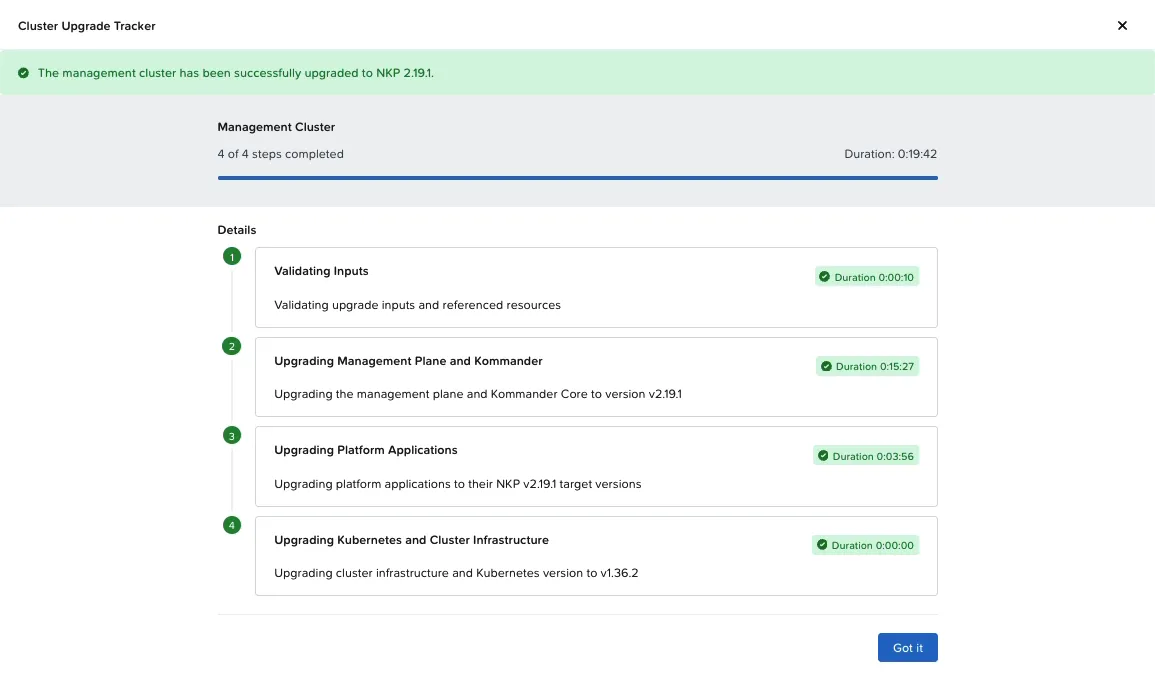
At the same instant as this screenshot, the machines pane still showed 3 new VMs, 1 being deleted and 6 old ones.
The object behind the tracker is an UpgradePlan (upgradeplans.upgrade.nkp.nutanix.com), in the cluster’s namespace. In it, the upgrading-kubernetes step starts and ends in the same second, with the message “Upgraded cluster infrastructure and Kubernetes version to v1.36.2”. The most likely explanation: in a patch, the Kubernetes version doesn’t change, so the “cluster is on the target version” check is true from the start. The UpgradePlan closes when it hands the new topology to Cluster API, and the VM replacement continues on its own.
The window only ends when every machine is on the new image build and the apps settle. From the terminal:
kubectl get upgradeplans.upgrade.nkp.nutanix.com -Akubectl get clusters.cluster.x-k8s.io -A -o jsonpath='{range .items[*]}{.metadata.name}{" CP:"}{.status.conditions[?(@.type=="ControlPlaneMachinesUpToDate")].status}{" Workers:"}{.status.conditions[?(@.type=="WorkerMachinesUpToDate")].status}{"\n"}{end}'Both Cluster API conditions stay False while any old VM remains, and they’re the ones that tell the truth.
Replacing the 8 VMs
- 03:23:23: the first 2 new VMs, one control plane and one worker. The control plane and the node pool roll in parallel, each one VM at a time (
maxSurge: 1,maxUnavailable: 0). - About 4 minutes per VM: creation in Prism Central, boot, joining the cluster and, only then, drain and deletion of the old one.
- 03:39:59: the last old VM started deletion. That’s 16 min 36 s for all 8.
The ClusterClass kept the name nkp-nutanix-v2.19.0. What changed was the image in the machine template, and that’s enough for Cluster API to recreate every node.
Settling after the last VM
Right after the last worker is replaced, the Applications list looks rough for a few minutes: on my management cluster, 59 of the 63 HelmReleases were not ready at the same time. The internal Git repository used by the platform’s Flux was recreated on the new node, and the HelmReleases waited out the backoff to fetch their charts again. At 03:47:15 they were all ready, 7 min 16 s after the last VM.
This isn’t the time to touch anything. Wait for the count to go back to zero:
kubectl get helmreleases -A --no-headers | grep -vc TrueManagement, from the click until everything was ready: 43 min 28 s.
And the workload clusters while the management cluster upgrades?
They keep serving. The services workload cluster’s podinfo answered 2,540 of 2,540 requests during the 43 minutes of the management upgrade. The management cluster manages the workload clusters’ lifecycle, but it isn’t in their traffic path.
4. Services workload cluster from the UI
Same page, Workload Clusters section → Upgrade → 2.19.1 → the 2.19.1 Rocky image on the control plane and on worker-0.
A workload cluster’s tracker has one step fewer: without Kommander, it goes from validation straight to platform applications. The UpgradePlan reported Upgraded 43 seconds after the click. The VM replacement started at 24 seconds and kept going for another 11 minutes after “completed”.
| Milestone | Time | Since the click |
|---|---|---|
| Click on Upgrade | 03:49:21 | — |
| First new VMs (control plane and worker) | 03:49:45 | 24 s |
UpgradePlan Upgraded (the page shows completed) | 03:50:04 | 43 s |
| Last old VM being deleted | 04:01:37 | 12 min 16 s |
| All 36 HelmReleases ready | 04:06:09 | 16 min 48 s |
This cluster’s VMs were replaced faster than the management cluster’s, about 2 minutes each: fewer pods to drain per node.
Watch the workload upgrade
The workload recording, from the click to the last VM, in the same format as the management one: the UI on one side and, on the other, the machines being replaced and podinfo answering.
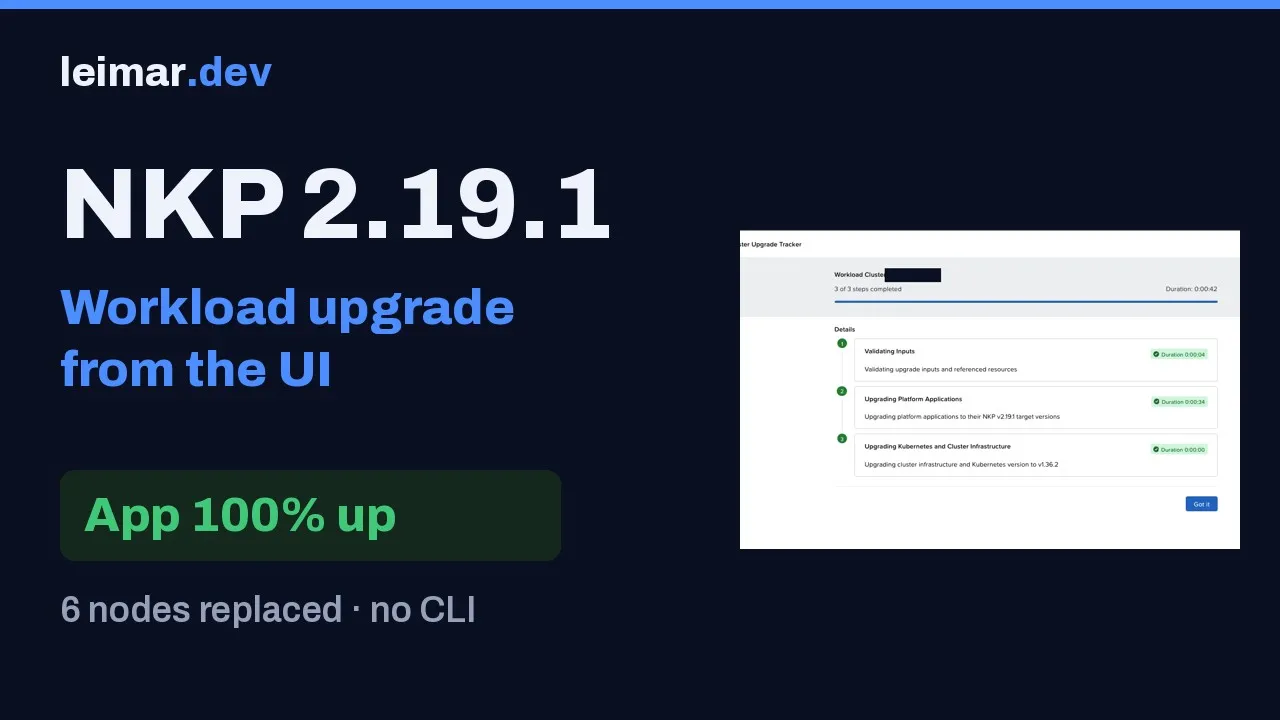
podinfo during the replacement
podinfo runs with 3 replicas. With each drained worker, one replica left and came up on another node, and the Deployment sat at 2/3 for a few seconds. The service didn’t notice: 981 of 981 requests returned 200, from the click until the HelmReleases were ready.
With a single replica, the result would be different. The rolling update creates the new node before draining the old one, but a single-replica pod is down between the eviction and coming up on the new node. For an application to get through an NKP upgrade without going down, it needs at least two replicas on different nodes and, ideally, a PDB.
A leftover for the cleanup
After the replacement, one Pending pod was left: the Rook Ceph crash collector of one of the old workers. Rook creates one of these Deployments per node, pinned to the node name by a nodeSelector. The ones for the other old nodes were removed, but this one kept pointing at a node that no longer exists. It doesn’t affect Ceph (HEALTH_OK), but it’s worth looking for this kind of leftover after any rolling update:
kubectl get pods -A | grep -Ev 'Running|Completed'During the post-window cleanup, I deleted that Deployment. The Rook operator didn’t recreate it, and Ceph stayed HEALTH_OK.
The numbers
| Step | 2.18 → 2.19 (October, CLI + UI) | 2.19.0 → 2.19.1 (all from the UI) |
|---|---|---|
| Preparation | ≈2 days | ≈1 h |
| Backups before the window | — | ≈15 min |
| Management: Kommander and platform applications | ≈30 min (CLI) | 19 min 42 s |
| Management: 8 VMs | ≈26 min (CLI) | 16 min 36 s |
| Management: apps settling | — | 7 min 16 s |
| Services workload: 6 VMs | — | 11 min 52 s |
| Services workload: from the click to apps ready | 21 min (UI) | 16 min 48 s |
| Window, from the first click to the last app ready | ≈1 h 42 | 1 h 02 |
podinfo requests answered | — | 4,089 of 4,089 (1 per second, 03:00–04:10) |
The comparison with October isn’t exact: that was a minor, with a new Kubernetes version and manual CLI steps. Still, it shows where a patch’s time goes: the VM replacement, which neither path avoids.
5. Post-upgrade verification
From the UI:
- Administration → Upgrades: both clusters on 2.19.1, steps completed, no lingering warning.
- Applications: no app in Pending, Deploying or Error.
- The MCP Server on the new version and the AI Navigator responding.
What I checked in the lab, from the terminal:
| Check | Management | Services workload |
|---|---|---|
VMs on the new build (UP-TO-DATE) | 8 of 8 | 6 of 6 |
Nodes Ready, Kubernetes 1.36.2, Rocky 9.8 | 8 of 8 | 6 of 6 |
| HelmReleases ready | 63 of 63 | 36 of 36 |
ControlPlaneMachinesUpToDate / WorkerMachinesUpToDate | True / True | True / True |
| Test application | — | podinfo 3/3 |
kubectl get upgradeplans.upgrade.nkp.nutanix.com -A # PHASE Upgraded, VERSION v2.19.1kubectl get machines -A # UP-TO-DATE True on all of themkubectl get nodes # on each cluster: Ready, v1.36.2kubectl get helmreleases -A --no-headers | grep -vc Truekubectl get pods -A | grep -Ev 'Running|Completed'The MCP Server security fix
The most important fix in 2.19.1 is the NKP MCP Server one (NCN-118494), so I tested it. The service is internal to the management cluster (ClusterIP), and I made the calls through port-forward, first with no authentication and then with an invalid token:
| Call | Result |
|---|---|
initialize and tools/list | They answer: the handshake and the tool list (four tools, all read-only) are open |
list_resources (namespaces), no identity | Refused: “missing username or groups in request metadata” |
| The same call with an invalid token | Refused, with the same message |
The server log shows why: it builds the Kubernetes client from the caller’s user and groups and, without that identity, it doesn’t run the tool. No cluster data goes out to an anonymous call. Since the handshake stays open, keep the service inside the cluster, the way it ships.
6. Symptoms and first steps
| Symptom | First step |
|---|---|
| The UI shows no recent progress or logs you out during the management upgrade | Reload the page and log in again (it doesn’t restart the upgrade) |
| “Error fetching NKP” with HTTP 500 right after a node replacement | The UI pod is coming up on another node. Wait a minute and reload |
| The page shows Completed, but Prism Central is still creating and deleting VMs | Expected in a patch. Watch the Machines until all are on the new build |
| Dozens of apps not ready right after the last VM | Flux settling. Wait a few minutes before acting |
| The management wizard stalls | Documented way out through the target-version CLI: nkp upgrade kommander, then nkp upgrade cluster nutanix --vm-image |
docker.io/nutanix credentials are missing | nkp update cluster nutanix-registry-credentials --all-namespaces and retry |
Workload cluster stopped at UpgradingPlatformApplications with AuthenticationFailed | NCN-118728: <cluster>-oci-creds secret on the managed cluster |
| Node stuck in drain | Find the pod and PDB holding the drain (kubectl get pdb -A, ALLOWED DISRUPTIONS column at 0) |
Pending pod pinned to a node that no longer exists | Check the Deployment’s nodeSelector. If it’s per node and the node is gone, the leftover can be removed |
HelmRelease in exhausted or another rollback/release in progress | Suspend and resume the HelmRelease |
kubectl -n <ns> patch helmrelease <hr> --type='json' -p='[{"op":"replace","path":"/spec/suspend","value":true}]'kubectl -n <ns> patch helmrelease <hr> --type='json' -p='[{"op":"replace","path":"/spec/suspend","value":false}]'The guide makes a point worth repeating: an upgrade error doesn’t trigger automatic remediation or rollback. Write down the step, the component and the message, with a screenshot of the tracker, before acting.
Nutanix case: the material that speeds up the answer
If a real production failure isn’t solved by the steps above, open a case on the portal with the material ready. It shortens the first response:
- Support bundle from the management cluster and the affected cluster:
nkp diagnose --kubeconfig <file>. The bundle includes secret names, without values, and pod and node logs. - Versions: source and target, Prism Central and AOS, images used.
- Where it stopped: the step, the exact time and the message, with the tracker screenshot.
- The cluster’s
UpgradePlan(kubectl get upgradeplans.upgrade.nkp.nutanix.com -A -o yaml) and the output ofkubectl get nkp clusters,machines -A. - Known issue ID, if the symptom matches one, and what you’ve already tried.
Is 2.19.1 worth it?
| Scenario | Recommendation |
|---|---|
| NKP MCP Server enabled | Upgrade now. Until the window, disable the MCP Server |
| NKP UI reachable by many users | Upgrade soon (UI CVE) |
| Still on 2.18 | Go straight to 2.19.1 (management through the CLI on this path) |
| Management created on 2.17, pre-provisioned clusters, Harbor, anonymous mirror, air-gapped or NKP Metal | 2.19.1 fixes exactly these scenarios |
| None of this applies and you’re in a change freeze | You can wait for the next window, with the MCP Server disabled and UI access restricted |
What I learned
- The UI became the main path. In 2.19.1, management and workload clusters go through the same page, and the CLI stayed in the drawer.
- A patch doesn’t mean a short window. Preparation shrinks, but the new image replaces every node. Plan the window by the number of VMs (2 to 4 minutes each in my lab), not by the version number.
- “Completed” on screen doesn’t close the window. In a patch with no Kubernetes change, the tracker marks the upgrade as completed while the VM replacement is just starting. The window ends when every machine is on the new build and the apps are ready again.
- The wizard doesn’t replace the release notes. The summary panel said None tracked, and the portal had two known issues.
- The application stays up when it’s ready for the rolling update. With three replicas,
podinfoanswered all 4,089 requests. Two replicas on different nodes is the minimum to get through the node replacement. - Reserve headroom for the extra VMs. The rolling update creates before deleting: in my lab, 12 vCPU, 48 GiB, 160 GiB and 2 IPs per cluster during the window.
Checklist: NKP patch upgrade from the UI
- Patch release notes read on the portal the day before, matched against what’s enabled on the clusters
- Target-version node image in Prism Central, with its original name, one per OS in use
- Headroom on the Nutanix cluster and free IPs for one extra VM per node group
- Healthy Prism Central (CAPI and CSI depend on it)
- Velero backup
Completedand an etcd snapshot outside the cluster (never a VM snapshot) - Healthy apps, PDBs that allow the drain and critical applications with two or more replicas
- Known issues checked (registry mirror without credentials)
- Target-version CLI ready on a bastion, as the way out
- Order on the Upgrades page: management first, then workload clusters, one at a time
- End of the window by the machines and the apps, not by the tracker’s Completed
What I haven’t tested yet
- The direct 2.18 → 2.19.1 upgrade.
- The same patch in an air-gapped environment, with the new bundle.
- A workload cluster with a public registry mirror, to see the NCN-118728 adjustment in practice.
References
Nutanix
- Nutanix Kubernetes Platform 2.19.1 Release Notes (Nutanix portal)
- Nutanix Kubernetes Platform 2.19 Release Notes: simplified per-cluster upgrade
- Nutanix Kubernetes Platform Guide 2.19: Upgrading Kommander, Upgrading the Management Cluster, Upgrading a Workload Cluster Using the NKP UI, Monitoring an NKP Upgrade, Verifying NKP Upgrade, Troubleshoot Cluster Upgrades, Generating a Support Bundle (Nutanix portal, updated November 11, 2026)
- NKP on the downloads portal
Comments
Comments use GitHub Discussions; you need a GitHub account.